
MCP server · Analytics
Intelica MCP server
Ask your AI to analyse a company or website and get competitors, market score and a step-by-step action plan.
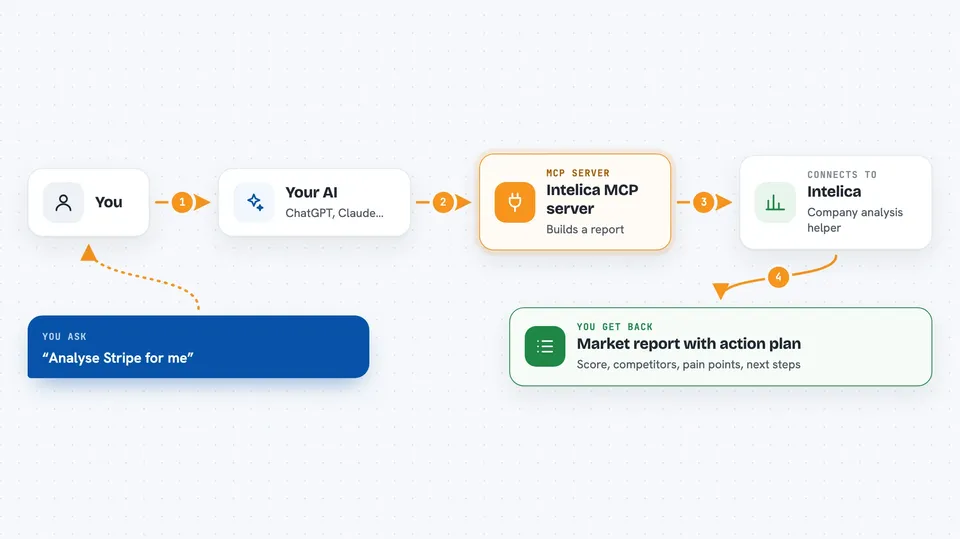
Intelica is a helper that lets your AI look at a company or a web address and come back with a short market report. You give it a name, a link or a one-line description, and it works out where that company sits, who it competes with and what it might do next. It is handy if you write about markets, check out startups or prepare a quick brief for your team.
What is an MCP server? The 30-second version
On its own, your AI can only chat with you using what it already knows. An MCP server is a small helper program that gives your AI a new skill or a connection to another service. This one connects your AI to Intelica, a competitive intelligence service. Once it is connected, you can ask your AI a question about a company, and it will quietly pass that question to Intelica and bring the answer back into your chat.
What this MCP server does
You ask your AI something like "analyse Stripe for me". Your AI sends that request to the Intelica helper. Intelica looks at the company or link you gave it and builds a structured report. It comes back with a market score, a list of competitors, likely pain points and a short action plan with steps and owners. Your AI shows you that report in the chat, in plain words you can read or copy.
 Click to zoom
What you can do with it
- Analyse a company from a name, a link or a short description
- Get a list of likely competitors and where the company sits in the market
- See a market score that rates how strong the company's position looks
- Get a suggested decision such as enter, avoid, monitor, acquire or partner
- Receive a short action plan with steps, owners and deadlines
- Compare up to ten companies in one batch request
- Run a free demo call to see what the output looks like
Try asking your AI
- “Analyse Stripe payment API for developers and tell me who its main competitors are”
- “Look at this website and give me a market positioning summary with a score”
- “Compare these five fintech startups and tell me which one looks strongest”
- “Give me an action plan for entering the European payments market”
What it gives back to you
You get back a structured report: a market score, a short list of competitors, notes on pain points and a suggested next move. There is also a small action plan with steps, who should own each step and how many days it should take. It usually arrives in the chat as a readable summary you can copy into a document or email. Every claim comes with source links so you can check where the information came from.
Before you start
What you need
- A free trial key from Intelica (five calls, no wallet needed)
- Or a small USDC balance if you want to pay per call after the trial
- An AI app that can connect to MCP servers, such as Claude Desktop or another MCP-capable tool
Good to know
Each paid call costs between $0.05 and $1.00 in USDC, so keep an eye on how many times you ask, and remember the reports are AI-generated estimates rather than verified facts.
Install it with your AI
Add Intelica MCP server to your AI, no technical skills needed
You don't install anything by hand. You copy one prompt, paste it into an AI that can work on your computer, and it checks, installs and connects the server for you, asking you when it needs something.
Sign in to get the install prompt
Members get a ready-made prompt that lets the Claude desktop app check Intelica MCP server, install it and connect it for them, step by step. You don't need any technical skills: you copy, paste and answer a few questions. Your connected AI can also find and install any of the 4,609 MCP servers here for you.
Who it's for
Founders, analysts, marketers and consultants who need a quick read on a company or market without doing all the research by hand.



