
MCP server · Developer tools · official
TestDino MCP server
by testdino-hq · official
Ask your AI to check TestDino test runs, debug failures, and manage manual test cases for you.
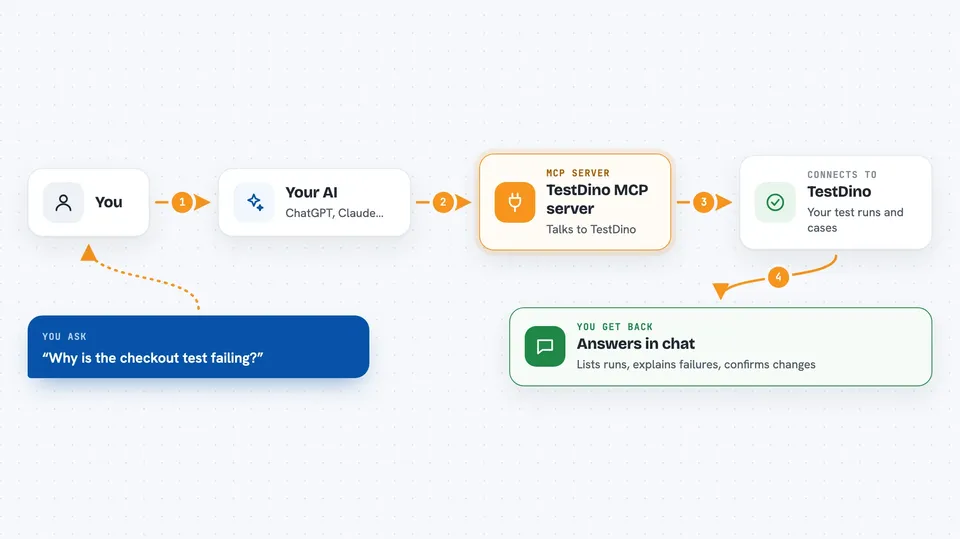
TestDino MCP is a small helper that connects your AI assistant to your TestDino test management account. Once it is set up, you can ask your AI in plain words about your test runs, failures, and manual test cases instead of clicking around the TestDino dashboard. It is handy for testers, QA leads, and developers who live in TestDino every day.
What is an MCP server? The 30-second version
On its own, your AI can only chat with you. An MCP server is a small helper program that gives your AI a new skill or a connection to an app or service. This one connects your AI to TestDino, so it can look up your test runs, test cases, releases, and sessions and even make changes there when you ask. You stay in the chat, and the helper does the talking to TestDino behind the scenes.
What this MCP server does
You ask your AI something like which test runs failed today or why this test keeps failing. Your AI passes that request to this helper, which talks to your TestDino account using a personal access token you provide. TestDino sends back the details, and the helper hands them to your AI, which explains them to you in the chat. If you ask it to, the helper can also create or update things in TestDino, like manual test cases, releases, runs, and per-case results. You never have to open the TestDino dashboard unless you want to.
 Click to zoom
What you can do with it
- Check your TestDino connection and list your organizations and projects
- Browse test runs and filter them by branch, author, commit, or environment
- Debug a failing test case with its errors, logs, steps, and artifacts
- Create, update, and organize manual test cases and suites
- Plan releases and spin up manual test runs with assigned testers
- Record per-case verdicts like passed, failed, or blocked from chat
- File a Jira, Linear, Asana, or monday.com issue from a failing test
Try asking your AI
- “Check TestDino health and show me my projects”
- “List the test runs from the main branch in the last 24 hours”
- “Why is the checkout test failing? Show me the error and any screenshots”
- “Create a manual test case for password reset and add it to the login suite”
What it gives back to you
You get answers written in the chat, like a list of test runs with their pass and fail counts, or a summary of why a test failed with its error message and steps. When you ask it to change something, it confirms what it created or updated, for example a new manual test case or a tester assigned to a run. For failing tests, it can also give you short-lived download links to artifacts like traces and screenshots. Everything shows up as normal chat text you can read and copy.
Before you start
What you need
- A TestDino account
- A personal access token from TestDino (User Settings, then Personal Access Tokens)
- An MCP-compatible app like Cursor or Claude Desktop
- Node.js 20 or newer if you install it with npm
Good to know
It can create and change things in your TestDino account, like test cases, runs, releases, and results, so review before you confirm.
Install it with your AI
Add TestDino MCP server to your AI, no technical skills needed
You don't install anything by hand. You copy one prompt, paste it into an AI that can work on your computer, and it checks, installs and connects the server for you, asking you when it needs something.
Sign in to get the install prompt
Members get a ready-made prompt that lets the Claude desktop app check TestDino MCP server, install it and connect it for them, step by step. You don't need any technical skills: you copy, paste and answer a few questions. Your connected AI can also find and install any of the 4,609 MCP servers here for you.
Who it's for
QA engineers, testers, and developers who use TestDino and want to check or manage their test data without leaving their AI chat.



