
MCP server · Research
GeekNews MCP server
by the0807
Lets your AI pull the latest GeekNews articles and weekly roundups for you.
This is a small helper that connects your AI assistant to GeekNews, a Korean tech news site. Once it is set up, you can just ask your AI for the top stories or the newest posts, and it will go fetch them for you. It is handy if you like keeping up with tech news but do not want to open the site every day.
What is an MCP server? The 30-second version
On its own, your AI can only chat with you using what it already knows. An MCP server is a small helper program that gives your AI one new skill, in this case the ability to read GeekNews for you. You add this helper to your AI app once, and from then on the AI can look things up on GeekNews whenever you ask. Think of it like giving your assistant a bookmark and a pair of hands for one specific website.
What this MCP server does
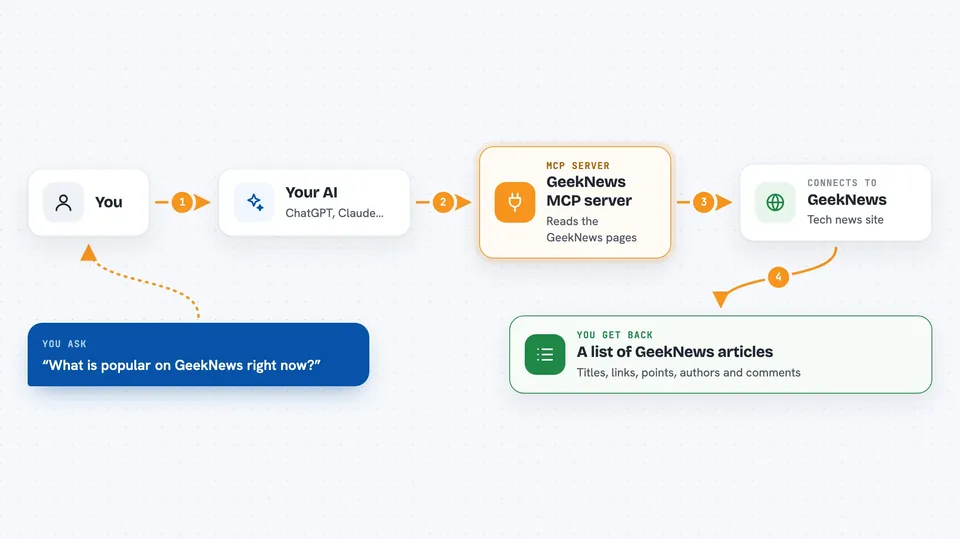
You ask your AI something like what is popular on GeekNews right now. The AI passes your request to this helper. The helper visits GeekNews, reads the page, and picks out the article titles, links, points, authors, times, comment counts and ranks. Then it hands that list back to your AI, which shows it to you in the chat. It also keeps a copy of the data for a day so it does not hammer the GeekNews site with requests.
 Click to zoom
What you can do with it
- Get the top articles on GeekNews right now
- Get the newest posts as they come in
- Read Ask and Show posts from the community
- Fetch the most recent weekly news roundup
- Look up a specific weekly news issue by its ID
- See points, authors, comment counts and ranks for each article
Try asking your AI
- “What are the top 10 articles on GeekNews today?”
- “Show me the newest GeekNews posts, just the titles and links.”
- “Get me the latest weekly news roundup from GeekNews.”
- “What Ask posts are on GeekNews right now?”
What it gives back to you
You get a list of articles with their title, link, points, author, time posted, number of comments and rank. For weekly news you get the title, number, ID, a short description, the URL and the list of items inside it. Your AI usually shows this as a tidy list or a short summary in the chat. It does not change anything on GeekNews, it only reads.
Before you start
What you need
- An AI app that supports MCP servers, like the Claude desktop app
- Node.js installed on your computer if you use the Smithery option
- A free Smithery key if you install through Smithery
Good to know
It only reads public GeekNews pages, so there is nothing risky to change or delete, but it depends on the site's page layout and may stop working if GeekNews redesigns the site.
Install it with your AI
Add GeekNews MCP server to your AI, no technical skills needed
You don't install anything by hand. You copy one prompt, paste it into an AI that can work on your computer, and it checks, installs and connects the server for you, asking you when it needs something.
Sign in to get the install prompt
Members get a ready-made prompt that lets the Claude desktop app check GeekNews MCP server, install it and connect it for them, step by step. You don't need any technical skills: you copy, paste and answer a few questions. Your connected AI can also find and install any of the 4,609 MCP servers here for you.
Who it's for
Anyone who follows Korean tech news and wants their AI to bring the headlines to them instead of scrolling the site.


