
MCP server · Productivity
Hermes Action Bridge
Let your coding AI hand real-world tasks to Hermes Agent: research, browsing, messages, scheduling.
This is a small helper that lets your coding assistant pass tasks to Hermes Agent, a separate tool that can do things outside your code editor. If you use Claude Code, Codex, or Cursor and want your AI to research, send a message, or run a browser task, this bridge connects the two. It is handy for people who already have Hermes Agent set up and want their coding AI to use it.
What is an MCP server? The 30-second version
On its own, your AI can only chat with you. An MCP server is a small helper program that gives your AI a new skill or a connection to another app or service. This one connects your AI to Hermes Agent, so when you ask for something like research or a message to be sent, your AI can pass the request along to Hermes and bring the result back to you.
What this MCP server does
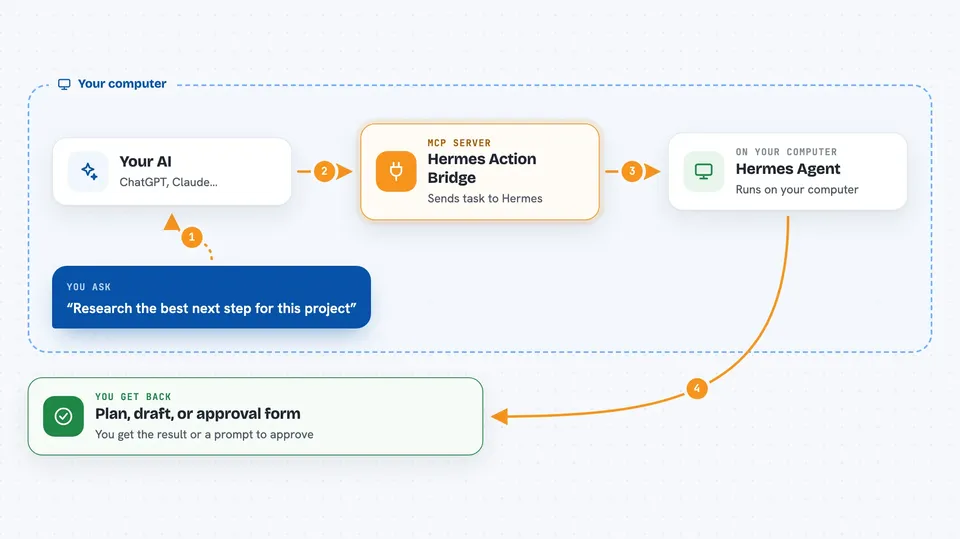
You ask your AI to do something outside your code editor, like research a topic or prepare a message. Your AI uses this bridge to send that request to Hermes Agent on your computer. Hermes then uses its own skills, tools, and integrations to carry out the task. The bridge has safety rules: by default, actions that could have real effects are turned into an approval request instead of running right away. You get the result, or an approval prompt, back in your chat.
 Click to zoom
What you can do with it
- Delegate research tasks to Hermes Agent
- Ask Hermes to run a browser workflow
- Prepare a message or social post for approval
- Schedule a job through Hermes cron support
- Use Hermes skills and toolsets from your coding AI
- Run a dry-run to see exactly what would be sent
- Approve a risky action through an interactive form
Try asking your AI
- “Research the best next step for this project and give me a plan.”
- “Draft a release note for the latest changes and show it to me before sending.”
- “Ask Hermes to open a browser and check the status of our staging site.”
- “Schedule a reminder for tomorrow morning about the deploy.”
What it gives back to you
You get back whatever Hermes produces: a plan, a draft, a summary, or a confirmation that an action ran. For risky actions, you get an approval form showing the exact action so you can confirm or cancel. Results appear in your AI chat as normal text, and you can ask for JSON if you want structured output.
Before you start
What you need
- Node.js 20 or newer
- Hermes Agent installed and available as the command hermes
- A supported AI client like Claude Code, Codex, or Cursor
Good to know
This bridge can trigger real-world actions through Hermes, like sending messages or publishing content, so keep the default approval setting on unless you fully trust the request and environment.
Install it with your AI
Add Hermes Action Bridge to your AI, no technical skills needed
You don't install anything by hand. You copy one prompt, paste it into an AI that can work on your computer, and it checks, installs and connects the server for you, asking you when it needs something.
Sign in to get the install prompt
Members get a ready-made prompt that lets the Claude desktop app check Hermes Action Bridge, install it and connect it for them, step by step. You don't need any technical skills: you copy, paste and answer a few questions. Your connected AI can also find and install any of the 4,609 MCP servers here for you.
Who it's for
Developers and technical teams who already use Hermes Agent and want their coding AI to delegate real-world tasks.


