MCP server · Productivity
Terminator MCP Agent
by mediar-ai
Lets your AI click, type and read things in desktop apps on your computer, without taking screenshots.

Terminator MCP Agent is a small helper that lets your AI assistant work with the programs on your own computer. It can open apps, click buttons, type text and read what is on screen. It is handy if you spend your day repeating the same clicks in Windows, macOS or Linux programs.
What is an MCP server? The 30-second version
On its own, your AI can only chat with you. An MCP server is a small helper program that gives your AI a new skill or a connection to something else. This one connects your AI to the desktop apps on your machine, so it can look at windows and interact with them when you ask. You stay in charge: the AI only does something when you tell it to.
What this MCP server does
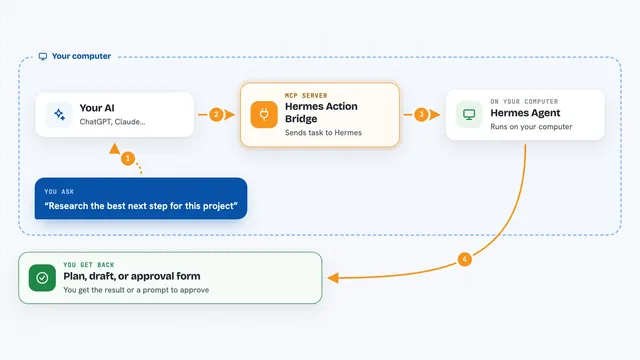
You ask your AI to do something on your computer, like open a program or fill in a form. The AI sends that request to this helper. The helper looks at the app through the accessibility features built into your operating system, finds the right button or field, and acts on it. Then it tells the AI what happened, and the AI explains the result back to you in the chat. No screenshots or picture recognition are involved, which makes it more reliable than clicking by eye.
 Click to zoom
What you can do with it
- Open and switch between desktop applications
- Click buttons, menus and links by their name
- Type text into fields and forms
- Read the contents of a window and pull out data
- Record a sequence of steps as a reusable workflow
- Run a saved workflow from the command line
- Inspect a web page inside a browser window
Try asking your AI
- “Open my email app and tell me how many unread messages I have”
- “Fill in the expense form with the numbers from my notes file”
- “Take the table on this screen and list every row for me”
- “Record what I do in this app so I can run it again tomorrow”
What it gives back to you
You get answers and summaries in the chat, in plain words. If it read a window, it can give you back the text or the list of items it found. If it clicked or typed something, it tells you what it did and whether it worked. It can also save a workflow file so you can run the same steps again later.
Before you start
What you need
- Node.js version 16 or newer installed on your computer
- An MCP client such as Claude Code, Cursor or VS Code
- On macOS, permission for your terminal or editor to control your computer (System Settings, Privacy and Security, Accessibility)
- On Linux, the at-spi2-core package for accessibility support
Good to know
This helper can click and type in your real programs, so a wrong instruction could change or delete something, and you should watch what it does the first few times.
Install it with your AI
Add Terminator MCP Agent to your AI, no technical skills needed
You don't install anything by hand. You copy one prompt, paste it into an AI that can work on your computer, and it checks, installs and connects the server for you, asking you when it needs something.
Sign in to get the install prompt
Members get a ready-made prompt that lets the Claude desktop app check Terminator MCP Agent, install it and connect it for them, step by step. You don't need any technical skills: you copy, paste and answer a few questions. Your connected AI can also find and install any of the 4,361 MCP servers here for you.
Who it's for
People who repeat the same clicks in desktop programs all day, like operations staff, testers and anyone doing routine data entry.