
MCP server · Finance and crypto
TickerDB MCP server
by tickerdb
Lets your AI look up ready-made stock, ETF and crypto signals and what usually happens next.
TickerDB is a service that already does the number crunching on US stocks, ETFs and crypto for you. It turns things like trend, momentum and analyst views into simple labels such as oversold or strong uptrend. This MCP server connects that service to your AI chat, so you can just ask questions in plain words.
What is an MCP server? The 30-second version
On its own, your AI can only chat with you. An MCP server is a small helper that gives your AI a new skill or a connection to another service. This one connects your AI to TickerDB, a stock market data service. Once it is connected, you ask a question and your AI quietly fetches the answers from TickerDB for you.
What this MCP server does
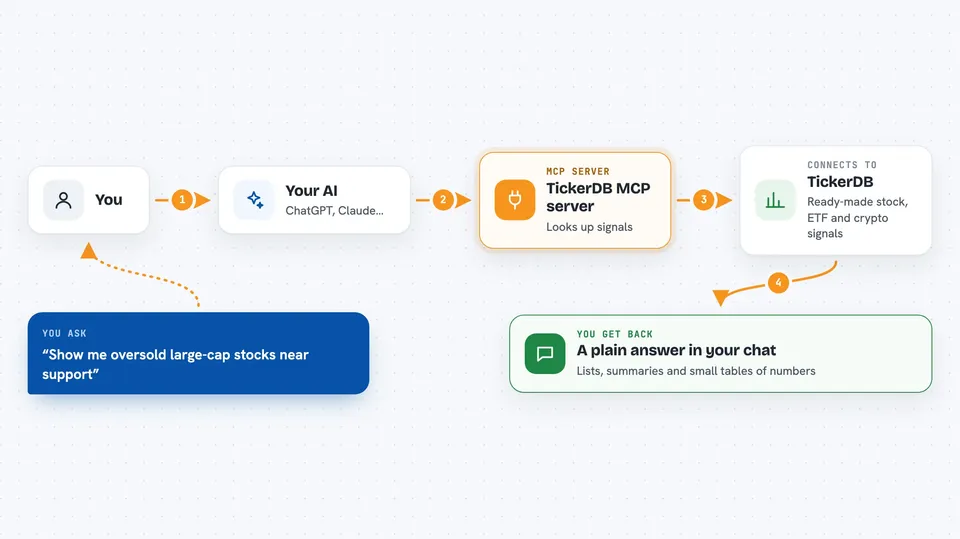
You ask your AI something like show me oversold large-cap stocks near support. Your AI sends that request to this helper, which passes it to TickerDB. TickerDB looks through its pre-computed indicators and sends back matching tickers and their states. Your AI then reads those labels and explains the results to you in the chat. You never touch any formulas or raw price tables.
 Click to zoom
What you can do with it
- Screen stocks, ETFs and crypto by states like oversold or strong uptrend
- Get a technical and fundamental snapshot for a single ticker
- See what usually happened after a stock entered a state like oversold
- Pull daily or weekly price history for returns, charts or backtests
- Check what changed on your watchlist since yesterday or last week
- Add or remove tickers from your saved watchlist
- Look up all available fields and their valid values
Try asking your AI
- “Show me oversold large-cap stocks near support”
- “What usually happens when AAPL goes oversold?”
- “What changed on my watchlist this week?”
- “Give me a snapshot for MSFT with trend and momentum”
What it gives back to you
You get back lists of tickers with their states, short summaries, and sometimes small tables of numbers. For example, it can show how a stock performed 5, 10, 20, 50 and 100 days after each past oversold moment. Your AI turns all of that into a plain answer in the chat. It can also report exactly which watchlist items moved and how.
Before you start
What you need
- A TickerDB account (free tier available)
- An API key from tickerdb.com/dashboard (a kind of password for apps)
- An MCP client like Claude, ChatGPT or Cursor
Good to know
It can change your saved watchlist, so double-check before letting your AI add or remove tickers.
Install it with your AI
Add TickerDB MCP server to your AI, no technical skills needed
You don't install anything by hand. You copy one prompt, paste it into an AI that can work on your computer, and it checks, installs and connects the server for you, asking you when it needs something.
Sign in to get the install prompt
Members get a ready-made prompt that lets the Claude desktop app check TickerDB MCP server, install it and connect it for them, step by step. You don't need any technical skills: you copy, paste and answer a few questions. Your connected AI can also find and install any of the 4,609 MCP servers here for you.
Who it's for
Anyone who follows stocks, ETFs or crypto and wants quick, plain-language answers without doing the math, from casual investors to analysts.



