
MCP server · Security · official
RSigma MCP server
by timescale · official
Let your AI help write, check and test Sigma security detection rules.
This connects your AI assistant to RSigma, a free toolkit from Timescale for working with Sigma rules. Sigma rules are written instructions that describe suspicious activity in computer logs. If part of your job involves checking those kinds of alerts, this makes your AI able to pitch in directly instead of just talking about it.
What is an MCP server? The 30-second version
On its own, your AI can only chat based on what it already learned. An MCP server is a small helper program that runs alongside your AI and hands it extra skills. This particular helper links your AI to RSigma, the Sigma detection toolkit. Once it is switched on, your AI can actually parse, check, convert and reason about Sigma rules through that link whenever you ask.
What this MCP server does
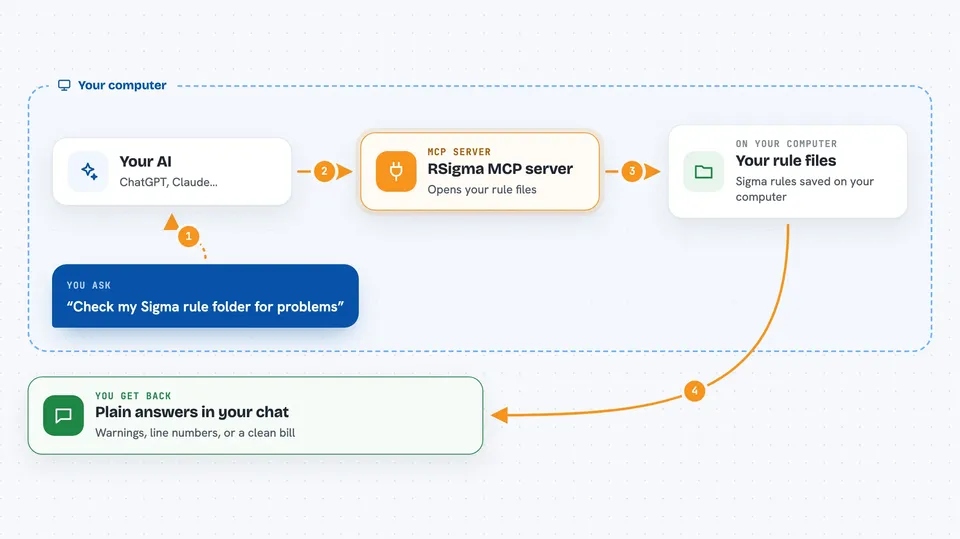
When you connect this, your AI gets access to the RSigma toolbox behind the scenes. You might say "check my rule folder" or "why didn't this rule fire?", and your AI sends that work down to RSigma. RSigma then inspects the actual rule files or tests them against sample log entries. Your AI takes whatever comes back and explains it to you in normal words right in the chat.
 Click to zoom
What you can do with it
- Check whether your Sigma rules follow best practices
- Explain why a specific rule matched or missed a given log entry
- Convert Sigma rules into ready-made database search queries
- List all the log fields your whole ruleset depends on
- Test a batch of saved log samples against your rules
Try asking your AI
- “Validate all the Sigma rules inside our detections folder and tell me if any have problems.”
- “Here is today's login failure record. Which of our existing rules would flag it?”
- “Turn our top five process creation rules into Postgres SELECT statements I can review.”
- “Which raw log fields show up nowhere in our current rule set?”
What it gives back to you
What lands in your chat really depends on what you asked. Ask for validation and you typically see either a clean bill of health or a numbered rundown of warnings tied to line numbers. Run an explanation and you often receive a walkthrough showing how each condition was checked piece by piece until something hit or everything came out empty-handed.
Before you start
Good to know
Be mindful that some capabilities touch production systems, hunt commands execute generated queries straight against your databases.
Install it with your AI
Add RSigma MCP server to your AI, no technical skills needed
You don't install anything by hand. You copy one prompt, paste it into an AI that can work on your computer, and it checks, installs and connects the server for you, asking you when it needs something.
Sign in to get the install prompt
Members get a ready-made prompt that lets the Claude desktop app check RSigma MCP server, install it and connect it for them, step by step. You don't need any technical skills: you copy, paste and answer a few questions. Your connected AI can also find and install any of the 4,361 MCP servers here for you.
Who it's for
Anyone responsible for maintaining Sigma-style monitoring content day to day, such as SOC analysts, blue-team engineers, detection-as-code authors and IT staff reviewing internal logging setups.




