
MCP server · Developer tools
Awesome Ionic MCP server
by Tommertom
Lets your AI look up Ionic components and Capacitor plugins, and run Ionic commands for you.
This is a helper for people building mobile apps with Ionic and Capacitor. It gives your AI assistant a way to look up Ionic components, Capacitor plugins, and run common Ionic commands. It is handy if you already work with Ionic, or you are learning it and want quick answers inside your chat.
What is an MCP server? The 30-second version
On its own, your AI can only chat with you. An MCP server is a small helper program that gives your AI a new skill or a connection to a tool. This one connects your AI to Ionic and Capacitor, so it can look up components and plugins, and run Ionic commands when you ask. You install it once, and then your AI can use it in the background.
What this MCP server does
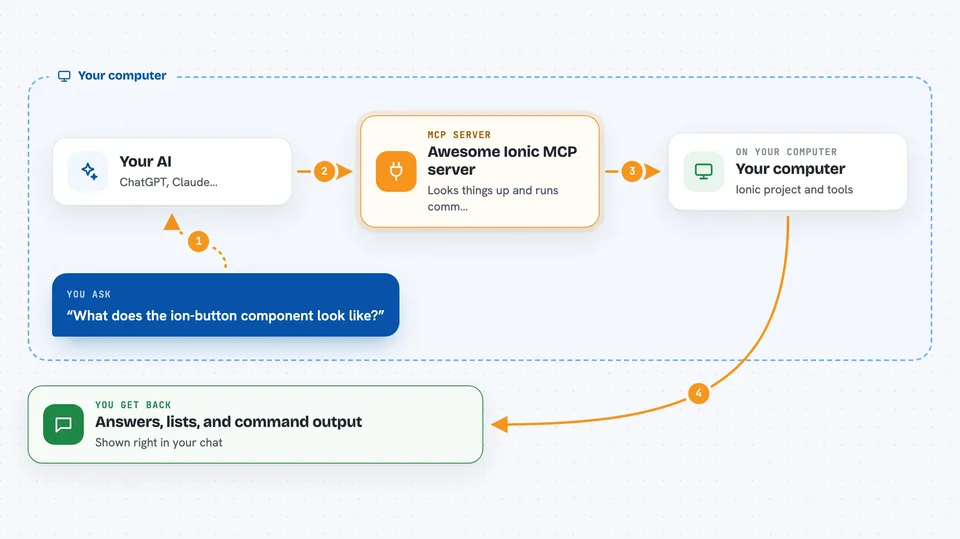
You ask your AI something about Ionic or Capacitor, like which component to use or how a plugin works. Your AI passes that request to this helper. The helper looks it up in Ionic docs, plugin lists, or runs an Ionic command on your computer. Then it sends the answer or result back, and your AI shows it to you in the chat.
 Click to zoom
What you can do with it
- Look up the TypeScript definition of any Ionic component by its HTML tag
- List all Ionic components, official Capacitor plugins, and community plugins
- Fetch API docs and demos for a specific component or plugin
- Run Ionic CLI commands like build, serve, generate, and info
- Run Capacitor commands like sync, add platform, and doctor
- Create a new Ionic project from a template
- Generate pages, components, and services in your project
Try asking your AI
- “What does the ion-button component look like in TypeScript?”
- “List all official Capacitor plugins.”
- “Run capacitor doctor for my iOS setup.”
- “Generate a new page called home in my Ionic project.”
What it gives back to you
You get back plain answers, lists, and code snippets right in the chat. For commands, you see the output the command produced, like build results or a list of plugins. If the command changes files, like generating a page, you will see that it ran and what it created.
Before you start
What you need
- Node.js installed on your computer (the npx command uses it)
- An MCP client like Claude Desktop, Cline, Cursor, VS Code Copilot, or Windsurf
- A GitHub token (optional, but recommended to avoid rate limits when fetching plugin lists)
Good to know
Some commands can create, change, or delete files in your project, so check what your AI is about to run before you say yes.
Install it with your AI
Add Awesome Ionic MCP server to your AI, no technical skills needed
You don't install anything by hand. You copy one prompt, paste it into an AI that can work on your computer, and it checks, installs and connects the server for you, asking you when it needs something.
Sign in to get the install prompt
Members get a ready-made prompt that lets the Claude desktop app check Awesome Ionic MCP server, install it and connect it for them, step by step. You don't need any technical skills: you copy, paste and answer a few questions. Your connected AI can also find and install any of the 4,609 MCP servers here for you.
Who it's for
Mobile app developers and learners who use Ionic and Capacitor with React, Angular, Vue, or plain JavaScript.




