MCP server · Developer tools
Architecture Viewer MCP server
by tomyangod
Lets your AI check whether its code changes broke the structure of your project before you commit.
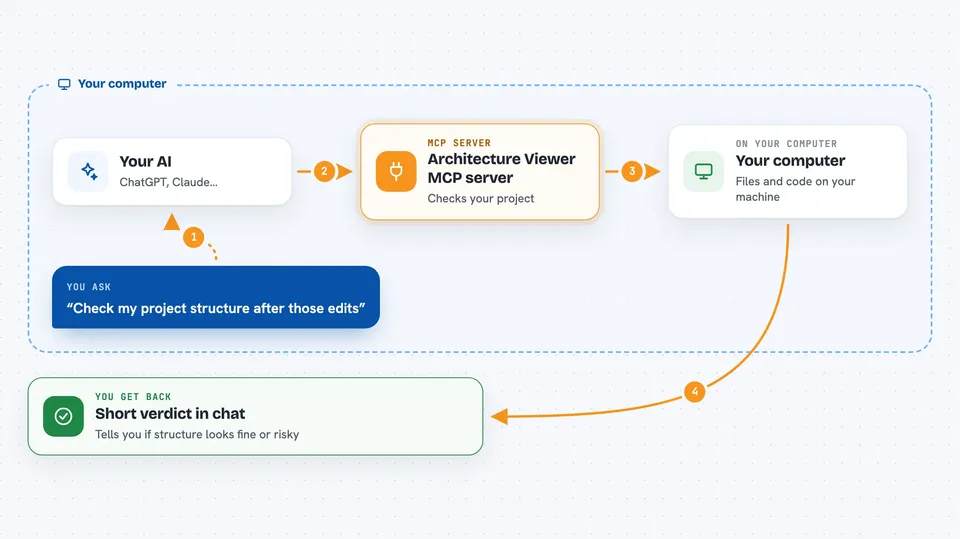
Architecture Viewer is a helper that looks at what your AI just changed in your code and tells you if the structure got worse. It compares the current state of your project to your last saved version (git HEAD) and points out things like new cross-layer calls or deleted types. It is handy if you let an AI write or edit code and want a quick sanity check before you save the changes.
What is an MCP server? The 30-second version
On its own, your AI can only chat with you. An MCP server is a small helper program that gives your AI a new skill or a connection to a tool, and here it connects your AI to Architecture Viewer. Once connected, your AI can run a structure check on your project and read the result back to you in the conversation. You just ask in plain words, and the helper does the technical part behind the scenes.
What this MCP server does
You ask your AI to check the architecture after it edits your code. The AI calls this helper, which scans your project and compares it to your last saved version. The helper looks for things like new dependencies between layers, deleted types that other files relied on, or new outside packages. It then gives your AI a short verdict, usually a few lines, and your AI shows that to you in the chat. If something looks risky, you can ask the AI to explain the finding before you save anything.
 Click to zoom
What you can do with it
- Check your project structure after an AI edit
- Spot new cross-layer dependencies the AI introduced
- See which files are affected by a change
- Get a short pass or fail verdict in the chat
- Ask for an explanation of a specific finding
- Compare the current code to your last saved version
Try asking your AI
- “Check the architecture after those edits”
- “Did my last change break any layers?”
- “Explain that risk finding you just showed me”
- “What files are affected by the changes in this session?”
What it gives back to you
You get a short verdict in the chat, usually up to three lines, telling you if the structure looks fine or if there is a risk. It can also list which files or modules are affected by the change. When there is a problem, it points to the specific paths and dependencies involved so you can check them yourself. You can ask for more detail if the short answer is not enough.
Before you start
What you need
- Node.js 18 or newer installed on your computer
- The Architecture Viewer package, installed with one command
- An AI coding tool that supports MCP, like Cursor or Claude
- A git project is helpful but not strictly required
Good to know
It only checks structure, not whether your code actually works, so do not treat a green light as proof that everything is correct.
Install it with your AI
Add Architecture Viewer MCP server to your AI, no technical skills needed
You don't install anything by hand. You copy one prompt, paste it into an AI that can work on your computer, and it checks, installs and connects the server for you, asking you when it needs something.
Sign in to get the install prompt
Members get a ready-made prompt that lets the Claude desktop app check Architecture Viewer MCP server, install it and connect it for them, step by step. You don't need any technical skills: you copy, paste and answer a few questions. Your connected AI can also find and install any of the 4,361 MCP servers here for you.
Who it's for
Developers and engineers who use AI to write or edit code and want a quick structure check before saving their work.