MCP server · Developer tools
Decisions MCP server
by Roberton003
Let your AI keep a simple log of technical decisions, the guesses you made, and how they turned out.
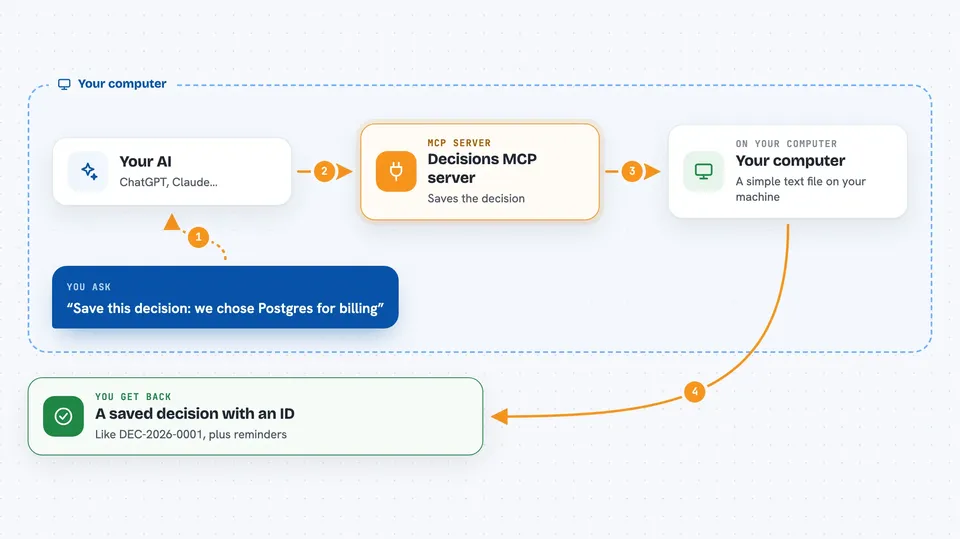
This is a small helper that lets your AI keep a written record of technical decisions. For each decision you can note what you expected to happen, and later write down what actually happened. It is handy for anyone who makes choices about tools or architecture and wants to remember why, and whether the choice worked out.
What is an MCP server? The 30-second version
On its own, your AI can only chat with you. An MCP server is a small helper program that gives your AI a new skill or a connection to something. This one gives your AI a place to store and look up your technical decisions. When you ask it to, the AI writes to that log or reads from it for you.
What this MCP server does
You tell your AI about a decision you made, for example which database you picked and why. The AI passes that to this helper, which saves it in a simple text file on your computer. Later you can ask the AI to add a prediction, like 'this should cut page load time in half'. When you have real results, you tell the AI, and it records whether the prediction was a success, a partial success, or a failure. The helper also reminds you when a decision still has predictions with no outcome yet.
 Click to zoom
What you can do with it
- Record a technical decision with the problem, the chosen solution, and the alternatives you skipped
- Attach a measurable prediction to a decision
- Record the real outcome and mark the prediction as success, partial success, or failure
- Search your decisions by keyword, technology, or domain
- See which decisions still have predictions waiting for an outcome
- Get a summary of how a technology has performed across your decisions
Try asking your AI
- “Record a decision: we chose Postgres over MongoDB for the billing service because we need strong transactions.”
- “Add a prediction to that decision: this should reduce duplicate-charge bugs by at least half within three months.”
- “Record the outcome for that prediction: duplicate-charge bugs dropped by about 60 percent, so mark it a success.”
- “Search my decisions for anything mentioning Postgres.”
What it gives back to you
You get short confirmations when something is saved, with an ID like DEC-2026-0001. When you search, you get a list of matching decisions with their details, predictions, and outcomes. If a decision still has predictions with no result, the reply includes a reminder that says how many are waiting. The technology report gives you a simple summary of how each technology has performed so far.
Before you start
What you need
- Python 3.10 or newer on your computer
- An MCP-compatible client, such as the Claude desktop app
- The mcp-server-decisions package installed with pip
Good to know
It only writes to a log file on your own computer, so nothing is sent anywhere, but the file is plain text and anyone with access to it can read your decisions.
Install it with your AI
Add Decisions MCP server to your AI, no technical skills needed
You don't install anything by hand. You copy one prompt, paste it into an AI that can work on your computer, and it checks, installs and connects the server for you, asking you when it needs something.
Sign in to get the install prompt
Members get a ready-made prompt that lets the Claude desktop app check Decisions MCP server, install it and connect it for them, step by step. You don't need any technical skills: you copy, paste and answer a few questions. Your connected AI can also find and install any of the 4,361 MCP servers here for you.
Who it's for
Developers, tech leads, and small teams who want a lightweight, honest record of why they chose a tool and whether it worked.