MCP server · Design tools
Figwright MCP server
by awdr74100
Lets your AI read your Figma designs and turn them into code, or build new Figma designs for you.
Figwright is a free helper that connects your AI assistant to Figma, the design app. It works both ways: your AI can look at a design you selected and write code for it, or it can create and edit frames, text, and styles right on your Figma canvas. It is handy for designers and developers who want their AI to actually work with their Figma files instead of just talking about them.
What is an MCP server? The 30-second version
On its own, your AI can only chat. An MCP server is a small helper program that gives your AI a new skill or a connection to an app. Figwright is that helper for Figma: it runs quietly on your own computer and links your AI to the Figma file you have open, so your AI can look at your design or make changes there when you ask. Nothing is sent to the internet; everything stays on your machine.
What this MCP server does
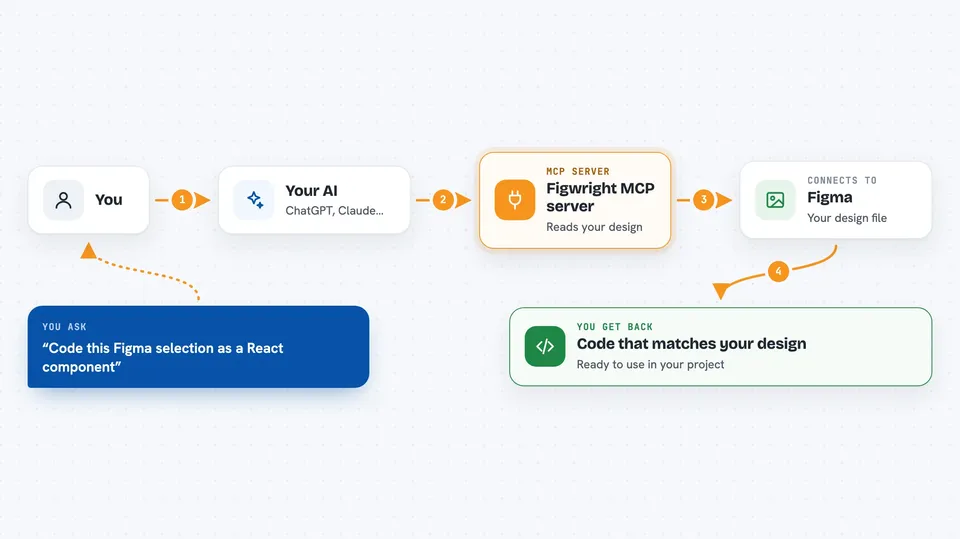
You ask your AI something like "code this Figma selection as a React component." Your AI passes that request to Figwright, which talks to a small Figma plugin you installed. The plugin reads the design details from your selected frame, like layout, text styles, and components, and sends them back. Figwright hands that information to your AI, which writes code that matches your existing components and styles. In the other direction, you can describe a design and your AI will use Figwright to create frames, text, and styles directly in Figma.
 Click to zoom
What you can do with it
- Turn a selected Figma frame into code for your framework
- Build new frames, text, and layouts in Figma from a description
- Reuse your existing components, colors, and text styles in generated code
- Create and edit Figma styles, variables, and components
- Export screenshots, PDFs, or videos of animated frames
- Compare a design against a saved version to see what changed
- Work across more than one open Figma file at a time
Try asking your AI
- “Code this Figma selection as a React component.”
- “Build a pricing section in Figma from this spec.”
- “What changed in this design since last week?”
- “Create a new page with a header and three feature cards.”
What it gives back to you
You get answers and results right in your chat. When reading a design, your AI shows you the code it wrote, matching your components and styles. When building in Figma, it tells you what frames, text, or styles it created or changed, and you can see them appear on your canvas. It can also hand you files like screenshots, PDFs, or short videos of your designs.
Before you start
What you need
- An MCP client like Claude Code or Cursor
- Node.js version 20.19 or newer, or 22.12 or newer
- The Figma desktop app to install the plugin (the free Figma plan is enough)
Good to know
Its write tools change your Figma file and its export tools save files to your computer, so always review what your AI did before trusting it.
Install it with your AI
Add Figwright MCP server to your AI, no technical skills needed
You don't install anything by hand. You copy one prompt, paste it into an AI that can work on your computer, and it checks, installs and connects the server for you, asking you when it needs something.
Sign in to get the install prompt
Members get a ready-made prompt that lets the Claude desktop app check Figwright MCP server, install it and connect it for them, step by step. You don't need any technical skills: you copy, paste and answer a few questions. Your connected AI can also find and install any of the 4,361 MCP servers here for you.
Who it's for
Designers and developers who use Figma and want their AI assistant to read designs into code or build designs for them.