MCP server · Finance and crypto
Toolstem Finance MCP server
by toolstem
Ask your AI for stock snapshots, company metrics, and side-by-side comparisons, with the math already done.
Toolstem is a helper that gives your AI a set of finance skills. You ask a question about a stock or a company, and the AI pulls the numbers together for you. It is handy if you follow shares, compare companies, or need quick facts without opening five different websites.
What is an MCP server? The 30-second version
On its own, your AI can only chat with you. An MCP server is a small helper program that gives your AI a new skill or a connection to an app or service. This one connects your AI to financial data, so when you ask about a company, the AI can go and look up the numbers for you. You do not need to know how it works under the hood. You just ask, and the answer comes back in the chat.
What this MCP server does
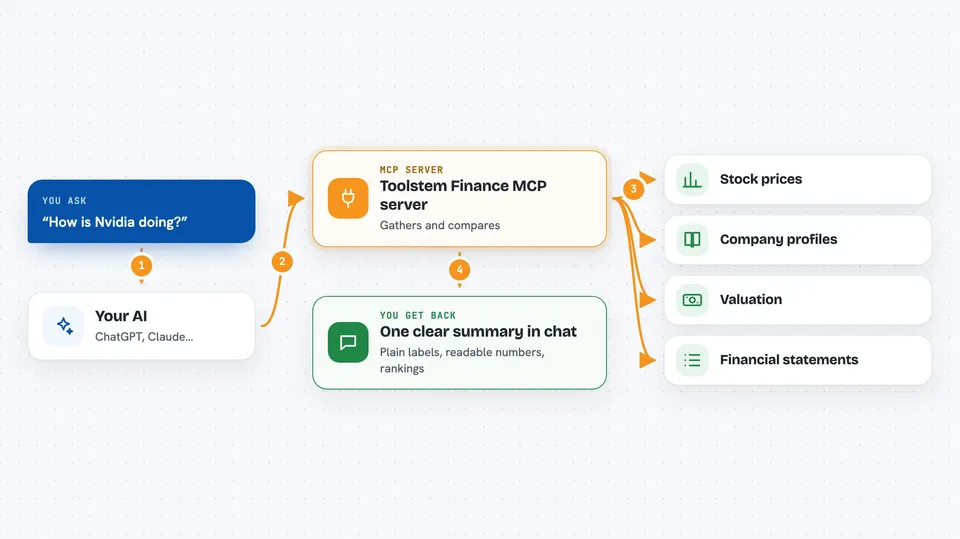
You ask your AI something like "how is Nvidia doing?" The AI passes that request to this helper. The helper then gathers information from several financial data sources at once, such as price, company profile, valuation, and financial statements. It also does some of the maths for you, like growth rates and margin trends, and labels things in plain words. Then the answer comes back to your AI, and your AI explains it to you in the chat.
 Click to zoom
What you can do with it
- Get a quick snapshot of any stock: price, market cap, and a simple valuation signal
- See company fundamentals like revenue, profit, margins, and debt in one go
- Compare two to five companies side by side on price, growth, and health
- Check whether a stock looks undervalued, fairly valued, or overvalued
- See growth over the last few years as a single yearly growth number
- Spot which company in a group has the best growth or the strongest balance sheet
- Ask for numbers in a readable format like $2.78T instead of long digits
Try asking your AI
- “Use Toolstem to get a snapshot of NVDA”
- “Show me the company metrics for Apple, annual figures please”
- “Compare AAPL, MSFT, and GOOGL on valuation and growth”
- “Which of these three companies has the strongest balance sheet: Amazon, Walmart, Target”
What it gives back to you
You get back a tidy summary in the chat: prices, company facts, and plain labels like UNDERVALUED or STRONG. For comparisons, you also get a short ranking, for example which company has the lowest price-to-earnings ratio or the best growth. Numbers are rounded and made readable, so you do not have to count zeros. Everything arrives as one answer, not a pile of separate replies.
Before you start
What you need
- An MCP client, such as the Claude desktop app
- A small amount of USDC (a digital dollar) in a wallet for the paid calls, about one cent per question
- If you self-host instead: your own Financial Modeling Prep API key
Good to know
Each question costs about one cent in USDC from the agent's wallet, so keep an eye on how often you ask, and remember the data can be end-of-day rather than live.
Install it with your AI
Add Toolstem Finance MCP server to your AI, no technical skills needed
You don't install anything by hand. You copy one prompt, paste it into an AI that can work on your computer, and it checks, installs and connects the server for you, asking you when it needs something.
Sign in to get the install prompt
Members get a ready-made prompt that lets the Claude desktop app check Toolstem Finance MCP server, install it and connect it for them, step by step. You don't need any technical skills: you copy, paste and answer a few questions. Your connected AI can also find and install any of the 4,066 MCP servers here for you.
Who it's for
Anyone who follows stocks or compares companies for work, like analysts, finance teams, founders, or curious investors who use an AI assistant.