MCP server · Research · official
TorrentClaw MCP server
by torrentclaw · official
Lets your AI search movies and shows, find torrents with magnet links, and check where to stream them.
This is a small helper made by TorrentClaw that plugs into your AI assistant. Once it is connected, you can ask your AI to look up a movie or TV show and it will search TorrentClaw for you. It is handy if you often hunt for titles, torrents, or streaming options and want the answers right in your chat.
What is an MCP server? The 30-second version
On its own, your AI can only chat with you using what it already knows. An MCP server is a small helper program that gives your AI a new skill or a connection to an app or service. This one connects your AI to TorrentClaw, a site that keeps movie and TV metadata. So when you ask about a title, your AI can actually look it up there and bring the details back to you.
What this MCP server does
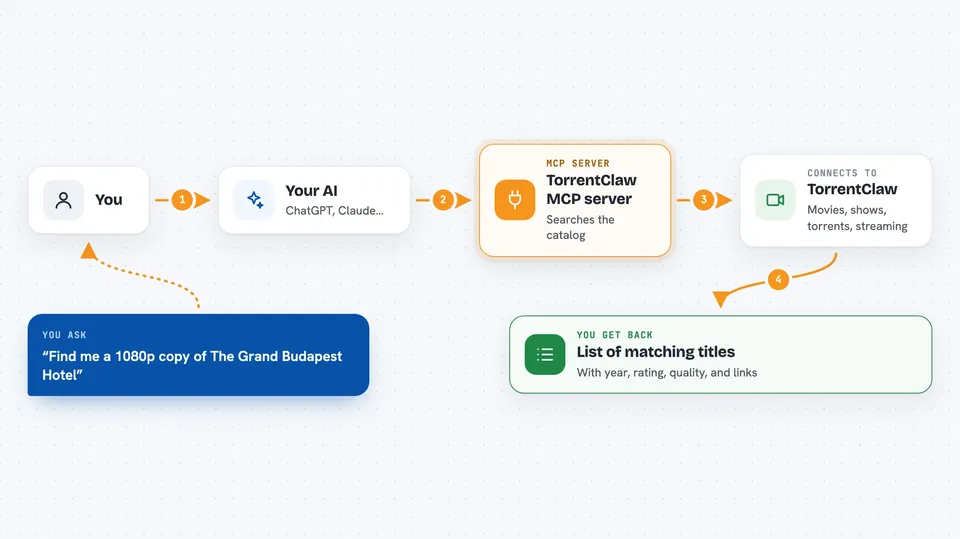
You ask your AI something like find me a good copy of a movie. Your AI passes that request to this helper. The helper talks to the TorrentClaw website and searches its catalog. It comes back with matching titles, torrent options, magnet links, and sometimes where the title is streaming. Your AI then shows you the results in plain text in your chat.
 Click to zoom
What you can do with it
- Search movies and TV shows by title, genre, year, rating, or quality
- Get magnet links and torrent details for a title
- Check which streaming services carry a show in your country
- Look up cast and director for a movie or show
- See popular titles and recently added content
- Get type-ahead suggestions to check a title's exact name
- Ask for a torrent's audio and video quality scan
Try asking your AI
- “Find me a 1080p copy of The Grand Budapest Hotel”
- “Where can I stream the latest season of Severance in the UK”
- “Who directed Parasite and who is in the cast”
- “What movies were added to TorrentClaw recently”
What it gives back to you
You get back a list of matching titles with short details like year, rating, and quality. For each one you may see torrent options, magnet links, and streaming providers. Cast and director come back as a simple list. It all shows up as text in your chat, so you can read it or copy what you need.
Before you start
What you need
- The Claude desktop app or another AI assistant that supports MCP servers
- Node.js installed on your computer (the free software that runs the helper)
Good to know
This server deals with torrent links, so make sure downloading and sharing files is allowed where you live and that you have the rights to the content.
Install it with your AI
Add TorrentClaw MCP server to your AI, no technical skills needed
You don't install anything by hand. You copy one prompt, paste it into an AI that can work on your computer, and it checks, installs and connects the server for you, asking you when it needs something.
Sign in to get the install prompt
Members get a ready-made prompt that lets the Claude desktop app check TorrentClaw MCP server, install it and connect it for them, step by step. You don't need any technical skills: you copy, paste and answer a few questions. Your connected AI can also find and install any of the 4,361 MCP servers here for you.
Who it's for
People who often look up movies and TV shows, compare torrent options, or check where to stream something, and want to do it from their AI chat.