MCP server · Research · official
VidWords YouTube MCP server
by haljishi · official
Let your AI read YouTube videos and answer with the exact second it found the answer.
VidWords is a helper that lets your AI assistant actually read YouTube videos instead of guessing from the title. It searches what was said, and it also looks at what was shown on screen, like slides, charts and text. It is handy if you research, write, or check facts from videos and want a link that jumps to the right moment.
What is an MCP server? The 30-second version
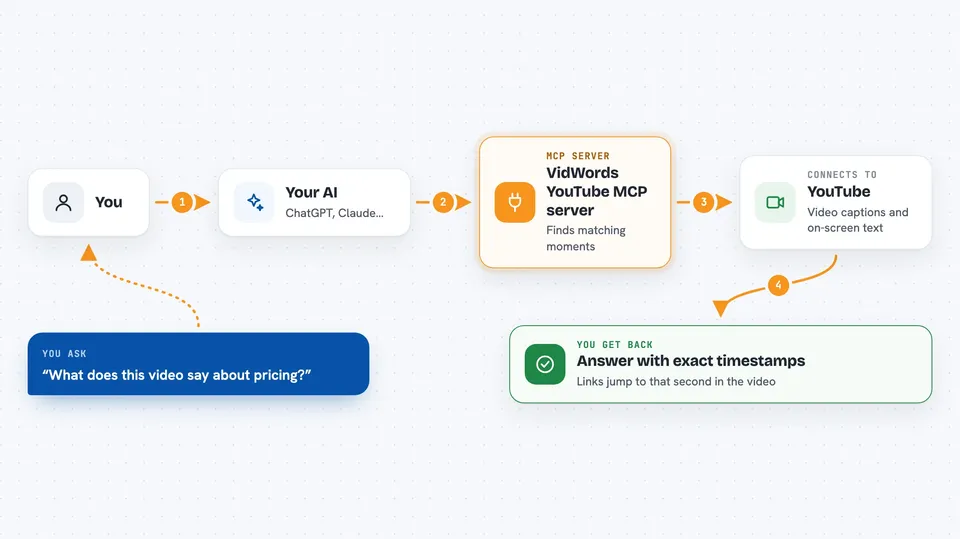
On its own, your AI can only chat with you. It cannot open a video and watch it. An MCP server is a small helper program that gives your AI a new skill, and in this case the skill is reading YouTube videos for you. You ask a question, your AI passes it to VidWords, and VidWords sends back the matching moments with links.
What this MCP server does
You ask your AI something like what does this video say about pricing. Your AI sends that question to the VidWords server. The server looks through the video's captions, and if you ask for it, through the pictures on screen too. It finds the moments that match and sends them back with the exact time. Your AI then shows you the answer with a link that jumps straight to that second in the video.
 Click to zoom
What you can do with it
- Find where a video talks about a topic and get a link to that exact second
- Pull the full written text of a video or a whole channel's recent uploads
- Search across up to 25 videos in one go, like a whole channel
- Look at slides, charts and on-screen text that were never spoken out loud
- Ask a question against a finished video analysis and get checked citations
- List a channel's recent videos from its handle or link
- Check your plan and remaining credits before running a big job
Try asking your AI
- “What does this video say about pricing? Give me the timestamps.”
- “Search this channel's last 10 videos for anything about onboarding.”
- “Summarize the slides shown in this talk, with links to each one.”
- “Find the moment in this interview where they mention the launch date.”
What it gives back to you
You get back short quoted moments with timestamps and links that jump to that second on YouTube. You can also get full transcripts as text, lists of a channel's recent videos, or a summary of a video's slides and charts. When you ask a question against a finished analysis, the answer comes with citations that were checked first, and if nothing matched you are told the evidence is not enough instead of getting a guess.
Before you start
What you need
- A VidWords account (you can create one during the sign-in step, and the free plan includes some credits)
- A verified email address on that account
- An AI app that supports MCP connectors, like Claude, ChatGPT, Claude Desktop, Claude Code or Cursor
Good to know
Some tools use credits or Watch minutes from your account, so a big job across many videos can use up your monthly allowance.
Install it with your AI
Add VidWords YouTube MCP server to your AI, no technical skills needed
You don't install anything by hand. You copy one prompt, paste it into an AI that can work on your computer, and it checks, installs and connects the server for you, asking you when it needs something.
Sign in to get the install prompt
Members get a ready-made prompt that lets the Claude desktop app check VidWords YouTube MCP server, install it and connect it for them, step by step. You don't need any technical skills: you copy, paste and answer a few questions. Your connected AI can also find and install any of the 4,361 MCP servers here for you.
Who it's for
Anyone who researches, writes or fact-checks from YouTube videos, like marketers, journalists, students and analysts.