MCP server · Productivity · official
Fast Video Cataloger MCP server
by frelo · official
Let your AI search, view and tag your local video library, with transcripts, scene thumbnails and keywords.
This is a small helper that connects your AI assistant to Fast Video Cataloger, a Windows program that keeps a searchable catalog of your own video files. Once connected, you can ask for footage in your own words and the assistant searches your catalog, looks at the actual shots and does the filing for you. It is handy for anyone with a big pile of video who does not want to click through it by hand.
What is an MCP server? The 30-second version
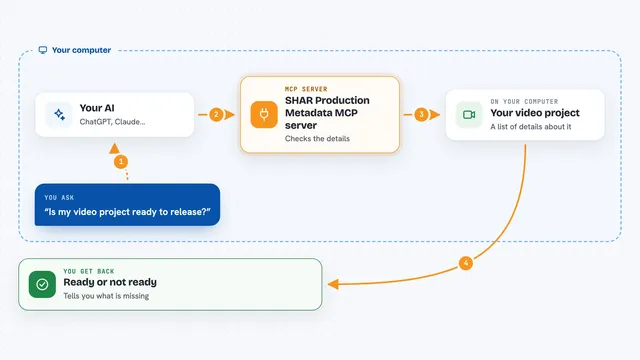
On its own, your AI can only chat. An MCP server is a small helper program that gives your AI a new skill or a connection to an app or service. This one connects your AI to Fast Video Cataloger on your own computer, so it can look things up in your video catalog or make changes there when you ask. Nothing is uploaded: the assistant only receives the titles, transcript lines and scene images it asks for.
What this MCP server does
You ask your AI something about your video library, like finding a moment where someone said a certain thing. The AI uses this helper, and the helper talks to the Fast Video Cataloger server running on your PC. The server looks through your catalog and sends back matching videos, scenes with timecodes, transcript lines or thumbnails. If you gave it an Editor key, the helper can also add keywords, build bins and index new videos for you.
What you can do with it
- Find videos and moments by what was said, with timecodes
- Find scenes by describing the picture, like a drone shot over a city at night
- Fetch scene thumbnails so the assistant can see and judge a shot
- List every keyword in your catalog so the assistant knows what it can search for
- Add or remove keywords on a video or a single scene
- Build bins and add videos to them
- Index catalog entries that have no thumbnails yet
Try asking your AI
- “Find every clip where someone talks about the budget, with timecodes”
- “Show me scenes that look like a drone shot over a city at night”
- “What keywords exist in my catalog?”
- “Add the keyword interview to this video and put it in the Clients bin”
What it gives back to you
You get back lists of videos and scenes with their timecodes, transcript lines, keyword lists and catalog statistics, all shown as text in the chat. When you ask for a thumbnail, the assistant can actually see the image and describe or judge the shot for you. If you have an Editor key, it also tells you what it changed, like which keywords it added or which bin it filled.
Before you start
What you need
- Windows 10 or 11 (x64)
- Fast Video Cataloger 10.4 or later (the free 30-day trial works)
- Your catalog shared through the Fast Video Cataloger server, set up from the Server section on the start page
- An API key from Manage Users in the same Server section: Viewer to search and read, Editor to also tag and build bins
Good to know
With an Editor key the assistant can add or remove keywords and build bins in your catalog, so check what it changed; it cannot delete videos or bins, take a video out of a bin, play video or drive the player.
Install it with your AI
Add Fast Video Cataloger MCP server to your AI, no technical skills needed
You don't install anything by hand. You copy one prompt, paste it into an AI that can work on your computer, and it checks, installs and connects the server for you, asking you when it needs something.
Sign in to get the install prompt
Members get a ready-made prompt that lets the Claude desktop app check Fast Video Cataloger MCP server, install it and connect it for them, step by step. You don't need any technical skills: you copy, paste and answer a few questions. Your connected AI can also find and install any of the 4,361 MCP servers here for you.
Who it's for
Anyone with a large local video library who wants to search and file footage by talking to an AI, like video editors, archivists, researchers and content creators on Windows.