MCP server · Health and learning
Trainzilla MCP server
by Trainzilla
Let your AI act as your Trainzilla coach: look up clients, plans, check-ins and do coach math for you.
This is a small helper that connects your AI assistant to Trainzilla, the app personal trainers use to run their coaching business. Once it is set up, you can ask your AI things like who your clients are, how their habits are going, or what calories to recommend, and it answers using your real Trainzilla data. It is handy for trainers who already use Trainzilla and want to save time on lookups and quick calculations.
What is an MCP server? The 30-second version
On its own, your AI can only chat with you. It cannot see your Trainzilla account or do anything inside it. An MCP server is a small helper program that gives your AI a new skill, in this case a connection to Trainzilla. You install it once, your AI uses it behind the scenes, and from then on it can look things up and prepare changes in Trainzilla when you ask.
What this MCP server does
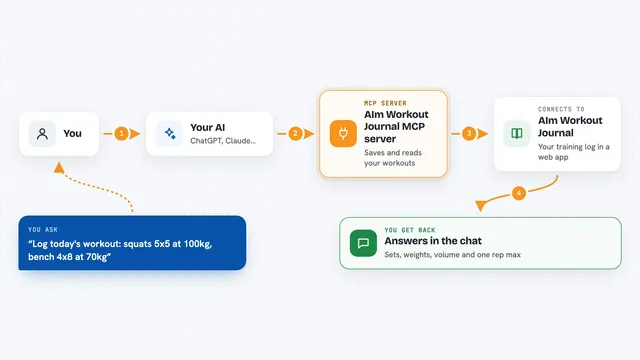
You ask your AI a question in plain words, like who your clients are or how a client's habits are going. Your AI passes that request to this helper. The helper talks to the Trainzilla service using your coach login, fetches the answer, and hands it back. Your AI then shows it to you in the chat as a list, a summary or a number. For changes like creating a habit or scheduling a session, it shows you a preview first and only does it if you say yes.
What you can do with it
- See who you are logged in as and list your clients
- Look up a client's profile, habits and habit compliance
- List workout plans, diet plans, check-ins, sessions and subscriptions
- Get a billing summary for your coaching business
- Calculate calories, macros and one-rep-max numbers offline
- Create habits, check-ins, sessions, workout plans and diet plans after you confirm
- Ask for a weekly review of a client in one go
Try asking your AI
- “Use tzilla-coach: who am I, and list my clients.”
- “Show me the recent habit activity for my client Sarah.”
- “What calories and macros should I recommend for a 35 year old client who trains 4 times a week?”
- “Give me a weekly review for my client Marco.”
What it gives back to you
You get answers in the chat, in plain language. Lists of clients, plans, check-ins or sessions come back as tidy lists. Numbers like calories, macros or one-rep-max come back as short explanations. For write actions, you first see a preview of what would change, and only after you confirm does it actually happen in Trainzilla.
Before you start
What you need
- A Trainzilla coach account
- Your coach login tokens from the Trainzilla web app (the README shows how to copy them from your browser)
- Node.js installed on your computer
- An MCP client like Claude Desktop, Claude Code or Cursor
Good to know
It can create habits, check-ins, sessions and plans in your Trainzilla account, so always read the preview before confirming, and keep your login tokens private.
Install it with your AI
Add Trainzilla MCP server to your AI, no technical skills needed
You don't install anything by hand. You copy one prompt, paste it into an AI that can work on your computer, and it checks, installs and connects the server for you, asking you when it needs something.
Sign in to get the install prompt
Members get a ready-made prompt that lets the Claude desktop app check Trainzilla MCP server, install it and connect it for them, step by step. You don't need any technical skills: you copy, paste and answer a few questions. Your connected AI can also find and install any of the 4,609 MCP servers here for you.
Who it's for
Personal trainers and online coaches who already use Trainzilla and want their AI assistant to help with client lookups, quick math and drafting plans.