
MCP server · Developer tools
DiffContext MCP server
Lets your AI pick just the right Python functions for a code change, so it stops breaking things it never saw.
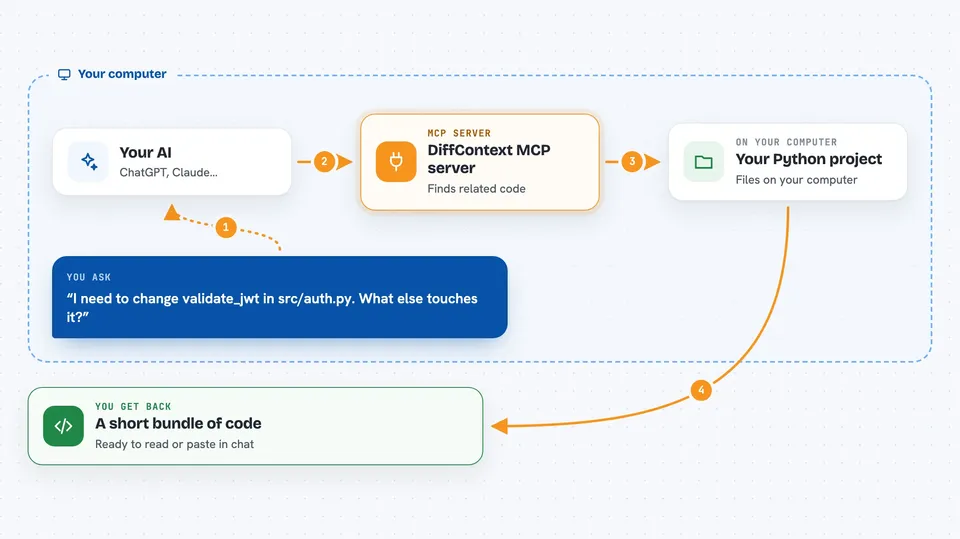
DiffContext is a helper for Python codebases. You tell it what you are about to change, and it finds the small set of functions your AI actually needs to see: the ones that call your function, the ones that override it, the tests that cover it. It is handy if you work in a big Python project and your AI keeps missing parts of the code.
What is an MCP server? The 30-second version
On its own, your AI can only chat with you. An MCP server is a small helper program that gives your AI a new skill or a connection to something else. This one connects your AI to DiffContext, which reads your Python project and picks the relevant code. So when you ask your AI to change a function, it can first ask this helper which other functions matter, and then write the change with those in view.
What this MCP server does
You ask your AI to change something in your Python project. The AI asks DiffContext which functions are connected to that change. DiffContext looks at the project's structure and finds the callers, the subclasses and the related tests. It then packs the most useful ones into a size that fits your AI's limit, and tells the AI what it had to leave out. Your AI gets a small, focused bundle of code instead of the whole repository.
 Click to zoom
What you can do with it
- Find the functions that call the one you are changing
- Find subclasses that override a method
- Find tests that cover a function
- Pack the relevant code into a size your AI can handle
- Report what was left out of the bundle
- Check how well the selection matches your project's own history
Try asking your AI
- “I need to change validate_jwt in src/auth.py. What else in the project touches it?”
- “Show me the callers and tests for the function I am about to edit.”
- “Give me a small bundle of code around this change, under 8000 tokens.”
- “Which subclasses override this method, and will my change break them?”
What it gives back to you
You get a short bundle of code in the chat, ready to read or paste. It usually includes the function you are changing, the functions that call it, related subclasses and a few tests. There is also a short note at the top saying what was left out, so you know what the AI did not see. Sometimes it will say it could not find anything relevant, which is also useful to know.
Before you start
What you need
- Python 3.9 or newer on your computer
- The diffcontext package installed, with the mcp extra
- A local copy of the Python project you want to work on
- An AI app that supports MCP servers, like Claude Code, Cursor or Windsurf
Good to know
It only reads your code and selects what to show, but it can miss things, so double-check before trusting that no callers exist.
Install it with your AI
Add DiffContext MCP server to your AI, no technical skills needed
You don't install anything by hand. You copy one prompt, paste it into an AI that can work on your computer, and it checks, installs and connects the server for you, asking you when it needs something.
Sign in to get the install prompt
Members get a ready-made prompt that lets the Claude desktop app check DiffContext MCP server, install it and connect it for them, step by step. You don't need any technical skills: you copy, paste and answer a few questions. Your connected AI can also find and install any of the 4,609 MCP servers here for you.
Who it's for
Developers and reviewers who work on large Python projects and use an AI assistant to help make or review changes.




