
MCP server · Browser automation
vibatchium MCP server
Let your AI drive a real Chrome browser on your own computer, in parallel, without you watching.
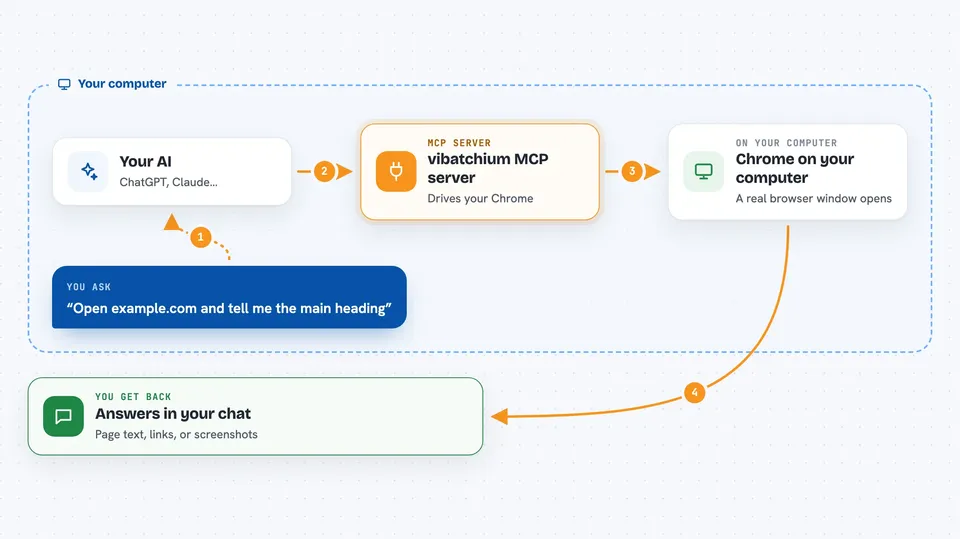
vibatchium is a helper program that runs real Google Chrome on your own machine and lets your AI control it. It is made for the kind of browsing you want done quietly in the background: several browser windows at once, logged-in profiles that stay logged in, and pages that normally block robots. It is handy if you need your AI to visit sites, read pages, fill forms, or take screenshots while you do something else.
What is an MCP server? The 30-second version
On its own, your AI can only chat with you. An MCP server is a small helper program that gives your AI a new skill or a connection to an app or service. This one connects your AI to a real Chrome browser on your computer, so when you ask it to open a page or click something, it actually does it. You do not need to understand how it works inside; you just connect it once and then talk to your AI like normal.
What this MCP server does
You ask your AI something like "go to this page and tell me what is on it". Your AI passes that request to vibatchium, which is running quietly in the background on your computer. vibatchium opens a real Chrome window (or several at once), visits the page, and does what you asked, such as reading text, clicking, typing, or taking a screenshot. It then sends the result back to your AI, which explains it to you in the chat. You can also keep separate browser profiles logged in, so one session can be your work account and another can be your personal one.
 Click to zoom
What you can do with it
- Open a web page and read its text back to you
- Take a screenshot of a page
- Click buttons and fill in forms on a page
- Run several browser sessions at the same time, each logged in separately
- Search the web for URLs without needing a search API
- Fetch a page and read it, with an optional proxy per request
- Save login details in an encrypted vault and use them later
- Scan page content for prompt-injection tricks before your AI reads it
Try asking your AI
- “Open example.com and tell me what the main heading says”
- “Take a screenshot of my bank's login page in the banking session”
- “Search for the pricing page of three competitor sites and summarize each one”
- “In the work session, log in and check if I have any new messages”
What it gives back to you
You get back plain answers, lists of links, page text, or screenshots right in your chat. If your AI clicked or typed something, it will tell you what it did and what changed on the page. For parallel runs, you get one result per session, so you can compare them side by side.
Before you start
What you need
- A computer running Linux, macOS, or Windows (the README was tested on Linux)
- Python and pipx installed (pipx is a small tool that installs Python programs cleanly)
- Google Chrome installed on the same computer
- About 10 minutes to run the setup commands once
Good to know
It can click, type, and log in on real websites using your saved credentials, so only point it at sites and accounts you are comfortable letting your AI touch.
Install it with your AI
Add vibatchium MCP server to your AI, no technical skills needed
You don't install anything by hand. You copy one prompt, paste it into an AI that can work on your computer, and it checks, installs and connects the server for you, asking you when it needs something.
Sign in to get the install prompt
Members get a ready-made prompt that lets the Claude desktop app check vibatchium MCP server, install it and connect it for them, step by step. You don't need any technical skills: you copy, paste and answer a few questions. Your connected AI can also find and install any of the 4,361 MCP servers here for you.
Who it's for
People who want their AI to browse the web for them in the background, especially researchers, analysts, and anyone who needs several logged-in browser sessions running at once.


