
MCP server · Finance and crypto
x402 Crypto Market MCP server
by tunedforai
Ask your AI for live crypto prices, funding, orderflow and wallet risk across 20 exchanges.
This is a helper that connects your AI assistant to a live crypto market data service called x402. Once it is set up, you can just ask your AI things like the current Bitcoin price or whether traders are buying or selling, and it will go and look it up for you. It is handy for anyone who follows crypto prices and does not want to open five different websites.
What is an MCP server? The 30-second version
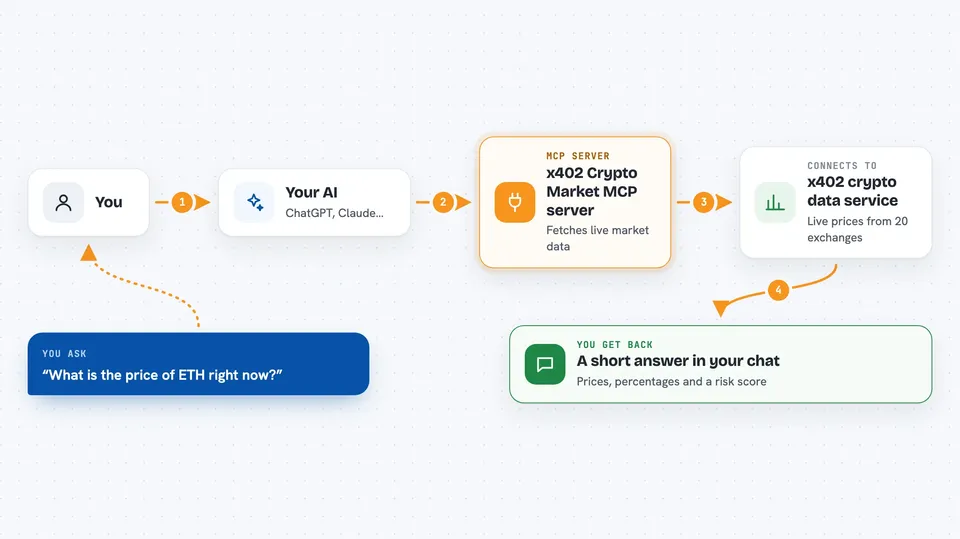
On its own, your AI can only chat with you using what it already learned. An MCP server is a small helper program that gives your AI one new skill, in this case a connection to the x402 crypto market service. When you ask a question about crypto, your AI passes it to this helper, the helper fetches live numbers from x402, and your AI explains them back to you in plain words. You do not need an account or a password for the free version.
What this MCP server does
You ask your AI a question about a coin, like the price of ETH or how traders are positioned. Your AI sends that request to this helper on your computer. The helper talks to the x402 service, which pulls live data from 20 crypto exchanges and other sources. The service sends back a small set of numbers, and your AI turns them into a short answer in the chat. For wallet checks, the helper asks the service to score an address and returns a risk reading.
 Click to zoom
What you can do with it
- Check the live price, funding rate and open interest for a coin
- See whether buyers or sellers are more active right now
- Spot large whale trades and liquidation pressure across exchanges
- Get a quick macro read with signals like DXY, VIX and fear and greed
- Look up lighter coverage for tokens outside the main list
- Check a crypto wallet address for risk flags like mixers or sanctions
- Ask for the current pricing and quick-start info for the service
Try asking your AI
- “What is the current price and funding rate for BTC?”
- “Show me the orderflow for ETH over the last hour”
- “Is this wallet address risky: 0x1234abcd...?”
- “Give me a quick macro read on the crypto market today”
What it gives back to you
You get short, readable answers in the chat: prices, percentages, funding rates, open interest, buy and sell ratios, and a fear and greed reading. For orderflow questions you get cross-exchange buy and sell pressure, whale activity counts and liquidation numbers. For wallet checks you get a risk score with notes on what was found. Everything comes back as text your AI writes out for you, not as files.
Before you start
What you need
- The Claude desktop app, Cursor, Cline, Windsurf or another app that supports MCP servers
- Node.js installed on your computer (the free version needs it to run the helper)
Good to know
The free version has rate limits and is meant for testing and light use, and the data is a market reading, not financial advice.
Install it with your AI
Add x402 Crypto Market MCP server to your AI, no technical skills needed
You don't install anything by hand. You copy one prompt, paste it into an AI that can work on your computer, and it checks, installs and connects the server for you, asking you when it needs something.
Sign in to get the install prompt
Members get a ready-made prompt that lets the Claude desktop app check x402 Crypto Market MCP server, install it and connect it for them, step by step. You don't need any technical skills: you copy, paste and answer a few questions. Your connected AI can also find and install any of the 4,609 MCP servers here for you.
Who it's for
People who follow crypto prices, traders doing quick pre-trade checks, and anyone curious about market activity who wants answers without opening many tabs.



