MCP server · Developer tools
NixOS MCP server
by utensils
Look up real NixOS packages, options, Home Manager and nix-darwin settings instead of guessing.
This is a small helper that lets your AI look up real information about NixOS, Home Manager and nix-darwin. It is handy if you write Nix configuration files and you are tired of your AI inventing package names that do not exist. You do not need Nix installed to use it.
What is an MCP server? The 30-second version
On its own, your AI can only chat from what it already learned. An MCP server is a small helper program that gives your AI a new skill or a connection to a service. This one connects your AI to NixOS package and option data, so when you ask about a package or a setting, it can look it up instead of making something up.
What this MCP server does
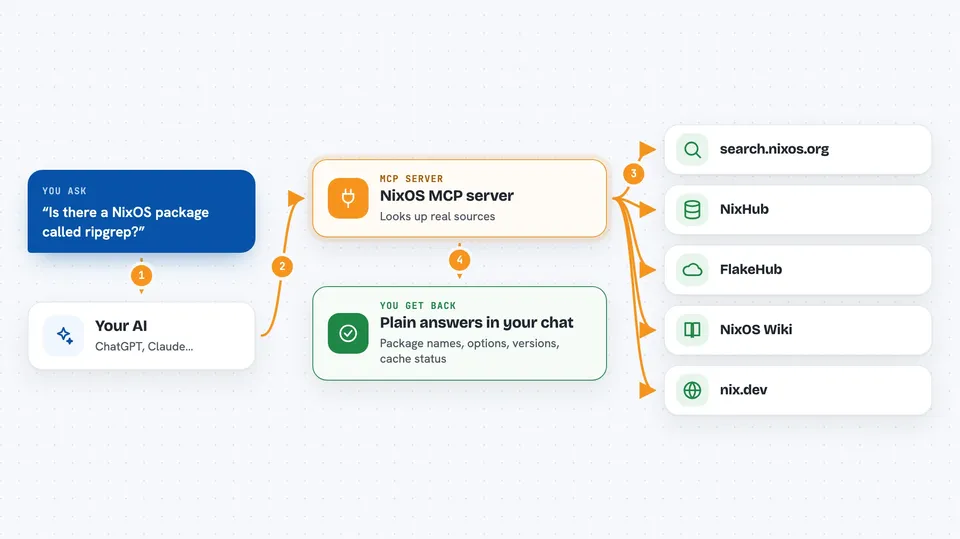
You ask your AI a question about NixOS, like whether a package exists or how to set an option. Your AI sends that question to this helper. The helper queries real sources such as search.nixos.org, NixHub, FlakeHub, the NixOS Wiki and nix.dev. Then it hands the answer back to your AI, which shows it to you in the chat.
 Click to zoom
What you can do with it
- Search over 130,000 NixOS packages by name
- Look up NixOS system options and what they do
- Find Home Manager options for your dotfiles
- Browse nix-darwin settings for macOS
- Check package version history with commit hashes
- See if a package is already in the binary cache
- Search NixOS Wiki and nix.dev documentation
Try asking your AI
- “Is there a NixOS package called ripgrep and what does it include?”
- “What Home Manager option do I use to enable git?”
- “Show me recent versions of python with their nixpkgs commit hashes”
- “Is firefox already in the binary cache for x86_64-linux?”
What it gives back to you
You get back plain answers in the chat: package names, option names, short descriptions, version lists with commit hashes, and cache status with download sizes. Results usually come as tidy lists or short summaries you can copy into your Nix files. Nothing on your computer is changed, it only reads information.
Before you start
What you need
- A computer with Python available (the tool runs anywhere Python runs)
- uvx or pip to run the helper (uvx is the easiest, no install needed)
- An MCP-capable AI app like Claude Desktop or another client that supports MCP servers
Good to know
It only reads public information, so it will not change anything on your system, but double check version and option names before you paste them into your configuration.
Install it with your AI
Add NixOS MCP server to your AI, no technical skills needed
You don't install anything by hand. You copy one prompt, paste it into an AI that can work on your computer, and it checks, installs and connects the server for you, asking you when it needs something.
Sign in to get the install prompt
Members get a ready-made prompt that lets the Claude desktop app check NixOS MCP server, install it and connect it for them, step by step. You don't need any technical skills: you copy, paste and answer a few questions. Your connected AI can also find and install any of the 4,609 MCP servers here for you.
Who it's for
People who write NixOS, Home Manager or nix-darwin configuration and want their AI to stop inventing package names.