MCP server · Social media · official
Veezee MCP server
by veezeehq · official
Lets your AI look up LinkedIn, Reddit and X profiles, companies, posts and search results for you.
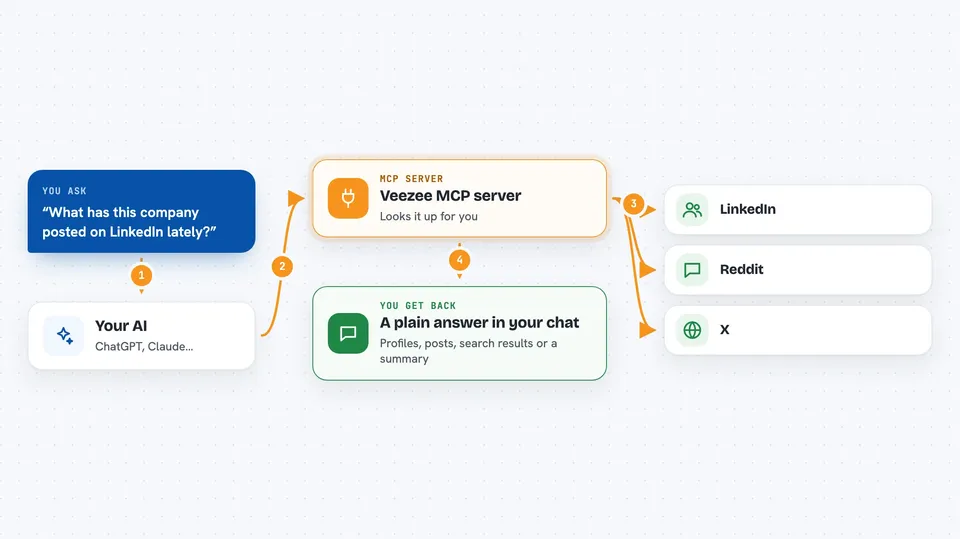
Veezee is a helper that connects your AI assistant to LinkedIn, Reddit and X (the site formerly called Twitter). Once it is connected, you can ask your AI things like "what has this company posted lately?" and it will go and fetch the answer. It is handy for anyone who does research on people, companies or online conversations without wanting to click around three different websites.
What is an MCP server? The 30-second version
On its own, your AI can only chat with you using what it already knows. An MCP server is a small helper program that gives your AI a new skill or a connection to an outside service. This one connects your AI to Veezee, which in turn talks to LinkedIn, Reddit and X. So when you ask a question about a profile or a post, your AI asks Veezee, and Veezee brings back the data.
What this MCP server does
You ask your AI a question about a person, a company, a subreddit or a post on LinkedIn, Reddit or X. Your AI sends that request to the Veezee helper. Veezee looks the information up on the right platform and sends it back. Your AI then turns it into a normal answer in your chat, like a short summary or a list. You never have to open the other websites yourself.
 Click to zoom
What you can do with it
- Look up a LinkedIn profile or company page
- Search for people on LinkedIn by keyword
- Read recent posts from a person or company
- Search Reddit posts, comments, subreddits or users
- Read a Reddit discussion thread
- Look up an X profile or a single tweet
- Search X for posts about a topic
- Check how many credits you have left
Try asking your AI
- “What has this LinkedIn company posted in the last month?”
- “Find recent Reddit discussions about our product name”
- “Show me the latest tweets from this X account”
- “Search Reddit for people asking about switching tools in our category”
What it gives back to you
You get back plain answers in your chat: profile details, company info, lists of posts, search results, or a summary of a discussion thread. Numbers like follower counts, likes and comment counts come through too. If you asked it to search, you get a short list of matching items with links. Nothing is changed on the other platforms; it only reads.
Before you start
What you need
- An MCP-capable AI client, like Claude Code, Cursor, VS Code or claude.ai
- A free Veezee key, which you can get without signing up or paying
Good to know
The free tier only shows cached data and the first page of results, and each call uses up credits from your daily allowance.
Install it with your AI
Add Veezee MCP server to your AI, no technical skills needed
You don't install anything by hand. You copy one prompt, paste it into an AI that can work on your computer, and it checks, installs and connects the server for you, asking you when it needs something.
Sign in to get the install prompt
Members get a ready-made prompt that lets the Claude desktop app check Veezee MCP server, install it and connect it for them, step by step. You don't need any technical skills: you copy, paste and answer a few questions. Your connected AI can also find and install any of the 4,361 MCP servers here for you.
Who it's for
People who do research on people, companies or online conversations, like recruiters, marketers, salespeople, journalists and analysts.