
MCP server · Analytics
AutoEQ MCP server
by verIdyia
Lets your AI look up EQ settings, sound signatures and Harman scores for 8,800+ headphones and IEMs.
This is a small helper that connects your AI assistant to the AutoEQ headphone database. It holds EQ settings, sound descriptions and preference scores for thousands of headphones and in-ear monitors. It is handy if you are shopping for headphones, tuning the sound of the ones you own, or just curious how two models compare.
What is an MCP server? The 30-second version
On its own, your AI can only chat with you. An MCP server is a small helper program that gives your AI a new skill or a connection to an app or service. This one connects your AI to the AutoEQ headphone database, so it can look up EQ settings, compare models and check rankings for you when you ask. You do not need to understand how it works inside. You just talk to your AI like normal.
What this MCP server does
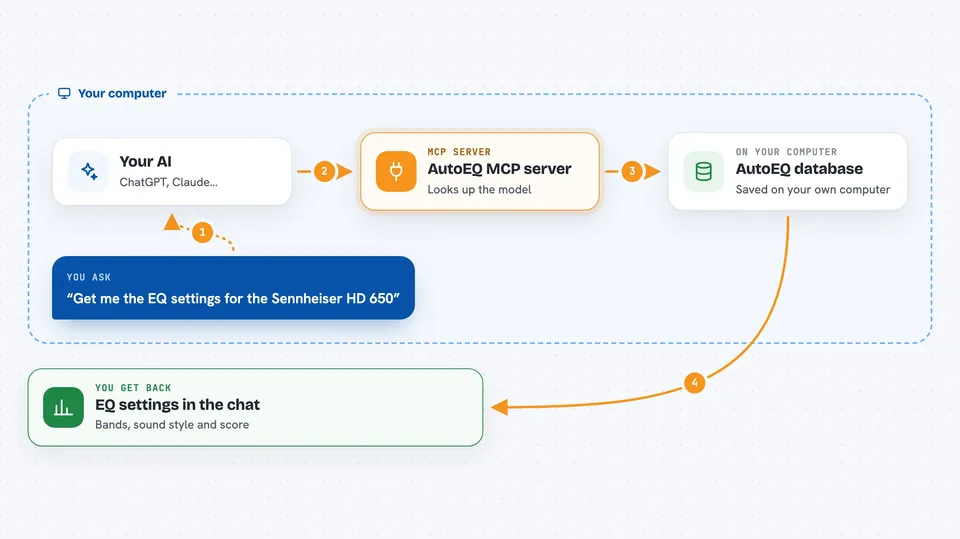
You ask your AI a question about headphones, like the EQ settings for a certain model. The AI sends that request to this helper program running on your computer. The helper looks the model up in its local copy of the AutoEQ database, which it built from the public AutoEQ project. It then hands the answer back to the AI, and the AI writes it out for you in the chat. It can also compare two models band by band or list the top-ranked ones.
 Click to zoom
What you can do with it
- Look up EQ settings for a specific headphone or IEM by name
- Compare two models side by side across all frequency bands
- Find headphones that match a sound style like warm, bright or neutral
- See Harman preference score rankings for headphones and IEMs
- Browse the 61 available target curves such as Harman and Diffuse Field
- Refresh the local database from the AutoEQ project when new data comes out
Try asking your AI
- “Get me the EQ settings for the Sennheiser HD 650”
- “Compare the HiFiMan HE400se and the Sennheiser HD 600”
- “Recommend warm-sounding over-ear headphones”
- “What are the top-ranked IEMs by Harman score?”
What it gives back to you
You get answers written out in the chat, not files to open. For a single headphone you get its EQ settings, a band-by-band breakdown with small visual bars, its sound signature and its Harman score. For a comparison you get the two models lined up band by band. For a ranking you get a list of models with their scores.
Before you start
What you need
- Python installed on your computer
- The autoeq-mcp program installed with pip
- About 20 seconds for the first database sync, which downloads the AutoEQ data and builds a small local database
Good to know
The eq_sync tool downloads data from the internet and rebuilds the local database, so it needs a working connection and a moment to finish.
Install it with your AI
Add AutoEQ MCP server to your AI, no technical skills needed
You don't install anything by hand. You copy one prompt, paste it into an AI that can work on your computer, and it checks, installs and connects the server for you, asking you when it needs something.
Sign in to get the install prompt
Members get a ready-made prompt that lets the Claude desktop app check AutoEQ MCP server, install it and connect it for them, step by step. You don't need any technical skills: you copy, paste and answer a few questions. Your connected AI can also find and install any of the 4,066 MCP servers here for you.
Who it's for
Headphone and IEM fans, people tuning their audio gear, and anyone comparing models before buying.




