
MCP server · Video editing · official
Oh My Cassette video editing
by Cassette-Editor · official
Turn a folder of raw clips into a finished, beat-synced video cut just by describing it in chat.
Oh My Cassette is a helper that lets your AI assistant edit video for you. You point it at a folder of raw clips, describe the video you want in plain words, and it comes back with a finished cut. It is handy for anyone who has footage to turn into a short video but does not want to learn editing software.
What is an MCP server? The 30-second version
On its own, your AI can only chat. An MCP server is a small helper program that gives your AI a new skill or a connection to another service. This one connects your AI to Cassette, an online video editing service, so the AI can send your clips there, plan the edit, and bring back a finished video. You stay in the chat the whole time.
What this MCP server does
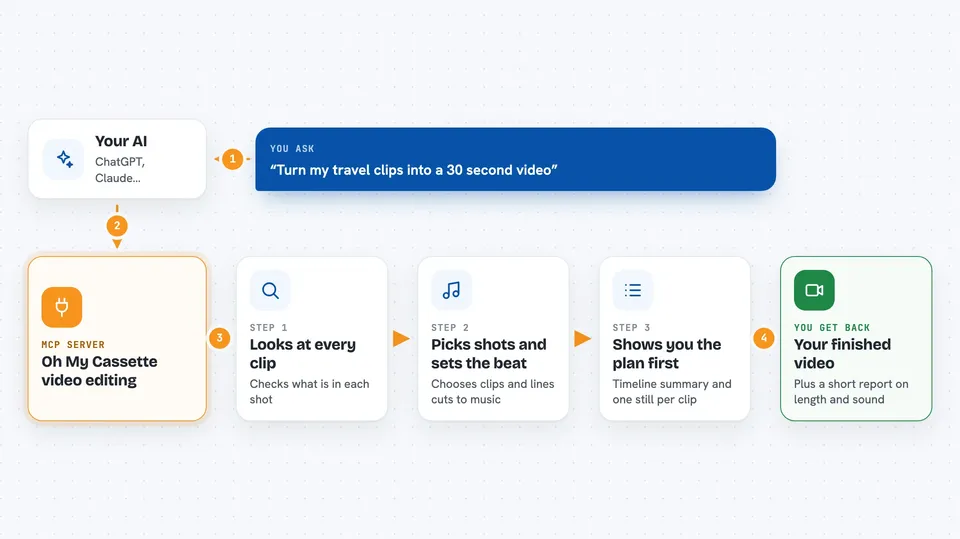
You tell your AI which folder holds your clips and what kind of video you want. The AI uploads the clips to Cassette and looks at what is in each one. It then picks the shots, sets the pacing, matches music to the mood, and lines the cuts up with the beat. Before anything is rendered, it shows you a readable summary of the timeline and a contact sheet, which is one still frame per clip. Once you approve, it renders the video and hands you the finished file.
 Click to zoom
What you can do with it
- Turn a folder of clips into a finished video from one description
- Sync cuts to the beat of a music track automatically
- Pick the best shots and set the pacing for you
- Add subtitles, title cards, and transitions
- Place one video on top of another as picture-in-picture
- Review a timeline summary and contact sheet before rendering
- Export the finished cut and check its duration and audio levels
Try asking your AI
- “Edit the clips in ./footage into a 30-second travel vlog with beat-synced cuts”
- “Make a 15-second product commercial from these clips, refreshing and ad-like”
- “Turn these cooking clips into a clean tutorial with simple subtitles”
- “Use all the clips in this folder and add a title card at the start and end”
What it gives back to you
You get a readable summary of the planned timeline and a link to a contact sheet, so you can see the shape of the cut before anything renders. After you approve, you get a finished video file plus a short report on its duration, black frames, and audio levels. Everything shows up right in your chat.
Before you start
What you need
- A Cassette account (sign up on their site)
- Claude Code, Codex, OpenCode, or a working Hermes Agent setup
- Python 3.11 to 3.13
- ffmpeg installed on your computer
Good to know
Uploaded clips and exports are deleted after 24 hours, so keep your own copy of every source file and move any finished video you want to keep.
Install it with your AI
Add Oh My Cassette video editing to your AI, no technical skills needed
You don't install anything by hand. You copy one prompt, paste it into an AI that can work on your computer, and it checks, installs and connects the server for you, asking you when it needs something.
Sign in to get the install prompt
Members get a ready-made prompt that lets the Claude desktop app check Oh My Cassette video editing, install it and connect it for them, step by step. You don't need any technical skills: you copy, paste and answer a few questions. Your connected AI can also find and install any of the 4,361 MCP servers here for you.
Who it's for
People who have raw video clips and want a finished short video without opening editing software, like vloggers, small business owners, and social media creators.


