
MCP server · Developer tools
VerifyAX MCP server
by verifyax
Lets your AI register test agents, build scenarios, and run evaluations on VerifyAX for you.
This is a helper that connects your AI assistant to VerifyAX, a platform for testing how well AI agents behave. Once it is set up, you can just describe what you want in plain words and your assistant does the clicking for you. It is handy for anyone who checks or compares AI agents without wanting to write code.
What is an MCP server? The 30-second version
On its own, your AI can only chat with you. An MCP server is a small helper program that gives your AI a new skill or a connection to another service. This one connects your AI to VerifyAX, so it can register agents, create test scenarios, and read evaluation results for you. You ask in normal language, and the helper carries the request over to VerifyAX.
What this MCP server does
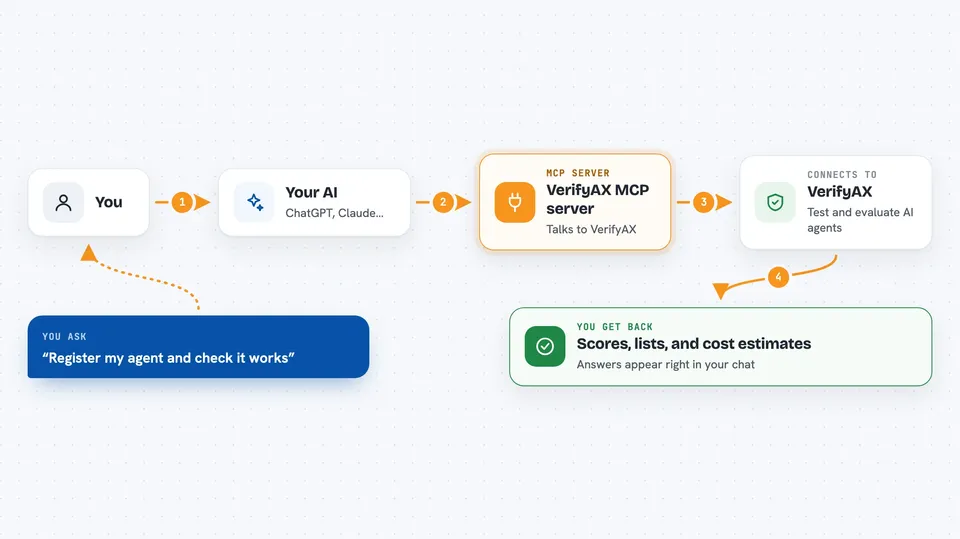
You tell your AI what you want, like registering an agent or running an evaluation. The AI uses this helper, which talks to the VerifyAX platform using your account. For longer jobs, like generating a scenario or running an evaluation, the helper waits until the work finishes and then brings back the result. You see the answer right in your chat, such as scores, a list of agents, or a cost estimate. You never have to write any code or open a separate dashboard.
 Click to zoom
What you can do with it
- Register a new agent and check that it is reachable
- List all the agents in your workspace
- Generate a test scenario from skill tags
- Run an evaluation of an agent against a scenario
- Read scores and transcripts from a past run
- Preview how many credits a run will cost
- Delete an agent or scenario you no longer need
Try asking your AI
- “Register my agent at https://my-agent.example.com and confirm it is reachable”
- “Generate an info_exchange scenario tagged empathy and coordination”
- “Evaluate agent X against scenario Y and summarize the scores”
- “How many credits will it cost to run this scenario against my agent”
What it gives back to you
You get answers written in the chat, like a list of your agents, a summary of evaluation scores, or a short transcript from a run. It can also show credit usage and cost estimates as numbers. When it creates or deletes something, it tells you what it did. Nothing appears in a separate file unless you ask your AI to save it.
Before you start
What you need
- A VerifyAX account
- A VerifyAX API key (you make one in the VerifyAX console under Settings, then API Keys)
- An AI client that supports MCP, such as Claude, Cursor, or VS Code
- For the local option only: Node.js version 20 or newer
Good to know
Some actions spend credits or permanently delete agents and scenarios, so check with your AI before letting it run or delete anything.
Install it with your AI
Add VerifyAX MCP server to your AI, no technical skills needed
You don't install anything by hand. You copy one prompt, paste it into an AI that can work on your computer, and it checks, installs and connects the server for you, asking you when it needs something.
Sign in to get the install prompt
Members get a ready-made prompt that lets the Claude desktop app check VerifyAX MCP server, install it and connect it for them, step by step. You don't need any technical skills: you copy, paste and answer a few questions. Your connected AI can also find and install any of the 4,609 MCP servers here for you.
Who it's for
People who test or compare AI agents, like QA testers, product managers, and support teams, who want to work in plain language instead of code.



