
MCP server · Developer tools
Munim MCP server
by vishalsg42
Lets your AI work across many client accounts at once, reading all of them and changing only the one you name.
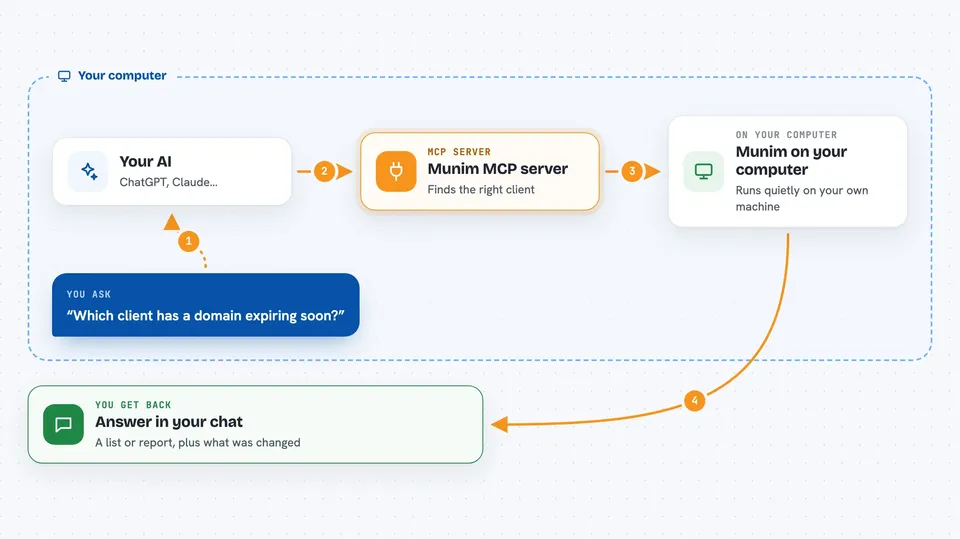
Munim is a helper that lets your AI stay connected to several client accounts at the same time, like Cloudflare, Vercel, Notion and others. Normally an AI can only be logged in to one account per service, so people who look after many small businesses have to switch sessions all day. Munim holds them all together so you can ask about any of your clients in one place.
What is an MCP server? The 30-second version
On its own, your AI can only chat with you. An MCP server is a small helper program that gives your AI a new skill or a connection to an app or service. Munim is that helper, and here it connects your AI to the accounts of the clients you look after, like their Cloudflare or Vercel setups. Once it is running, your AI can look things up in those accounts and make changes there when you ask.
What this MCP server does
You ask your AI a question about your clients, for example which domain is expiring soon. Your AI passes that request to Munim, which is running quietly on your own computer. Munim knows which client each account belongs to, finds the right one, and talks to that provider using the provider's own tools. The answer comes back into your chat, and if you asked for a change, Munim makes it only in the client you named. Every call is written to a log so you can see what was done.
 Click to zoom
What you can do with it
- Read across all your clients at once to compare or check something
- Make a change inside one named client's account
- See which tools a client's provider account can be asked to do
- Run a check on a client and get a report of what is wrong
- Ask your AI to explain a problem in plain language
- Connect a new client by signing in through a browser
- Look up what is set up and what is missing with a doctor command
Try asking your AI
- “Which of my clients has a domain expiring this quarter?”
- “Check ivyandfern.co.uk for Ivy & Fern Studio”
- “List the tools available for Ivy & Fern on Cloudflare”
- “What is not set up yet, and what command fixes it?”
What it gives back to you
You get answers in your chat, like a list of clients with expiring domains, or a short report of what a check found. When Munim makes a change, it tells you what it did and in which client. It can also give you the list of tools a provider account offers, so you know what is possible. Everything it returns goes into your AI's chat, so you read it like a normal reply.
Before you start
What you need
- Python 3.10 or newer
- The uv tool, pipx, or pip to install Munim
- A coding agent that supports MCP, like Claude Code
- Accounts with the providers you want to connect, like Cloudflare or Vercel
Good to know
Munim can make real changes in your clients' accounts, so be careful when you ask it to write or fix something, and check the run log to see exactly what it did.
Install it with your AI
Add Munim MCP server to your AI, no technical skills needed
You don't install anything by hand. You copy one prompt, paste it into an AI that can work on your computer, and it checks, installs and connects the server for you, asking you when it needs something.
Sign in to get the install prompt
Members get a ready-made prompt that lets the Claude desktop app check Munim MCP server, install it and connect it for them, step by step. You don't need any technical skills: you copy, paste and answer a few questions. Your connected AI can also find and install any of the 4,609 MCP servers here for you.
Who it's for
People who look after the web and email setup of several small businesses, like freelancers, agencies, and IT helpers.



