MCP server · Browser automation
WebDriverIO MCP server
by webdriverio
Let your AI open browsers and mobile apps, click around, and report back what it finds.
This is a helper that lets your AI assistant actually drive a web browser or a phone app, instead of just talking about them. You ask in plain words, and it opens Chrome, Firefox, Edge, Safari, an Electron app, or an Android or iOS app and does the steps for you. It is handy for anyone who checks websites or apps by hand and wishes the boring clicking could be done for them.
What is an MCP server? The 30-second version
On its own, your AI can only chat. An MCP server is a small helper program that gives your AI a new skill or a connection to something outside the chat. This one connects your AI to WebdriverIO, a well known tool for controlling browsers and mobile apps. So when you ask your AI to open a page or tap a button in an app, this helper is what actually does it.
What this MCP server does
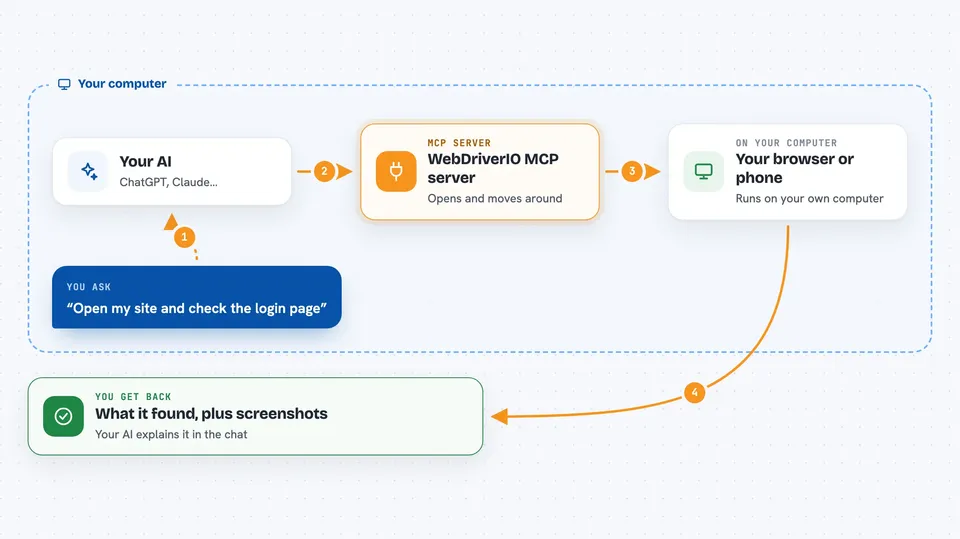
You tell your AI what you want, like open this website and check the login page. Your AI passes that to this helper. The helper starts a browser or a mobile app session, moves around the page or screen, clicks, types, and reads what is there. Then it sends the results back to your AI, which explains them to you in the chat. For mobile apps it uses Appium, a tool that talks to phones and emulators.
 Click to zoom
What you can do with it
- Open a website in Chrome, Firefox, Edge, or Safari and look at what is on the page
- Click buttons, fill in forms, and follow links step by step
- Take screenshots of a page or app screen
- Run the same steps on a phone app for Android or iOS
- Test on cloud devices from BrowserStack, Sauce Labs, LambdaTest, TestingBot, or Digital.ai
- Upload an app file to a cloud service so it can be tested on real devices
What it gives back to you
You get answers in the chat: what the page or screen looked like, which buttons and links were found, and what happened after each step. It can also hand back screenshots so you can see the page yourself. For cloud runs you get a session result, and the service keeps a record you can open later. If something failed, your AI tells you where it got stuck.
Before you start
What you need
- Node.js installed on your computer (the free runtime that runs this helper)
- For mobile apps: Appium installed, plus Xcode for iOS or Android Studio for Android
- For cloud testing: an account and access key from BrowserStack, Sauce Labs, LambdaTest, TestingBot, or Digital.ai
- An MCP client like Claude Desktop, Cursor, or VS Code with Copilot
Good to know
It can click, type, and change things on real websites and apps, so be careful about running it on accounts or pages where you do not want anything changed, and cloud testing may use up paid minutes on your account.
Install it with your AI
Add WebDriverIO MCP server to your AI, no technical skills needed
You don't install anything by hand. You copy one prompt, paste it into an AI that can work on your computer, and it checks, installs and connects the server for you, asking you when it needs something.
Sign in to get the install prompt
Members get a ready-made prompt that lets the Claude desktop app check WebDriverIO MCP server, install it and connect it for them, step by step. You don't need any technical skills: you copy, paste and answer a few questions. Your connected AI can also find and install any of the 4,361 MCP servers here for you.
Who it's for
People who check websites or mobile apps by hand, like QA testers, support teams, and anyone who wants a quick look at a page without clicking through it themselves.