MCP server · Browser automation
Periscope MCP server
by segentic-lab
Lets your AI test and audit websites: check pages, fill forms, log in, and report what is broken.
Periscope is a helper that gives your AI a set of website testing skills. Instead of just chatting, your AI can open a web page, click around, fill in forms, log in, and tell you what passed or failed. It is handy for anyone who has to check a website before launch or keep an eye on it afterward, even if you are not a tester.
What is an MCP server? The 30-second version
On its own, your AI can only talk. An MCP server is a small helper program that gives your AI a new skill or a connection to something else. This one connects your AI to a real web browser, so it can visit and test websites for you. You ask in plain words, and the AI uses this helper behind the scenes to do the work.
What this MCP server does
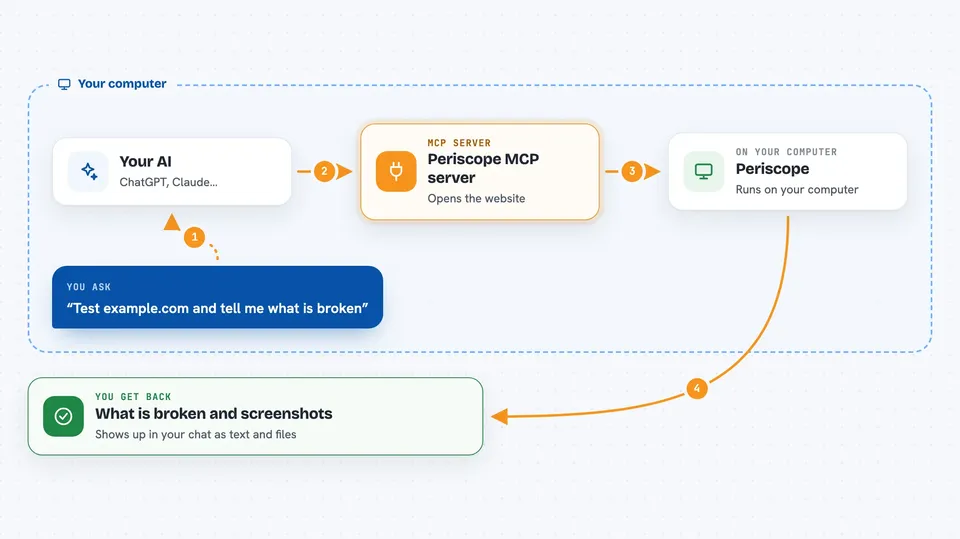
You ask your AI to check a website, like whether a page loads or a form works. The AI calls Periscope, which opens the page in a headless browser (a browser with no visible window). Periscope clicks, types, and checks things, then hands back clear answers, screenshots, and a list of problems. Your AI reads that and tells you what it found in the chat.
 Click to zoom
What you can do with it
- Test a single web page and get a screenshot plus a list of issues
- Crawl a whole site and audit every page it finds
- Fill in forms automatically with realistic test data
- Log into a site and keep that login for later tests
- Check accessibility, SEO, and AI-readiness of pages
- Run Lighthouse performance scores
- Mock network responses to test how a page behaves
Try asking your AI
- “Test https://example.com and tell me what is broken”
- “Crawl my site and run a full audit, then save a report”
- “Log into my app with the saved login and check the dashboard loads”
- “Check the accessibility of the signup page”
What it gives back to you
You get back clear answers, not just screenshots. For example, a check might say passed: true or false with the actual value it found. You also get lists of issues, saved report files, and screenshots you can look at. Everything shows up in your chat as text and file paths.
Before you start
What you need
- Python 3.11 or newer
- Playwright and its Chromium browser (the install script handles this)
- An MCP client like Claude Code, Cursor, or Windsurf
- For manual logins: a computer with a screen, since it opens a real browser window
Good to know
It can change things on a live website, like submitting forms or logging in, so be careful about pointing it at a real site you care about.
Install it with your AI
Add Periscope MCP server to your AI, no technical skills needed
You don't install anything by hand. You copy one prompt, paste it into an AI that can work on your computer, and it checks, installs and connects the server for you, asking you when it needs something.
Sign in to get the install prompt
Members get a ready-made prompt that lets the Claude desktop app check Periscope MCP server, install it and connect it for them, step by step. You don't need any technical skills: you copy, paste and answer a few questions. Your connected AI can also find and install any of the 4,361 MCP servers here for you.
Who it's for
Anyone who needs to check or test websites, like QA testers, developers, and product people who want quick answers without writing test code.