
MCP server · Finance and crypto
CNN Fear & Greed MCP server
by wildsurfer
Your AI can look up the CNN Fear & Greed Index score, its rating, and about a year of daily history.
This is a small helper that lets your AI read the CNN Fear & Greed Index, a 0 to 100 gauge of how the US stock market is feeling. It gives you the current score and rating, plus the values from the previous close, a week ago, a month ago and a year ago. It is handy if you follow the markets and want a quick read on sentiment without opening a browser.
What is an MCP server? The 30-second version
On its own, your AI can only chat with you using what it already knows. An MCP server is a small helper program that gives your AI a new skill or a connection to an app or service. This one connects your AI to the CNN Fear & Greed Index, so when you ask about market sentiment it can go and fetch the current numbers for you. You do not need to understand how it works inside; you just add it once and then ask questions in plain words.
What this MCP server does
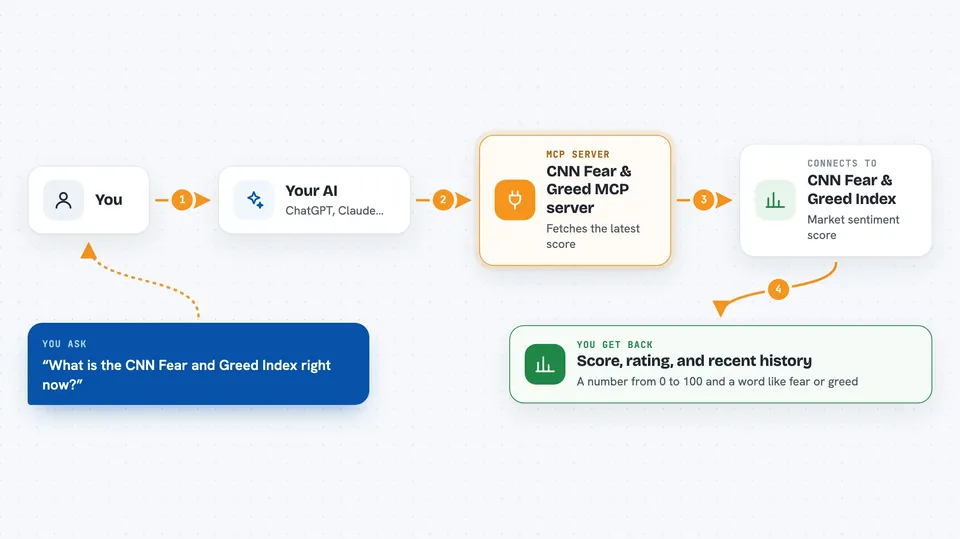
You ask your AI something about the Fear & Greed Index, like what the score is today. Your AI passes that request to this helper program running on your computer. The helper asks CNN's own data feed for the latest numbers. Then it hands the score, the rating and the past values back to your AI, which explains them to you in the chat. If you want more, you can ask for the daily history too.
 Click to zoom
What you can do with it
- Check the current Fear & Greed score and its rating
- Compare today's score with the previous close, last week, last month and last year
- See about a year of daily scores to spot trends
- Look at the seven component indicators, like market momentum and volatility
- Ask what the VIX or junk bond demand reading is right now
- Get the exact timestamp CNN last updated the index
Try asking your AI
- “What is the CNN Fear and Greed Index right now?”
- “Has market sentiment been getting more greedy or more fearful this month?”
- “Show me the daily Fear and Greed scores for the past year.”
- “What are the component indicators saying, especially volatility and junk bond demand?”
What it gives back to you
You get the score as a number from 0 to 100 and a word like fear, neutral or greed. You also get the values from the previous close, a week ago, a month ago and a year ago, and the exact time CNN updated it. If you ask for history, you get about a year of daily scores, each with its own rating. It all shows up as a short list or summary in your chat.
Before you start
What you need
- The Go programming language installed on your computer
- The cnnfag command installed (one short command does it)
- An MCP client like Claude Desktop or another AI app that supports MCP servers
Good to know
The data belongs to CNN and is meant for personal use, so check their terms before using it in anything commercial, and remember the feed can change or disappear at any time.
Install it with your AI
Add CNN Fear & Greed MCP server to your AI, no technical skills needed
You don't install anything by hand. You copy one prompt, paste it into an AI that can work on your computer, and it checks, installs and connects the server for you, asking you when it needs something.
Sign in to get the install prompt
Members get a ready-made prompt that lets the Claude desktop app check CNN Fear & Greed MCP server, install it and connect it for them, step by step. You don't need any technical skills: you copy, paste and answer a few questions. Your connected AI can also find and install any of the 4,609 MCP servers here for you.
Who it's for
Anyone who follows the US stock market and wants quick sentiment checks, like investors, analysts, finance writers and curious office workers.



