
MCP server · Security
ScreenVerity MCP server
Lets your AI check a name against U.S. exclusion and debarment lists and hand you a signed receipt.
This is a small helper that lets your AI check whether a person or company appears on U.S. government exclusion, debarment, or license lists. It is handy for compliance, HR, credentialing, and vendor-check work where you need to show what you looked at. You do not need an account or a key to try it.
What is an MCP server? The 30-second version
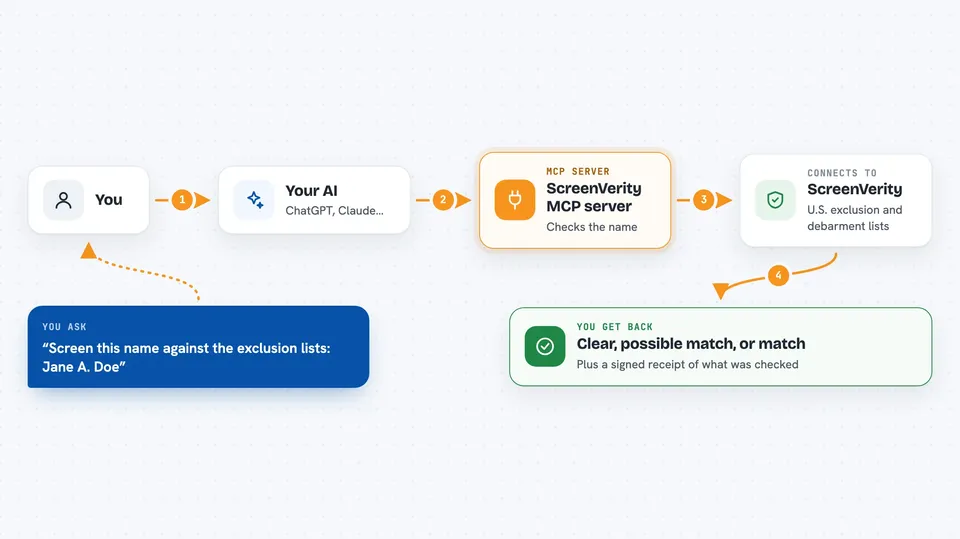
On its own, your AI can only chat with you. An MCP server is a small helper program that gives your AI a new skill or a connection to an outside service. This one connects your AI to ScreenVerity, a screening service that holds copies of public exclusion lists. When you ask your AI to check a name, the AI calls this helper, the helper asks ScreenVerity, and the answer comes back into your chat.
What this MCP server does
You ask your AI to screen a name, for example a nurse, a contractor, or a supplier. The AI passes that name to this helper, along with any details you gave it like a date of birth, license number, or NPI. The helper sends the request to ScreenVerity, which checks the name against the lists it has loaded. You get back a simple result, either clear, possible match, or match, plus a signed receipt showing exactly which list snapshots were checked. You can also ask which lists are loaded before you trust a result.
 Click to zoom
What you can do with it
- Screen one person or company name against the loaded exclusion and debarment lists
- See which lists are loaded, their jurisdiction, and how fresh they are
- Check whether a list is fully loaded, partly loaded, or never loaded
- Get a signed receipt that proves which list snapshots were used
- Verify a receipt later against the original request and response
- Add a date of birth, license number, or NPI to make a common name more precise
Try asking your AI
- “Screen this name against the exclusion lists: Jane A. Doe, DOB 1974-03-02”
- “Which lists are loaded right now, and are any of them only partial?”
- “Run a screen for Acme Medical Staffing LLC in Texas”
- “Verify this receipt against the request and response I saved”
What it gives back to you
You get a short structured answer in the chat: a status of clear, possible match, or match, plus a note about whether the screen was complete. If a list was unavailable, it tells you the screen was not full. It also gives you a signed receipt you can keep as evidence of what was checked. If you hit the rate limit, it says so plainly instead of pretending the name was clear.
Before you start
What you need
- Node.js installed on your computer (the free runtime that runs the helper)
- An MCP client such as Claude Code or the Claude desktop app
Good to know
A possible match is a signal to look closer, not a reason to reject someone, and this tool is not a consumer report, so do not use it for employment, credit, insurance, or housing decisions without talking to a lawyer.
Install it with your AI
Add ScreenVerity MCP server to your AI, no technical skills needed
You don't install anything by hand. You copy one prompt, paste it into an AI that can work on your computer, and it checks, installs and connects the server for you, asking you when it needs something.
Sign in to get the install prompt
Members get a ready-made prompt that lets the Claude desktop app check ScreenVerity MCP server, install it and connect it for them, step by step. You don't need any technical skills: you copy, paste and answer a few questions. Your connected AI can also find and install any of the 4,361 MCP servers here for you.
Who it's for
Compliance officers, HR and credentialing staff, recruiters, and vendor-check teams who need to screen names against U.S. exclusion lists and keep a record.




