MCP server · Developer tools
Wopee MCP server
by Wopee-io
Let your AI create test cases for your web app and run them in real browsers, then report pass or fail.
Wopee is a service that tests web apps for you. This MCP server connects your AI assistant to Wopee, so you can ask it to write test cases, turn them into user stories, and run them in real browsers. It is handy if you work with a web app and want to check that things still work, without learning a testing tool from scratch.
What is an MCP server? The 30-second version
On its own, your AI can only chat with you. An MCP server is a small helper program that gives your AI a new skill or a connection to another service. This one connects your AI to Wopee, a testing service for web apps. Once it is connected, your AI can ask Wopee to look at your app, write test cases, run them, and bring back the results.
What this MCP server does
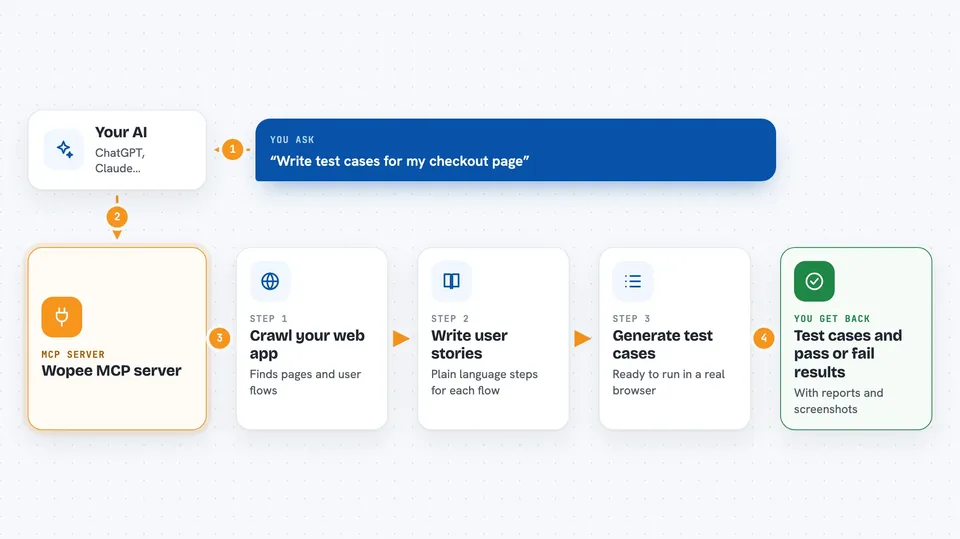
You ask your AI something like "write test cases for my checkout page". The AI passes that request to this helper. The helper talks to Wopee, which crawls your web app and generates user stories, test cases, and even Playwright code. Later, you can ask the AI to run those tests in a real browser, and Wopee sends back pass or fail results with reports and screenshots.
 Click to zoom
What you can do with it
- List the analysis suites already set up in your Wopee project
- Start a new analysis that crawls your web app and writes user stories and test cases
- Generate test cases, test case steps, and reusable test cases for a suite
- Fetch the generated user stories or Playwright code as text
- Update an app context or user stories file with your own content
- Run test cases in real browsers with the autonomous testing agent
- Check the status and results of recent test runs
Try asking your AI
- “Fetch all existing analysis suites for my project”
- “Dispatch a new analysis suite and focus on the checkout flow”
- “Generate user stories with test cases for my latest suite”
- “What's the status of my recent test runs?”
What it gives back to you
You get back lists, tables, and text in the chat. For example, a list of suites with their names and IDs, or a set of user stories and test cases in plain language. When tests run, you get pass or fail results, agent reports, and code reports, and you can ask for a formatted summary table.
Before you start
What you need
- A Wopee account (sign up at wopee.io)
- Your Wopee project UUID (found in your project settings)
- A Wopee API key (create one at cmd.wopee.io, in your project's settings)
- Node.js version 18 or newer on your computer
Good to know
This server can change files in your Wopee project and start test runs that use your Wopee account, so check what your AI is about to do before you say yes.
Install it with your AI
Add Wopee MCP server to your AI, no technical skills needed
You don't install anything by hand. You copy one prompt, paste it into an AI that can work on your computer, and it checks, installs and connects the server for you, asking you when it needs something.
Sign in to get the install prompt
Members get a ready-made prompt that lets the Claude desktop app check Wopee MCP server, install it and connect it for them, step by step. You don't need any technical skills: you copy, paste and answer a few questions. Your connected AI can also find and install any of the 4,361 MCP servers here for you.
Who it's for
This is most useful for QA testers, product managers, and developers who want to test a web app without writing all the test code by hand.