MCP server · Developer tools
MK QA Master MCP server
by kao273183
Let your AI run your tests, look at failures, and suggest what to fix next.
MK QA Master is a helper that connects your AI assistant to your test suite. You can ask it to run your tests, show you what failed, and even look at a web page or mobile screen to suggest new tests. It is handy for anyone who runs tests but does not want to dig through logs and screenshots by hand.
What is an MCP server? The 30-second version
On its own, your AI can only chat. An MCP server is a small helper program that gives your AI a new skill. This one connects your AI to your testing tools, so it can run tests, read the results, and write new test files for you. You just ask in plain words, and the helper does the technical part.
What this MCP server does
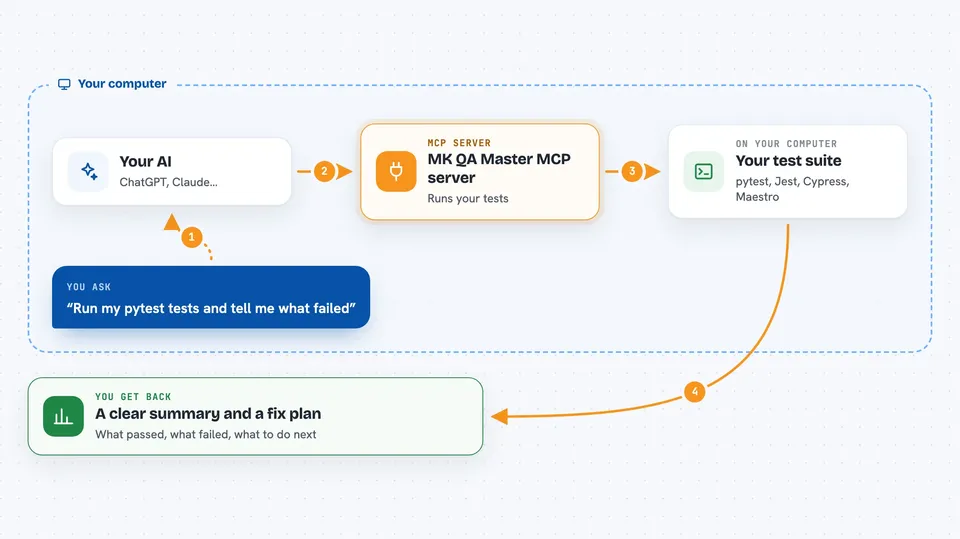
You ask your AI to run your tests. The AI uses this helper, which starts your test framework, like pytest, Jest, Cypress, or Maestro. The helper collects the results, including screenshots and videos of failures. Then it gives your AI a summary and a plan for what to fix or write next. Your AI shows you all of that in the chat.
 Click to zoom
What you can do with it
- Run your test suite and see which tests passed or failed
- Look at a web page or mobile screen and suggest test cases
- Write a ready-to-run test file for you
- Show screenshots and videos of failed tests
- Keep a history of your test runs and spot flaky tests
- Give you a prioritized list of what to fix next
- Test an API using an OpenAPI schema or a Postman collection
Try asking your AI
- “Run my pytest tests and tell me what failed”
- “Look at https://example.com and suggest some test cases”
- “Write a Playwright test for the login form on my page”
- “Give me a plan to improve my test suite”
What it gives back to you
You get a clear summary of your test run: how many passed, how many failed, and which ones. For failures, you can see screenshots and videos right in the chat. It also gives you a prioritized action plan telling you what to fix or write next. Everything is written in plain words so you can act on it.
Before you start
What you need
- A test project with a supported framework (like pytest, Jest, Cypress, or Maestro)
- The tools for that framework installed on your computer
- An MCP client like Claude Desktop or Cursor
Good to know
This tool can run tests that change things on your computer or online, so be careful when pointing it at live systems.
Install it with your AI
Add MK QA Master MCP server to your AI, no technical skills needed
You don't install anything by hand. You copy one prompt, paste it into an AI that can work on your computer, and it checks, installs and connects the server for you, asking you when it needs something.
Sign in to get the install prompt
Members get a ready-made prompt that lets the Claude desktop app check MK QA Master MCP server, install it and connect it for them, step by step. You don't need any technical skills: you copy, paste and answer a few questions. Your connected AI can also find and install any of the 4,361 MCP servers here for you.
Who it's for
This is for developers, QA engineers, and anyone who runs tests and wants an AI to help make sense of the results.