
MCP server · Finance and crypto
Solscan MCP server
by wowinter13
Lets your AI look up Solana wallet activity, token details, and transactions through Solscan.
This is a small helper program that connects your AI assistant to Solscan, a website that shows what happens on the Solana blockchain. Once it is set up, you can ask your AI plain questions about Solana wallets, tokens, and transactions, and it will go look up the answers for you. It is handy for anyone curious about crypto activity who does not want to click around block explorers by hand.
What is an MCP server? The 30-second version
On its own, your AI can only chat with you using what it already knows. An MCP server is a small helper program you run on your computer that gives your AI a new skill. This one gives your AI a connection to Solscan, so it can look up real Solana blockchain data when you ask. You stay in the chat, and the helper does the fetching behind the scenes.
What this MCP server does
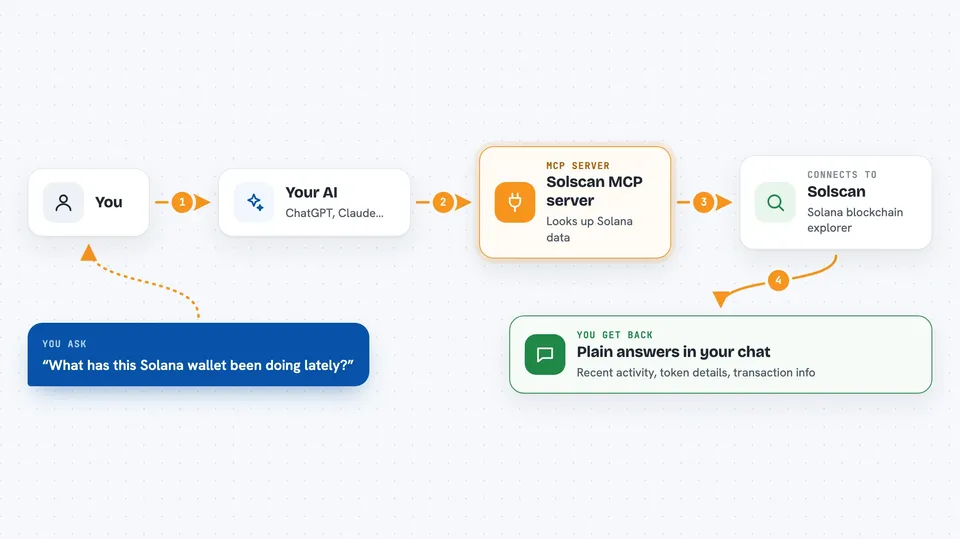
You ask your AI something about a Solana wallet, token, or transaction. The AI passes your question to this helper program running on your computer. The helper talks to the Solscan API, which is Solscan's official way for apps to request data. Solscan sends back the details, and the helper hands them to your AI. Your AI then explains the result to you in the chat, in normal words.
 Click to zoom
What you can do with it
- Look up the activity on a Solana wallet address
- Check details about a Solana token
- Inspect a specific transaction on Solana
- See what tokens an account holds
- Review recent transfers for an address
- Ask follow-up questions about the same wallet or token
Try asking your AI
- “What has this Solana wallet been doing lately? 5Q544fKrFoe6tsEbD7S8EmxGTJYAKtTVhAW5Q5pge4j1”
- “Tell me about this Solana token and who holds most of it”
- “Show me the details of this transaction hash”
- “Which tokens does this Solana address hold right now?”
What it gives back to you
You get answers written in the chat, based on real Solscan data. That can be a list of recent transactions, token details, or a short summary of what an address has been up to. If you ask about a specific transaction, you get its details explained in plain words. Nothing is changed on the blockchain; it only reads information.
Before you start
What you need
- A Solscan Pro API key from solscan.io/apis (a kind of password for apps; you sign up on their site to get one)
- The Rust toolchain installed on your computer, from rustup.rs
- The Claude desktop app, or another AI app that supports MCP servers
Good to know
It only reads Solana data through Solscan, but it does need your Solscan API key, so keep that key private and do not share your config file with others.
Install it with your AI
Add Solscan MCP server to your AI, no technical skills needed
You don't install anything by hand. You copy one prompt, paste it into an AI that can work on your computer, and it checks, installs and connects the server for you, asking you when it needs something.
Sign in to get the install prompt
Members get a ready-made prompt that lets the Claude desktop app check Solscan MCP server, install it and connect it for them, step by step. You don't need any technical skills: you copy, paste and answer a few questions. Your connected AI can also find and install any of the 4,609 MCP servers here for you.
Who it's for
People who follow Solana wallets and tokens, like crypto hobbyists, analysts, and anyone doing light on-chain research, who would rather ask questions in chat than click through a block explorer.



