MCP server · Notes
lean-memory MCP server
by Wuesteon
Give your AI a private, local memory that remembers facts about you and can look them up later.
lean-memory is a small memory helper for your AI. It saves facts you tell it, like where you work or what you like, into a file on your own computer. It is handy if you use Claude Desktop or Claude Code and want your AI to remember things between chats without sending your notes to a company server.
What is an MCP server? The 30-second version
On its own, your AI can only chat. It forgets everything as soon as the conversation ends. An MCP server is a small helper program that gives your AI a new skill. This one gives your AI a memory: it stores facts in a local file and looks them up when you ask, so your AI can remember things about you over time.
What this MCP server does
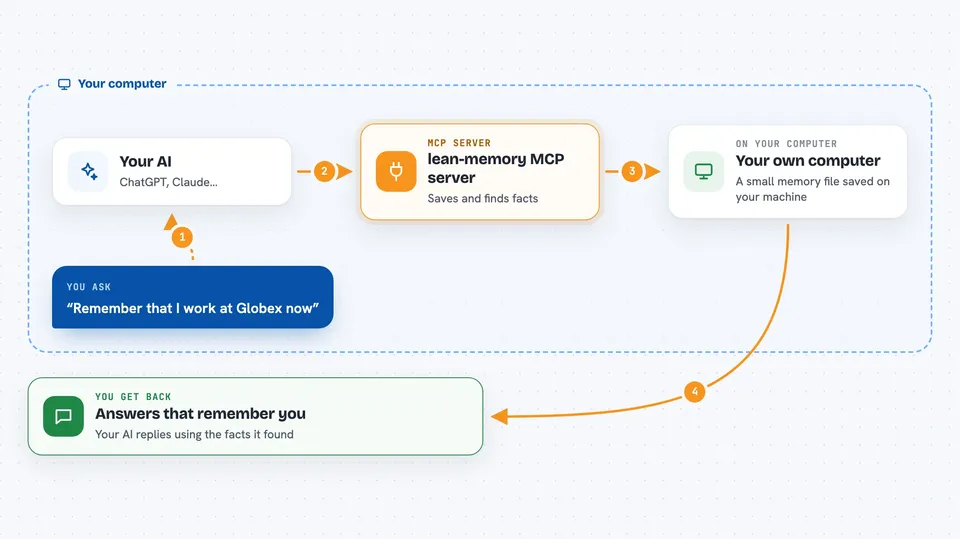
You tell your AI something worth remembering, like your new job or your favourite coffee. The AI passes that to lean-memory, which pulls out the useful facts and saves them in a small database file on your machine. Later, when you ask a question, the AI asks lean-memory to search that file. lean-memory finds the most relevant facts and hands them back, and the AI uses them to answer you. If you tell it something that replaces an old fact, the old one is kept but marked as no longer current, so you can still see what was true in the past.
 Click to zoom
What you can do with it
- Remember facts about you across separate chats
- Look up what it knows about a topic when you ask
- Update a fact when something changes, without losing the old one
- Search memories as they were at a past point in time
- Clear the memory for a namespace when you want a fresh start
- Keep everything on your own computer, with no cloud account needed
- Review and approve clean-up suggestions for old or duplicate memories
Try asking your AI
- “Remember that I work at Globex now.”
- “What do you know about where I work?”
- “What did I tell you about my employer last year?”
- “Forget everything in this memory namespace.”
What it gives back to you
You get answers in the chat that use the facts lean-memory found. When you ask it to remember something, it usually just confirms it saved the fact. When you search, it may show you a short list of matching facts with a relevance score. If you ask about the past, it can show you what was true at that time.
Before you start
What you need
- Python installed on your computer
- The lean-memory package installed with the mcp, models, and extract extras
- About 2 GB of free space for the open models it downloads on first run
- The Claude Desktop app or Claude Code
Good to know
The memory_clear tool erases memories for a namespace, so use it carefully. Maintenance suggestions are staged for your approval and expire after 30 days, so nothing changes without your say-so.
Install it with your AI
Add lean-memory MCP server to your AI, no technical skills needed
You don't install anything by hand. You copy one prompt, paste it into an AI that can work on your computer, and it checks, installs and connects the server for you, asking you when it needs something.
Sign in to get the install prompt
Members get a ready-made prompt that lets the Claude desktop app check lean-memory MCP server, install it and connect it for them, step by step. You don't need any technical skills: you copy, paste and answer a few questions. Your connected AI can also find and install any of the 4,066 MCP servers here for you.
Who it's for
Anyone who uses Claude Desktop or Claude Code and wants their AI to remember personal facts locally, especially people who care about privacy or work offline.