MCP server · Notes
A2CR MCP server
by a2cr
Save a compact handoff of your AI work so a fresh chat can pick up right where you left off.
A2CR is a small helper that lets your AI save a short summary of what you were working on, then hand that summary to a new chat window later. It is handy when a long task fills up your chat and you want to start fresh without losing the thread. It works with AI clients like Codex, Claude Code, and Cursor.
What is an MCP server? The 30-second version
On its own, your AI can only chat with you in the window you have open. An MCP server is a small helper program that gives your AI a new skill or a connection to something outside the chat. This one connects your AI to a local workspace on your own computer, where it can save and read short work checkpoints. So when you ask it to save or resume, it can actually do that for you.
What this MCP server does
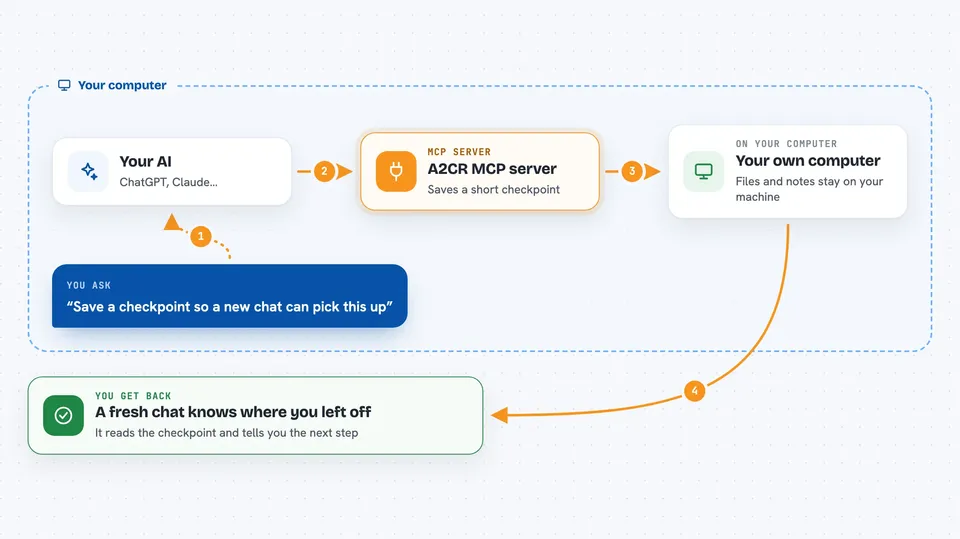
You ask your AI to save where things stand, and it writes a short checkpoint called a WorkBaton into a small database on your computer. Later, in a brand new chat window, you ask it to resume, and it reads that checkpoint back so the new window knows the goal, the current state, and the next step. If you have longer notes, it can keep those separately as WorkStash notes and point the checkpoint at them. Everything stays on your machine, and nothing is sent to an A2CR server.
 Click to zoom
What you can do with it
- Save a short checkpoint of your current work
- Resume that work in a fresh AI window
- List the checkpoints you have saved
- Load one specific checkpoint by name or number
- Delete a checkpoint you no longer need
- Store a temporary supporting note and retrieve it later
- Ask the AI whether saving a checkpoint makes sense right now
Try asking your AI
- “Save a checkpoint of where we are so I can start a new chat later.”
- “Resume my last checkpoint and tell me what the next step was.”
- “List all my saved checkpoints.”
- “Store a note about why we changed the login logic, then reference it in the checkpoint.”
What it gives back to you
You get short, readable answers in the chat. When you save, it confirms the checkpoint was stored and often shows the goal and next step it wrote down. When you resume, it reads the checkpoint back to you as a summary of the goal, current state, and next action. Listing gives you a simple list of your saved checkpoints.
Before you start
What you need
- Python 3.12 or 3.13 installed on your computer
- An AI client that supports MCP, such as Codex, Claude Code, or Cursor
- The a2cr-mcp package installed with pip
Good to know
Do not save passwords, API keys, or private customer data in checkpoints or notes, because A2CR is for work state, not secrets.
Install it with your AI
Add A2CR MCP server to your AI, no technical skills needed
You don't install anything by hand. You copy one prompt, paste it into an AI that can work on your computer, and it checks, installs and connects the server for you, asking you when it needs something.
Sign in to get the install prompt
Members get a ready-made prompt that lets the Claude desktop app check A2CR MCP server, install it and connect it for them, step by step. You don't need any technical skills: you copy, paste and answer a few questions. Your connected AI can also find and install any of the 4,361 MCP servers here for you.
Who it's for
People who run long AI coding or writing tasks and want to move the work into a fresh chat without re-explaining everything.