MCP server · Notes
Alcove MCP server
by epicsagas
Lets your AI search your private project docs and code so it stops asking you to re-explain everything.
Alcove is a small helper program that keeps your project notes and design docs in one private place on your own computer. When you ask your AI a question about your project, it looks things up in those docs instead of guessing. It is handy if you work across several projects and are tired of pasting the same background info into every chat.
What is an MCP server? The 30-second version
On its own, your AI can only chat with what you type or paste in. An MCP server is a small helper program that gives your AI a new skill or a connection to something outside the chat. Alcove is that helper here: it connects your AI to your own private folder of project docs and notes. So when you ask about your project, the AI can look things up there for you instead of making things up.
What this MCP server does
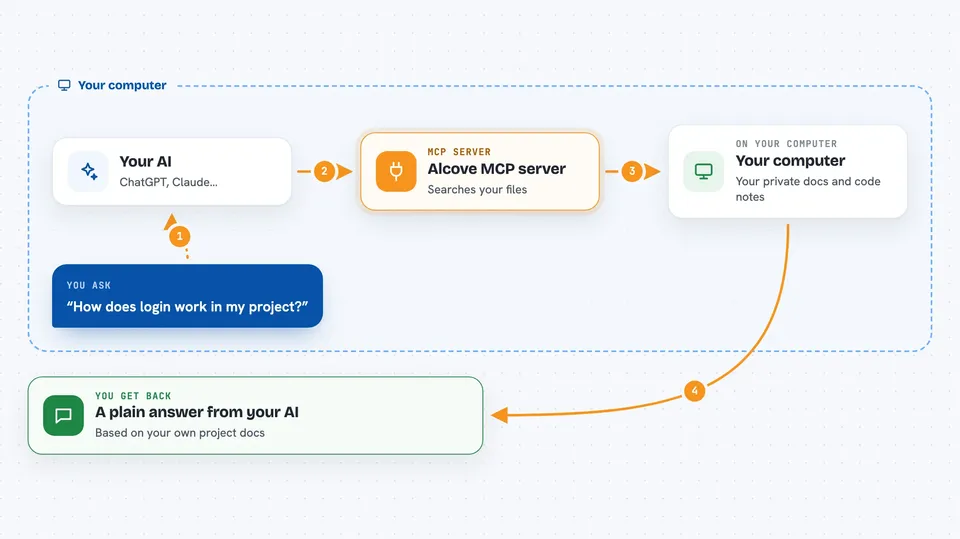
You ask your AI a question about your project, like how login works or where a decision was written down. The AI sends that question to Alcove, which searches your private docs and code notes on your machine. Alcove ranks the results and hands back the few most relevant files, not all of them. Your AI then reads those and answers you in plain words. You can also ask it to check whether your docs are complete or out of date.
 Click to zoom
What you can do with it
- Search your private project docs by keyword or meaning
- Switch between projects automatically based on the folder you are in
- Search across all your projects at once with one question
- Read a specific doc file the AI found
- Check which docs are missing, empty, or out of date
- Find broken links and stale notes in your docs
- Import a note from another tool into your doc folder
What it gives back to you
You get a normal chat answer from your AI, written in plain words. Behind the scenes Alcove hands back a short ranked list of matching docs, one result per file, best match first. If you ask for a check, you get a list of missing files, empty sections, or broken links. If you ask it to read a file, the AI shows you the relevant part of that doc.
Before you start
What you need
- The Alcove program installed on your computer
- Running alcove setup once after installing, to point it at your docs folder
- An AI coding agent like Claude Code or Codex, set up to use Alcove
Good to know
Alcove reads your private docs and code, so make sure you are comfortable with your AI seeing those files, and it can also change or create files in your doc folder when you ask it to.
Install it with your AI
Add Alcove MCP server to your AI, no technical skills needed
You don't install anything by hand. You copy one prompt, paste it into an AI that can work on your computer, and it checks, installs and connects the server for you, asking you when it needs something.
Sign in to get the install prompt
Members get a ready-made prompt that lets the Claude desktop app check Alcove MCP server, install it and connect it for them, step by step. You don't need any technical skills: you copy, paste and answer a few questions. Your connected AI can also find and install any of the 4,361 MCP servers here for you.
Who it's for
Developers and technical teams who keep project docs and want their AI coding assistant to actually know the project.