
MCP server · Notes
Agent Memory OS MCP server
by yamantaka520
Give your AI a shared, private memory it can save to and look things up in, across your team.
Agent Memory OS is a memory system for AI assistants. It lets your AI remember facts, preferences and lessons between chats, and share the right ones with the right people. It is handy if you use several AI tools and want them to stop forgetting things.
What is an MCP server? The 30-second version
On its own, your AI can only chat. It forgets everything when the conversation ends. An MCP server is a small helper program that gives your AI a new skill or a connection to something. This one connects your AI to your own memory store, so it can save notes and look them up for you when you ask.
What this MCP server does
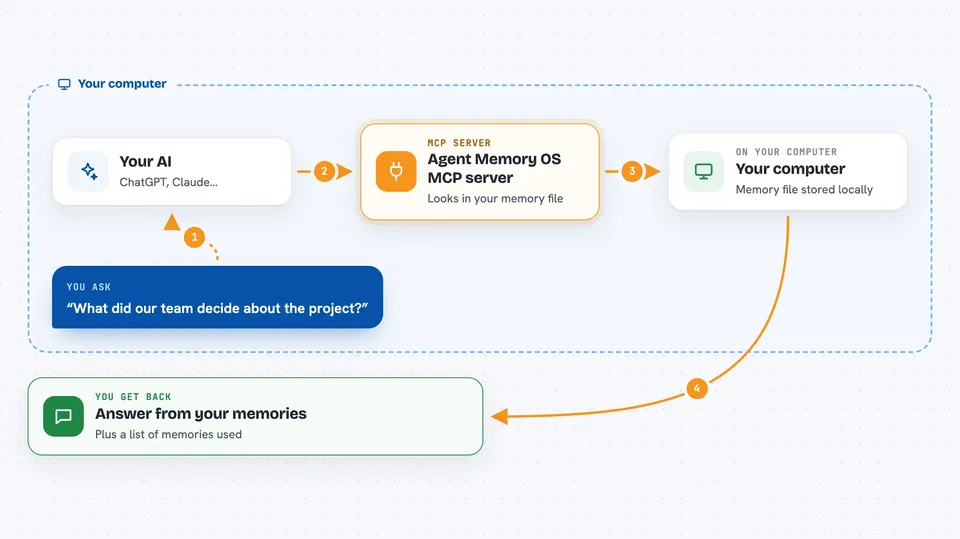
You ask your AI something, like what your team decided about a project. Your AI passes the question to this helper. The helper looks in a local memory file on your computer, checks what you are allowed to see, and picks the most useful pieces. It hands those back to your AI, which writes you a normal answer in the chat. You can also tell your AI to remember something, and it saves it for later.
 Click to zoom
What you can do with it
- Save a fact or preference so your AI remembers it next time
- Search your saved memories by keyword or by meaning
- Keep some memories private and share others with a team or project
- Link related memories so one reminds the AI of the other
- See which memories were used in an answer and why
- Sync memories between your own computers
- Archive old memories so they stop showing up
What it gives back to you
You get normal chat answers built from your saved memories. Behind the scenes it also returns lists of matching memories, short summaries, and a report explaining which memories were included or left out. When you save something, it confirms the memory was stored.
Before you start
What you need
- Python 3.11 or newer (the README says standard builds already include what it needs)
- The agent-memory-os package installed, ideally with the full extras
- A bearer token you create with one command, which acts like a password for the web console
Good to know
It stores notes about you and your work in a local file, so treat that file as private, and be careful about what you ask it to share with a team or sync to another computer.
Install it with your AI
Add Agent Memory OS MCP server to your AI, no technical skills needed
You don't install anything by hand. You copy one prompt, paste it into an AI that can work on your computer, and it checks, installs and connects the server for you, asking you when it needs something.
Sign in to get the install prompt
Members get a ready-made prompt that lets the Claude desktop app check Agent Memory OS MCP server, install it and connect it for them, step by step. You don't need any technical skills: you copy, paste and answer a few questions. Your connected AI can also find and install any of the 4,609 MCP servers here for you.
Who it's for
People who use several AI assistants for work and want them to share memory correctly across a team or project.




