
MCP server · Notes · official
Mnemosyne OS MCP server
by Mnemosyne-OS · official
Let your AI search and add to your own private memory vaults stored on your computer.
Mnemosyne OS is a desktop app that keeps your AI memories in private folders on your own machine, split by topic. This MCP server is the bridge that lets your AI helper read from and write to those memories. It is handy if you already use Mnemosyne OS and want your everyday chat assistant to tap into the same memory.
What is an MCP server? The 30-second version
On its own, your AI can only chat with what is in the current conversation. An MCP server is a small helper program that gives your AI a new skill or a connection to an app. This one connects your AI to Mnemosyne OS, the memory app running on your computer. When you ask something, your AI passes the request to this helper, and the helper talks to your vaults so the AI can look things up or save new notes for you.
What this MCP server does
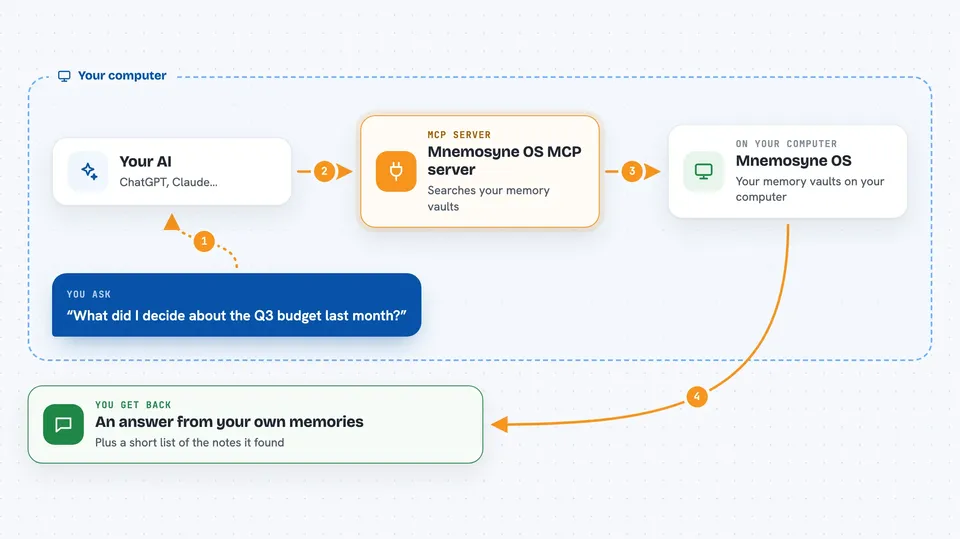
You ask your AI a question in plain words. The AI sends that request to this MCP server. The server talks to the Mnemosyne OS app on your machine, which searches your memory vaults. The app sends back the matching memories, and your AI uses them to answer you. It can also save new memories into a vault when you ask it to.
 Click to zoom
What you can do with it
- Search your memory vaults for something you discussed before
- Ask a question and get an answer grounded in your own saved memories
- Save a new note or fact into a chosen vault
- Look across different topic vaults to find related memories
- Pull up context from past sessions so you do not repeat yourself
- Read output from other coding agents that Mnemosyne OS has stored
Try asking your AI
- “What did I decide about the Q3 budget last month?”
- “Search my work vault for anything about the Henderson project.”
- “Save this to my personal vault: I prefer morning meetings.”
- “Remind me what I noted about the new hire onboarding process.”
What it gives back to you
You get back a written answer in the chat, built from the memories the server found. Sometimes you will see a short list of the matching memories with a snippet of each. When you save something, the AI confirms it was added to the vault you named. Everything stays on your machine.
Before you start
What you need
- The Mnemosyne OS desktop app installed and running on your computer
- At least one memory vault set up inside the app
- Your AI tool connected to this MCP server (the app helps you set this up)
Good to know
It reads and writes your private memory vaults, so anything you ask it to save will be stored on your computer.
Install it with your AI
Add Mnemosyne OS MCP server to your AI, no technical skills needed
You don't install anything by hand. You copy one prompt, paste it into an AI that can work on your computer, and it checks, installs and connects the server for you, asking you when it needs something.
Sign in to get the install prompt
Members get a ready-made prompt that lets the Claude desktop app check Mnemosyne OS MCP server, install it and connect it for them, step by step. You don't need any technical skills: you copy, paste and answer a few questions. Your connected AI can also find and install any of the 4,609 MCP servers here for you.
Who it's for
People who already use Mnemosyne OS and want their everyday AI assistant to remember things across sessions without sending their notes to the cloud.




