MCP server · Notes · official
Telys MCP server
by thyn-ai · official
Give your AI a private memory it can search, add to, and tidy up, all on your own computer.
Telys is a memory helper for your AI assistant. It keeps notes, snippets and documents in a folder on your own machine, and lets your AI look things up there when you ask. It is handy if you want your AI to remember things between chats without sending your text to a cloud service.
What is an MCP server? The 30-second version
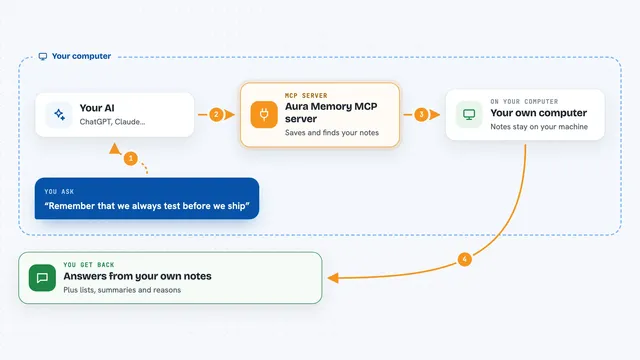
On its own, your AI can only chat with you. It cannot remember yesterday, and it cannot look inside your files. An MCP server is a small helper program that gives your AI a new skill. This one, the Telys MCP server, gives your AI a private memory store on your computer, so it can save things and search them back when you need them.
What this MCP server does
You install Telys once and sign in, which gives you a free license and a small on-device engine. Then you tell your AI client (like Claude Desktop or Cursor) to use Telys as an MCP server. From then on, when you ask your AI to remember something, it calls Telys, which writes the note into a local collection. When you ask a question, your AI searches that collection and reads the matching pieces back to you. Everything stays on your machine, and the server makes no network calls while it works.
What you can do with it
- Save notes, snippets or documents into a named memory collection
- Search your saved memory by meaning, not just exact words
- Search your saved memory by keyword with an on-device BM25 index
- List what collections you have and how many rows each one holds
- Update or delete specific saved items by their id
- Point Telys at a code folder and let it index the files for you
- Search that indexed folder and get fresh results every time
Try asking your AI
- “Remember this: our refund policy is 30 days from delivery, no questions asked.”
- “What did I save about the refund policy?”
- “Search my project notes for anything about the onboarding flow.”
- “Index my notes folder and tell me how many files it found.”
What it gives back to you
You get answers in your chat, written by your AI in normal sentences. Behind the scenes Telys hands back lists of matching items, counts, collection names, and short pieces of the text you saved. When you add, update or delete something, Telys tells your AI it worked, and your AI tells you.
Before you start
What you need
- A computer running macOS arm64, or Linux on x86_64 or arm64 (on Windows, use WSL2)
- Python installed, plus pipx to install the telys command
- A free Telys account, set up once with the telys login command
- An AI client that supports MCP servers, like Claude Desktop, Claude Code, Cursor or Codex
Good to know
It can change or delete things in your memory store, so be clear about which collection and which ids you want touched before you say yes.
Install it with your AI
Add Telys MCP server to your AI, no technical skills needed
You don't install anything by hand. You copy one prompt, paste it into an AI that can work on your computer, and it checks, installs and connects the server for you, asking you when it needs something.
Sign in to get the install prompt
Members get a ready-made prompt that lets the Claude desktop app check Telys MCP server, install it and connect it for them, step by step. You don't need any technical skills: you copy, paste and answer a few questions. Your connected AI can also find and install any of the 4,361 MCP servers here for you.
Who it's for
People who want their AI assistant to remember things privately on their own computer, especially writers, researchers and developers who keep a lot of notes.