
MCP server · Developer tools · official
XNS Relayer MCP server
by xns-cloud · official
Lets your AI set up and manage a self-hosted XNS Relayer storage server for you.
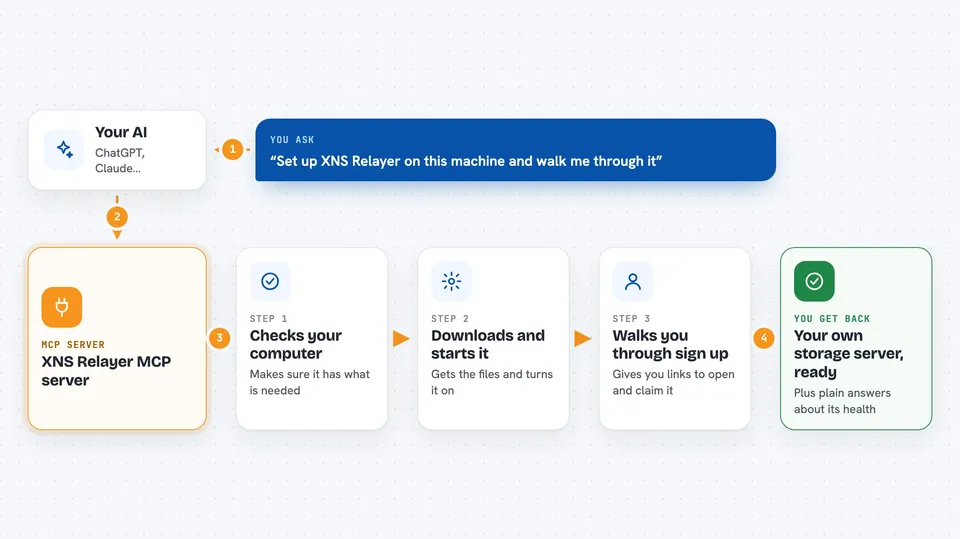
This is a helper that connects your AI assistant to XNS Relayer, a storage service you run yourself instead of renting from a big cloud company. It is made for people who want their own private storage but do not want to type commands all day. If you can chat, you can run it.
What is an MCP server? The 30-second version
On its own, your AI can only talk. An MCP server is a small helper program that gives your AI a new skill or a connection to another service. This one connects your AI to XNS Relayer, a storage system that runs on your own machine. So when you ask your AI to set up storage or check on it, the AI can actually do it through this helper.
What this MCP server does
You ask your AI to set up XNS Relayer storage. The AI uses this helper to check that your computer has what it needs, like Docker and free ports. Then it downloads the right files, starts the storage containers, and waits until everything is healthy. It also walks you through creating an account, verifying your email, and claiming your storage. After that, you can ask it to check health, change settings, or make backups.
 Click to zoom
What you can do with it
- Set up a new XNS Relayer storage server from scratch
- Check that your server is healthy and running
- Configure which storage hosts your data uses
- Test that storage actually works by saving and reading a file
- Change settings like worker count or backup schedule
- Restart services when something needs a refresh
- Create, list, restore, or delete configuration backups
Try asking your AI
- “Set up XNS Relayer on this machine and walk me through it”
- “Is my Relayer healthy right now?”
- “Show me the available host tags so I can pick data and parity hosts”
- “Make a backup of my Relayer configuration”
What it gives back to you
You get plain answers in the chat, like whether your server is healthy or what settings you can change. For setup, it gives you a sign-up link and a claim link to open in your browser. It can also show you lists of backups or host tags, and confirm when it has made a change. If something needs your attention, it tells you what to do next.
Before you start
What you need
- Node.js 20 or newer on the machine where you run the AI helper
- Docker Engine on the machine that will host the storage, or reachable over SSH
- An XNS account (you create it in your browser during setup, the AI never sees your password)
Good to know
Some actions like restoring a backup or restarting services can disrupt your storage, so the AI will ask you to confirm before doing them.
Install it with your AI
Add XNS Relayer MCP server to your AI, no technical skills needed
You don't install anything by hand. You copy one prompt, paste it into an AI that can work on your computer, and it checks, installs and connects the server for you, asking you when it needs something.
Sign in to get the install prompt
Members get a ready-made prompt that lets the Claude desktop app check XNS Relayer MCP server, install it and connect it for them, step by step. You don't need any technical skills: you copy, paste and answer a few questions. Your connected AI can also find and install any of the 4,609 MCP servers here for you.
Who it's for
People who want their own private storage without becoming system administrators, and small teams that prefer to keep data on their own machines.



