MCP server · Productivity
Yandex Delivery MCP server
by A1-x-Tech
Lets your AI price, book, track and cancel Yandex business deliveries for you.
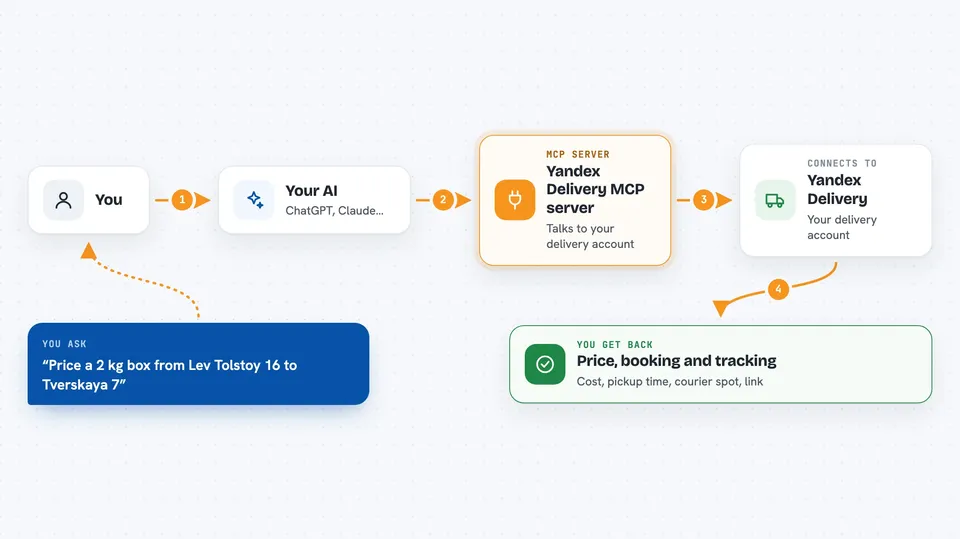
This is a helper that connects your AI assistant to your Yandex Delivery business account. You describe a delivery in plain words, and the assistant works out the price, books the courier, and shows you where things stand. It is made for companies and sellers who already have a Yandex Delivery business account, not for private senders.
What is an MCP server? The 30-second version
On its own, your AI can only chat. An MCP server is a small helper program that gives your AI a new skill, here a connection to Yandex Delivery. Once it is connected, the AI can ask Yandex Delivery for prices, create real orders and check statuses for you. You just type what you want, and the helper does the talking to Yandex behind the scenes.
What this MCP server does
You ask your AI something like price a 2 kg box from one address to another. The AI passes that to this helper, which talks to your Yandex Delivery account and comes back with a price, distance and pickup time. If you then say go ahead and book it, the helper creates the real order and starts the courier search. Later you can ask where the courier is, get a tracking link for the recipient, or cancel the order if it is still possible.
 Click to zoom
What you can do with it
- Price same-day courier delivery by address, weight and size
- Book a courier and start the search for a driver
- Track the courier's current position and get a link for the recipient
- Compare next-day and across-Russia delivery options and prices
- Find pickup points and parcel lockers by city or coordinates
- Check whether an order can be cancelled and if it costs anything
- Cancel a delivery and see the result
Try asking your AI
- “Price a 2 kg box from Lev Tolstoy 16 to Tverskaya 7”
- “Book the delivery if the final price is under 1000 rubles”
- “Where is the courier now and what link do I send the recipient”
- “Find next-day delivery options for this box to Kazan, to a door, a pickup point or a locker”
What it gives back to you
You get answers in the chat: prices, distances, estimated pickup times, lists of delivery options with dates and costs, pickup point addresses and opening hours. It can also return the courier's current position and a public tracking link you can forward. When you book or cancel, it tells you what changed and the new status of the order.
Before you start
What you need
- A Yandex Delivery business account with a signed contract
- A token from the Integrations tab of your Yandex Delivery account (a kind of password for apps)
- Node.js 20 or newer on your computer
- An AI app that supports local MCP servers, such as Codex, Claude Desktop, Claude Code, Cursor or VS Code
Good to know
It can create and cancel real deliveries in your Yandex account, and a cancellation may cost money, so check the price and the cancellation terms before you say go ahead.
Install it with your AI
Add Yandex Delivery MCP server to your AI, no technical skills needed
You don't install anything by hand. You copy one prompt, paste it into an AI that can work on your computer, and it checks, installs and connects the server for you, asking you when it needs something.
Sign in to get the install prompt
Members get a ready-made prompt that lets the Claude desktop app check Yandex Delivery MCP server, install it and connect it for them, step by step. You don't need any technical skills: you copy, paste and answer a few questions. Your connected AI can also find and install any of the 4,361 MCP servers here for you.
Who it's for
Companies and sellers who already use Yandex Delivery for business shipping and want to handle it by chatting with their AI.