MCP server · Productivity
Royal Mail MCP server
Book, track and cancel Royal Mail and Parcelforce parcels by chatting with your AI.
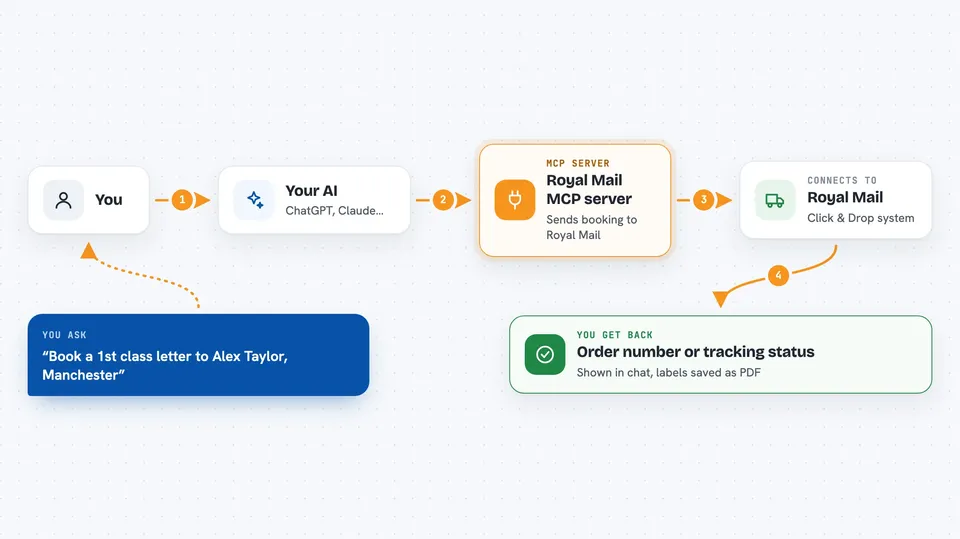
This is a small helper that lets your AI assistant talk to Royal Mail's Click & Drop system. You describe the parcel in plain words, and the AI books it, tracks it, or cancels it for you. It is handy if you post parcels for a shop, an office, or a small business and you are tired of clicking through the Click & Drop website.
What is an MCP server? The 30-second version
On its own, your AI can only chat. It cannot post a parcel or look up a tracking number. An MCP server is a small helper program you install once, and it gives your AI a new skill. This one gives your AI a direct line to Royal Mail Click & Drop, so when you ask it to book or track something, it can actually do it.
What this MCP server does
You type a request, like booking a parcel to an address. Your AI reads it, picks the right Royal Mail service, and passes the details to this helper. The helper sends the booking to Royal Mail's Click & Drop system using your own account key. Royal Mail replies with an order number, a tracking number, or a label file, and the AI shows you the result in the chat.
 Click to zoom
What you can do with it
- Book a single parcel or letter with a chosen Royal Mail or Parcelforce service
- Book many orders at once and get one merged PDF of all the labels
- Track one or several orders and get a plain-English status summary
- Cancel an order before it is manifested, with no charge
- Save a postage label as a PDF file on your computer
- List every Royal Mail and Parcelforce service the tool supports, with codes
Try asking your AI
- “Book a 1st class letter to Alex Taylor, 45 High Street, Manchester M1 1AA, 80 grams. Reference it ORDER-1842.”
- “Ship these three orders via Tracked 48 and give me the order numbers.”
- “Cancel order 1004. The customer sent the wrong postcode.”
- “Track orders 1002, 1003 and 1004 and summarise where each one is.”
What it gives back to you
You get back clear answers in the chat: an order number when a booking succeeds, a tracking number and current status when you track, or a confirmation when something is cancelled. For labels, the tool saves a PDF file on your computer and tells you where it is. For batch bookings, you get a single merged PDF ready to print.
Before you start
What you need
- A Royal Mail Click & Drop account
- Your Click & Drop API key (a kind of password for apps; you find it in Click & Drop under Settings, then API credentials)
- Node.js installed on your computer (the free software that runs this helper)
- An MCP-compatible AI app such as Claude Desktop, Cursor, Windsurf, Claude Code or Zed
Good to know
Your API key gives full access to your Click & Drop account, so keep it private, and remember the tool can book and cancel real shipments that cost real money.
Install it with your AI
Add Royal Mail MCP server to your AI, no technical skills needed
You don't install anything by hand. You copy one prompt, paste it into an AI that can work on your computer, and it checks, installs and connects the server for you, asking you when it needs something.
Sign in to get the install prompt
Members get a ready-made prompt that lets the Claude desktop app check Royal Mail MCP server, install it and connect it for them, step by step. You don't need any technical skills: you copy, paste and answer a few questions. Your connected AI can also find and install any of the 4,361 MCP servers here for you.
Who it's for
Small shops, office admins and anyone who posts parcels regularly and wants to book, track or cancel them by chatting instead of clicking.