
MCP server · Developer tools
ScriptFlow MCP server
by yanmxa
Lets your AI save repeated tasks as small scripts, then run them again whenever you ask.
ScriptFlow is a helper that lets your AI turn a task it just did into a small reusable script. Instead of explaining the same thing over and over, you save it once and run it again later. It is handy if you keep asking your AI to do the same kind of job, like renaming files or cleaning up a list.
What is an MCP server? The 30-second version
On its own, your AI can only chat with you. An MCP server is a small helper program that gives your AI a new skill or a connection to something else. This one, ScriptFlow, gives your AI a place to store and run little scripts on your computer. So when you ask for something you have done before, the AI can just run the saved script instead of rebuilding it from scratch.
What this MCP server does
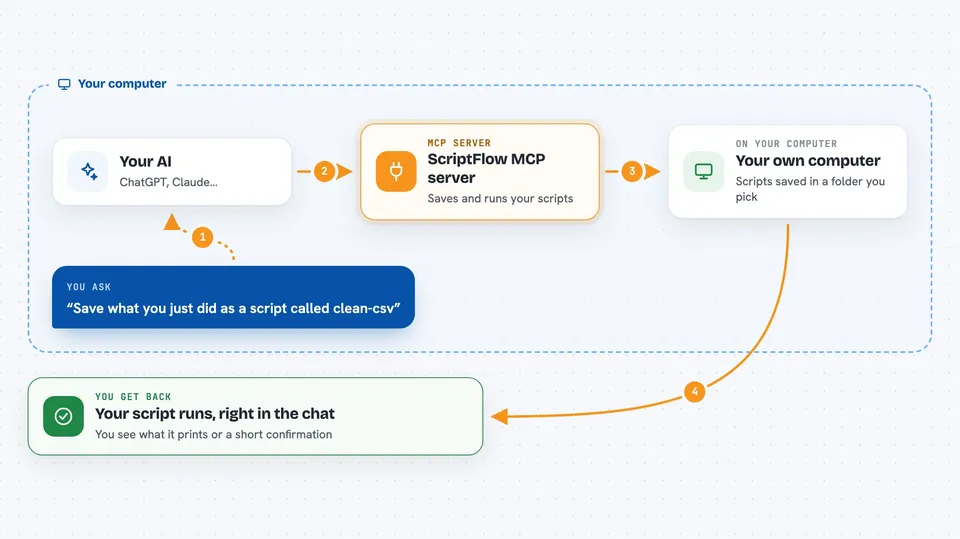
You ask your AI to do a task, and if it works well, you tell it to save that task as a script. ScriptFlow stores the script along with a name, a short description, and tags so you can find it later. Next time, you just ask your AI to run that script, and ScriptFlow runs it for you. You can also list, search, edit, or delete the scripts you have saved. Everything stays on your computer in a folder you choose.
 Click to zoom
What you can do with it
- Save a task your AI just did as a reusable script
- Run a saved script again with new inputs
- Search your saved scripts by name, description, or tag
- Edit a script when you want to change how it works
- List all your saved scripts to see what you have
- Delete scripts you no longer need
- Keep scripts in Bash, Python, Node.js, or TypeScript
Try asking your AI
- “Save what you just did as a script called clean-csv with the tag data”
- “Run the clean-csv script on this new file”
- “Show me all my scripts that mention reports”
- “Delete the old test script called hello”
What it gives back to you
When you ask for a list, ScriptFlow gives back the names, descriptions, and tags of your saved scripts. When you run one, you see whatever the script prints, like text, numbers, or a short message saying it finished. When you save or edit a script, you get a short confirmation. Everything shows up right in your chat with the AI.
Before you start
What you need
- Node.js installed on your computer (the free program that runs JavaScript tools)
- The Claude desktop app or another AI app that supports MCP servers
- A folder on your computer where you want the scripts saved (optional, there is a default)
Good to know
Scripts run real commands on your computer, so only save and run scripts you understand or trust.
Install it with your AI
Add ScriptFlow MCP server to your AI, no technical skills needed
You don't install anything by hand. You copy one prompt, paste it into an AI that can work on your computer, and it checks, installs and connects the server for you, asking you when it needs something.
Sign in to get the install prompt
Members get a ready-made prompt that lets the Claude desktop app check ScriptFlow MCP server, install it and connect it for them, step by step. You don't need any technical skills: you copy, paste and answer a few questions. Your connected AI can also find and install any of the 4,361 MCP servers here for you.
Who it's for
People who repeat the same small computer tasks often and want their AI to remember and rerun them, like analysts, writers, or anyone who works with files and lists.





