MCP server · Text to speech
Claude Code TTS server
by ybouhjira
Lets your AI read its answers out loud using OpenAI voices, so you can listen instead of read.
This is a small helper that makes Claude Code speak its answers out loud. It turns text into audio with OpenAI's voices and plays it through your computer's speakers. It is handy if you like to hear what the AI wrote while you do something else, or if reading long answers tires your eyes.
What is an MCP server? The 30-second version
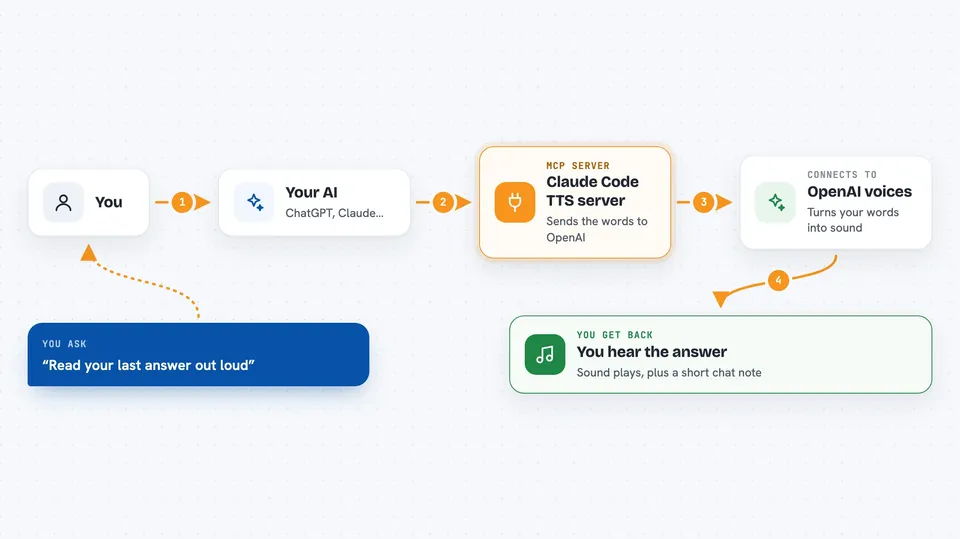
On its own, your AI can only chat with you in text. An MCP server is a small helper program that gives your AI a new skill or a connection to another service. This one connects your AI to OpenAI's text-to-speech service, so when you ask it to speak, it can send the words there and play back the audio on your machine.
What this MCP server does
You ask your AI to say something, or you just let it answer normally. The AI passes that text to this helper. The helper sends the words to OpenAI, which turns them into an audio file. Then the helper plays that file through your computer's speakers using a player that is already on your system. You hear the answer instead of only reading it.
 Click to zoom
What you can do with it
- Hear any Claude answer read out loud
- Pick from six voices, like nova or onyx
- Have the first sentence of every reply spoken automatically
- Queue up several things to say without them overlapping
- Check how many messages have been spoken so far
- Run a small command-line tool to speak text directly
Try asking your AI
- “Say build completed successfully with the nova voice”
- “Read your last answer out loud”
- “Use the onyx voice to tell me the task is done”
- “Check the text to speech status”
What it gives back to you
You get sound coming out of your speakers, plus a short confirmation in the chat that the text was spoken. If you ask for status, you get a small list of numbers, like how many messages are waiting and how many have been spoken. Nothing is written to your files or changed in your accounts.
Before you start
What you need
- The Claude Code app
- An OpenAI API key with text to speech access (a kind of password for apps; OpenAI gives you one on their site, and it costs a small amount per use)
- An audio player on your computer (macOS and Windows have one built in; on Linux you may need to install mpv, ffplay or mpg123)
- Go 1.21 or newer if you build it yourself from the source code
Good to know
Each spoken message is sent to OpenAI and costs a small amount of money, so keep an eye on your usage.
Install it with your AI
Add Claude Code TTS server to your AI, no technical skills needed
You don't install anything by hand. You copy one prompt, paste it into an AI that can work on your computer, and it checks, installs and connects the server for you, asking you when it needs something.
Sign in to get the install prompt
Members get a ready-made prompt that lets the Claude desktop app check Claude Code TTS server, install it and connect it for them, step by step. You don't need any technical skills: you copy, paste and answer a few questions. Your connected AI can also find and install any of the 4,361 MCP servers here for you.
Who it's for
People who use Claude Code and prefer to listen to answers instead of reading them, especially while working with their hands or eyes busy.