MCP server · Text to speech
Voice MCP server
Turn text into spoken audio in many voices and languages, right from your AI chat.
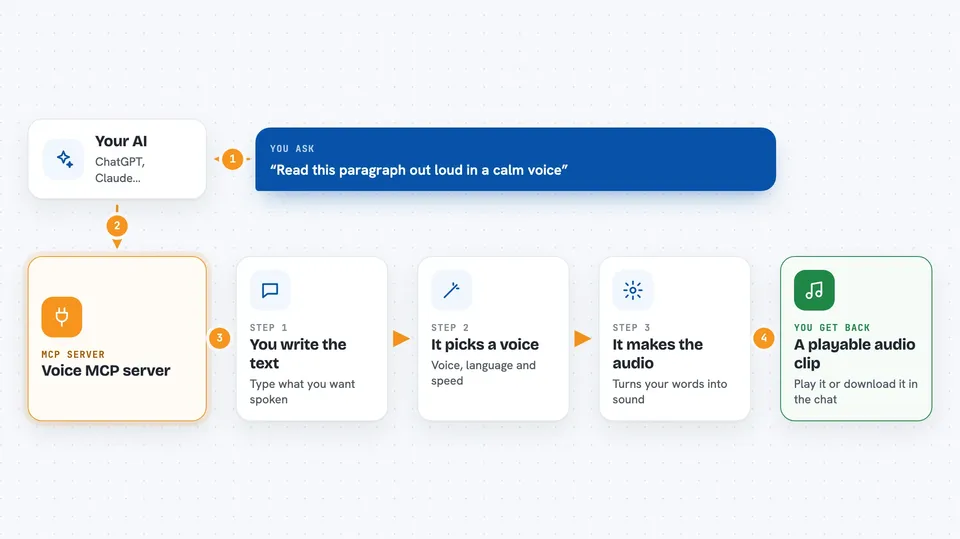
This is a small helper that lets your AI turn written text into spoken audio. You ask for a voice and a piece of text, and you get back a sound file you can play or save. It is handy if you make videos, voiceovers, or want to hear a draft read aloud.
What is an MCP server? The 30-second version
On its own, your AI can only chat with you in text. An MCP server is a small helper program that gives your AI a new skill or a connection to another service. This one connects your AI to a voice service, so when you ask for speech it can actually create audio for you instead of just describing it.
What this MCP server does
You type a request in plain words, like asking for a certain voice to read a paragraph. Your AI passes that request to this helper. The helper sends the text to the voice service and pays a tiny amount for each call. The service sends back a WAV audio file, and the helper hands it to your AI, which shows it to you in the chat so you can play or download it.
 Click to zoom
What you can do with it
- Turn a paragraph into spoken audio
- Pick from 10 standard voices or 10 character voices
- Choose one of 31 languages
- Adjust the speaking speed between 0.7x and 2.0x
- Fine-tune the quality level
- Generate up to 20 short texts in one batch
- Ask for audio in an OpenAI-style format
Try asking your AI
- “Read this paragraph in the Narrator voice at normal speed.”
- “Create a short welcome message in Spanish using the Assistant voice.”
- “Make an urgent-sounding announcement of this text, a bit faster.”
- “Turn these five product names into separate audio clips.”
What it gives back to you
You get back an audio file, usually as a WAV, shown in the chat as a playable clip or a download link. The helper also tells you which voice and settings were used. For batches, you get several clips at once. Nothing is changed anywhere else; it just creates audio from your text.
Before you start
What you need
- A Base wallet private key that holds a small amount of USDC (this is like a prepaid card for paying per request)
- Node.js 18 or newer if you install it on your computer
- The Claude desktop app or another MCP-compatible app
Good to know
Each paid call spends a small amount of USDC from your wallet, so keep an eye on how much you use.
Install it with your AI
Add Voice MCP server to your AI, no technical skills needed
You don't install anything by hand. You copy one prompt, paste it into an AI that can work on your computer, and it checks, installs and connects the server for you, asking you when it needs something.
Sign in to get the install prompt
Members get a ready-made prompt that lets the Claude desktop app check Voice MCP server, install it and connect it for them, step by step. You don't need any technical skills: you copy, paste and answer a few questions. Your connected AI can also find and install any of the 4,361 MCP servers here for you.
Who it's for
People who make videos, podcasts, voiceovers, or want to hear drafts read aloud, and anyone who wants quick spoken audio without a subscription.