MCP server · Text to speech
loudkit MCP server
by loudreader
Turn text into spoken audio on your own computer, with 28 voices and voice cloning.
loudkit is a text to speech tool that runs on your own machine instead of a company's servers. It turns written text into spoken audio files, and it can even learn a new voice from a short recording. It is handy if you want your AI to read text out loud, make audio files, or speak in a voice you choose.
What is an MCP server? The 30-second version
On its own, your AI can only chat with you in text. An MCP server is a small helper program that gives your AI a new skill or a connection to another tool. This one connects your AI to loudkit, a text to speech engine that runs on your computer. So when you ask your AI to say something out loud or make an audio file, it can actually do it through loudkit.
What this MCP server does
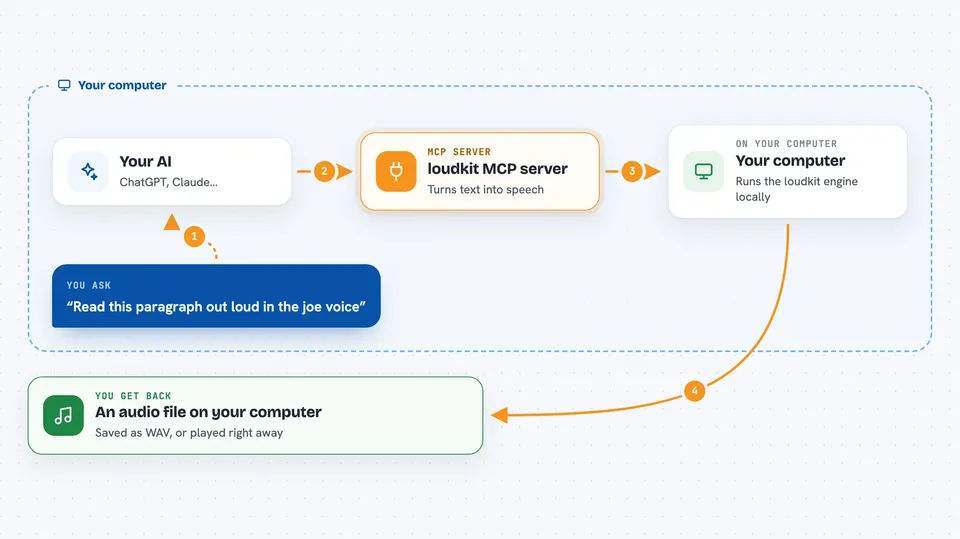
You type a request in your AI chat, like asking it to read a paragraph out loud. Your AI passes that text to the loudkit helper. The helper runs the loudkit engine on your computer, which turns the words into audio using the voice you picked. Then you get an audio file back, or it plays the sound for you, depending on how you set it up.
 Click to zoom
What you can do with it
- Turn any text into a spoken audio file
- Pick from 28 voices in ten languages
- Create a custom voice from a short recording
- Save the audio as WAV, FLAC, MP3 or Opus
- Make your AI read long documents out loud
- Run everything offline after the first download
Try asking your AI
- “Read this paragraph out loud in the joe voice”
- “Make an audio file of this text using the kathleen voice”
- “Clone my voice from this recording and read this sentence in it”
- “Turn this article into an MP3 I can listen to on my phone”
What it gives back to you
You get an audio file saved on your computer, usually as a WAV by default, or in another format if you ask. Your AI can also play the sound directly if the setup supports it. In the chat, your AI will tell you the file name and where it was saved, or confirm that it played the audio.
Before you start
What you need
- Python installed on your computer (for the pip install method)
- About 747 MB of free space for the model download
- A microphone or recording if you want to clone a voice
Good to know
Cloning a voice should only be done with recordings you own or have permission to use, and be careful not to use it to impersonate someone without their consent.
Install it with your AI
Add loudkit MCP server to your AI, no technical skills needed
You don't install anything by hand. You copy one prompt, paste it into an AI that can work on your computer, and it checks, installs and connects the server for you, asking you when it needs something.
Sign in to get the install prompt
Members get a ready-made prompt that lets the Claude desktop app check loudkit MCP server, install it and connect it for them, step by step. You don't need any technical skills: you copy, paste and answer a few questions. Your connected AI can also find and install any of the 4,361 MCP servers here for you.
Who it's for
Anyone who wants their AI to speak text out loud or make audio files, like writers, teachers, or people who prefer listening over reading.