
MCP server · Finance and crypto
A-share Financial Statements MCP server
Ask your AI about Chinese A-share annual reports and get clean balance sheets, income statements and cash flow numbers.
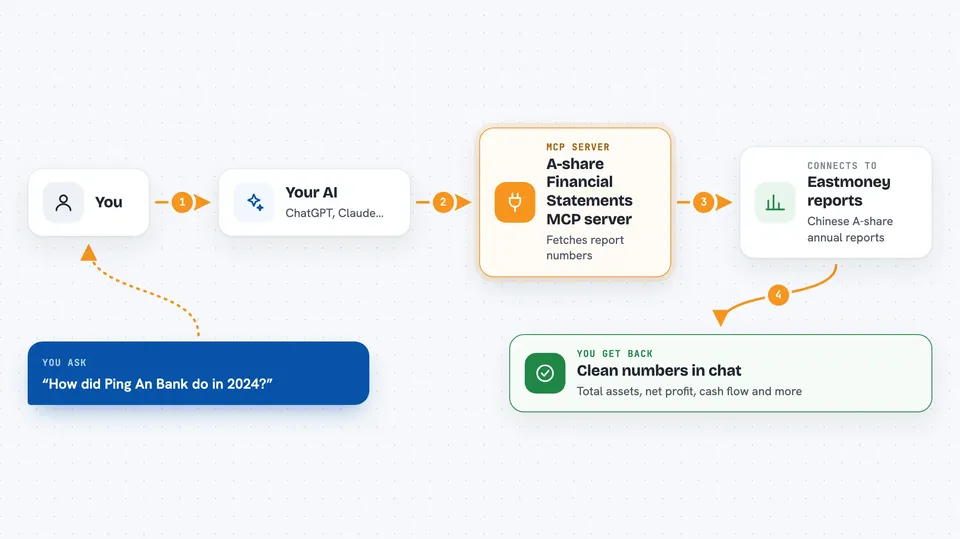
This is a small helper that lets your AI look up annual reports of Chinese A-share companies (Shanghai, Shenzhen, Beijing listed). You ask in plain words, and it pulls the numbers from Eastmoney for you. It is handy if you follow Chinese stocks or need quick financial figures without opening a finance website.
What is an MCP server? The 30-second version
On its own, your AI can only chat. An MCP server is a small helper program that gives your AI a new skill or a connection to an app or service. This one connects your AI to Chinese A-share financial statements, so it can look up balance sheets, income statements and cash flow numbers when you ask. You install it once, and then your AI can use it like a tool.
What this MCP server does
You ask your AI something like how Ping An Bank did in 2024. The AI passes your question to this helper. The helper fetches the annual report data from Eastmoney (through a free library called akshare), picks the useful fields, and hands them back. Your AI then shows you the numbers in the chat, or runs checks and comparisons on them.
 Click to zoom
What you can do with it
- Pull the three main financial statements for a company and a year
- Run accounting cross-checks that verify the numbers add up
- Compare several companies side by side and rank them
- See a company's numbers across multiple years with growth rates
- Get return on equity (ROE) based on average equity
- Turn a PDF, Word, PowerPoint or image report into clean text your AI can read
Try asking your AI
- “How did Ping An Bank do in 2024? Show me total assets, total liabilities, net profit and operating cash flow.”
- “Compare the four big Chinese banks for 2024 and rank them by ROE.”
- “Run the balance sheet cross-checks for Kweichow Moutai in 2024.”
- “Show me the last five years of total assets and net profit for CATL.”
What it gives back to you
You get back clean numbers with clear field names, like total assets or net profit. For comparisons you get a table with ranks and simple statistics such as average and highest. For cross-checks you get a short list saying which checks passed and any small differences. For multi-year views you get a timeline with growth rates and any odd jumps.
Before you start
What you need
- Python 3.10 or newer on your computer
- The Claude desktop app or another app that supports MCP servers
- An internet connection (the data comes from Eastmoney, no account or key needed)
Good to know
The data comes from Eastmoney and may be delayed or have its own quirks, and it is not investment advice, so double-check anything important before you rely on it.
Install it with your AI
Add A-share Financial Statements MCP server to your AI, no technical skills needed
You don't install anything by hand. You copy one prompt, paste it into an AI that can work on your computer, and it checks, installs and connects the server for you, asking you when it needs something.
Sign in to get the install prompt
Members get a ready-made prompt that lets the Claude desktop app check A-share Financial Statements MCP server, install it and connect it for them, step by step. You don't need any technical skills: you copy, paste and answer a few questions. Your connected AI can also find and install any of the 4,609 MCP servers here for you.
Who it's for
People who follow Chinese A-share stocks, students and analysts who want quick financial figures inside their AI chat.



