MCP server · Developer tools
TypeScribe MCP server
by yWorks
Lets your AI look up a TypeScript API it has never seen before, so it can help you use it.
TypeScribe is a small helper program that gives your AI assistant knowledge about a TypeScript API it was not trained on. It is handy if you work with a newer library, an internal one, or a company API that your AI keeps getting wrong. Instead of guessing, your AI can look things up.
What is an MCP server? The 30-second version
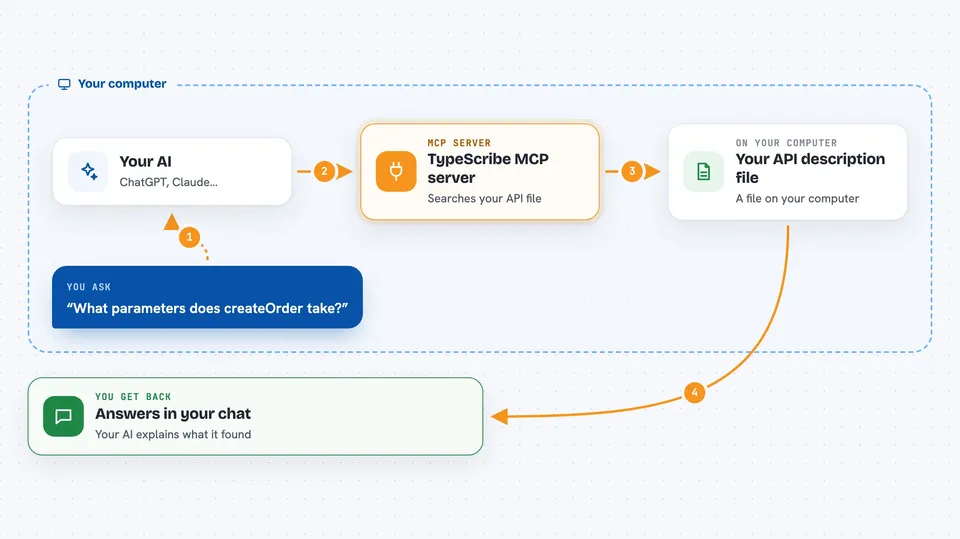
On its own, your AI can only chat with what it already learned. An MCP server is a small helper program you connect to your AI that gives it a new skill or a link to something outside the chat. This one, TypeScribe, links your AI to a TypeScript API description file you have on your computer. When you ask about that API, the AI asks TypeScribe, and TypeScribe answers from the real documentation.
What this MCP server does
You point TypeScribe at a JSON file that describes your TypeScript API, usually made with a tool called TypeDoc. When you ask your AI something about that API, the AI sends a question to TypeScribe. TypeScribe searches the description file and sends back the matching names, details, or relationships. Your AI then uses that to write code or explain things to you. You never have to paste the whole documentation into the chat.
 Click to zoom
What you can do with it
- Search for a symbol by name in your API
- Get the full details of one class, function, or type
- List the methods and properties of a class or interface
- See what parameters a function takes
- Find which classes implement an interface
- Find functions that return a certain type
- See how types inherit from each other
Try asking your AI
- “Use typescribe to find the class that handles user sessions in our API”
- “What parameters does the createOrder function take? Check with typescribe.”
- “Which classes implement the PaymentProvider interface in our API?”
- “Show me the inheritance chain for the BaseController class using typescribe.”
What it gives back to you
You get answers in the chat, written by your AI from what TypeScribe found. That can be a list of matching names, the details of one item, a list of methods, or a short explanation of how things connect. It is text, not files or changes to your code. Your AI decides how to present it.
Before you start
What you need
- Node.js and npm installed on your computer
- A TypeDoc JSON file describing your TypeScript API
- An AI tool that supports MCP servers, such as Cline, Cursor, or Claude
Good to know
This project is no longer under active public development, so it may not get fixes or updates.
Install it with your AI
Add TypeScribe MCP server to your AI, no technical skills needed
You don't install anything by hand. You copy one prompt, paste it into an AI that can work on your computer, and it checks, installs and connects the server for you, asking you when it needs something.
Sign in to get the install prompt
Members get a ready-made prompt that lets the Claude desktop app check TypeScribe MCP server, install it and connect it for them, step by step. You don't need any technical skills: you copy, paste and answer a few questions. Your connected AI can also find and install any of the 4,361 MCP servers here for you.
Who it's for
Developers and technical writers who work with TypeScript APIs that their AI assistant does not already know.