MCP server · Developer tools
machinegrade validate MCP server
by machinegrade
Let your AI check JSON, API responses, and SQL for mistakes before you trust them.
This is a small helper that lets your AI double-check the things it writes, like JSON data, API replies, or SQL queries, against a set of rules you give it. It is handy if you use AI to produce structured data and want a quick yes or no before you act on it. You do not need to be a programmer to understand the idea: it is a fact-checker for the AI's own output.
What is an MCP server? The 30-second version
On its own, your AI can only chat with you. An MCP server is a small helper program that gives your AI a new skill or a connection to another service. This one connects your AI to machinegrade validate, an online checking service. When you ask your AI to verify something, the AI sends it to this helper, and the helper sends back a simple pass or fail answer.
What this MCP server does
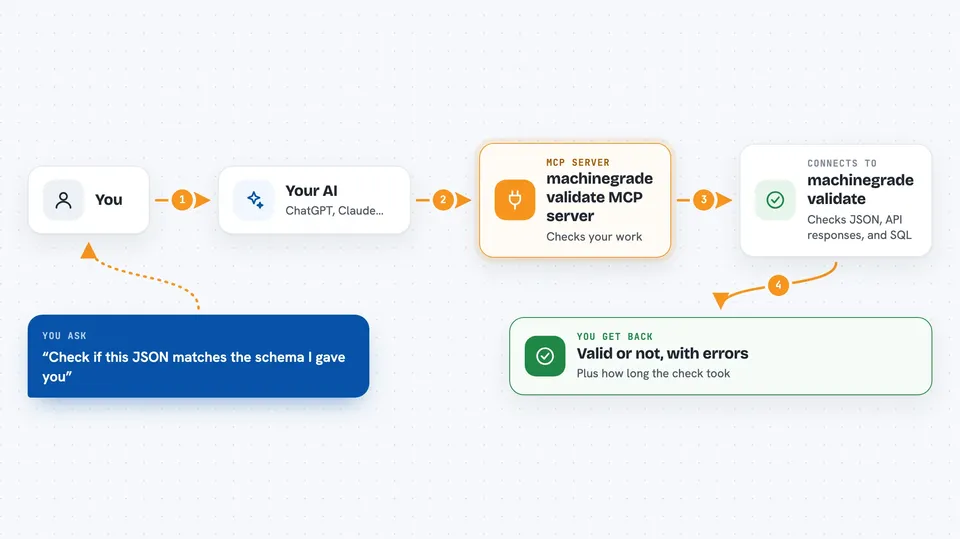
You ask your AI to check a piece of work, like a chunk of JSON or a SQL query. The AI passes it to this helper, along with the rules it should follow. The helper sends it to the machinegrade validate service. The service looks it over and sends back a verdict: is it valid, and if not, what is wrong. Your AI then tells you the result in plain words.
 Click to zoom
What you can do with it
- Check whether a piece of JSON follows a given schema
- Verify that an API response matches the expected format
- Test a SQL query for syntax errors in a specific database dialect
- Get a list of specific problems if something is invalid
- See how long the check took, in milliseconds
- Run checks without needing to install anything locally
Try asking your AI
- “Check if this JSON matches the schema I gave you”
- “Does this API response fit the OpenAPI spec for GET /users at status 200?”
- “Is this SQL query valid for MySQL?”
- “Validate this data and tell me what is wrong”
What it gives back to you
You get back a simple verdict: valid or not, a list of errors if there are any, and how long the check took. If the artifact is invalid, the errors explain what went wrong. Your AI can then summarize that for you or suggest fixes.
Before you start
What you need
- A free API key from machinegrade (you can get one by sending your email to their key endpoint; it is like a password for apps)
- An MCP-compatible client, like Claude Desktop or Claude Code
- Internet access if you use the hosted service (or you can run it locally)
Good to know
This service checks your data but does not store it long-term; still, avoid sending sensitive information unless you trust the service or self-host it.
Install it with your AI
Add machinegrade validate MCP server to your AI, no technical skills needed
You don't install anything by hand. You copy one prompt, paste it into an AI that can work on your computer, and it checks, installs and connects the server for you, asking you when it needs something.
Sign in to get the install prompt
Members get a ready-made prompt that lets the Claude desktop app check machinegrade validate MCP server, install it and connect it for them, step by step. You don't need any technical skills: you copy, paste and answer a few questions. Your connected AI can also find and install any of the 4,361 MCP servers here for you.
Who it's for
Anyone who uses AI to generate structured data, API responses, or SQL and wants a quick, automatic check before using the results.