MCP server · Developer tools
Tarn MCP server
Lets your AI write, run, and fix API tests, then explain what broke and how to fix it.
Tarn is a tool for testing APIs, which are the connections between software programs. It runs small test files written in a simple format and tells you clearly what passed and what failed. This MCP server is handy if you or your team check that a web service keeps working the way it should.
What is an MCP server? The 30-second version
On its own, your AI can only chat with you. An MCP server is a small helper program that gives your AI a new skill or a connection to another tool. This one connects your AI to Tarn, so the AI can run your API tests, look at the results, and suggest fixes when something breaks. You just ask in plain words, and the AI does the clicking and reading for you.
What this MCP server does
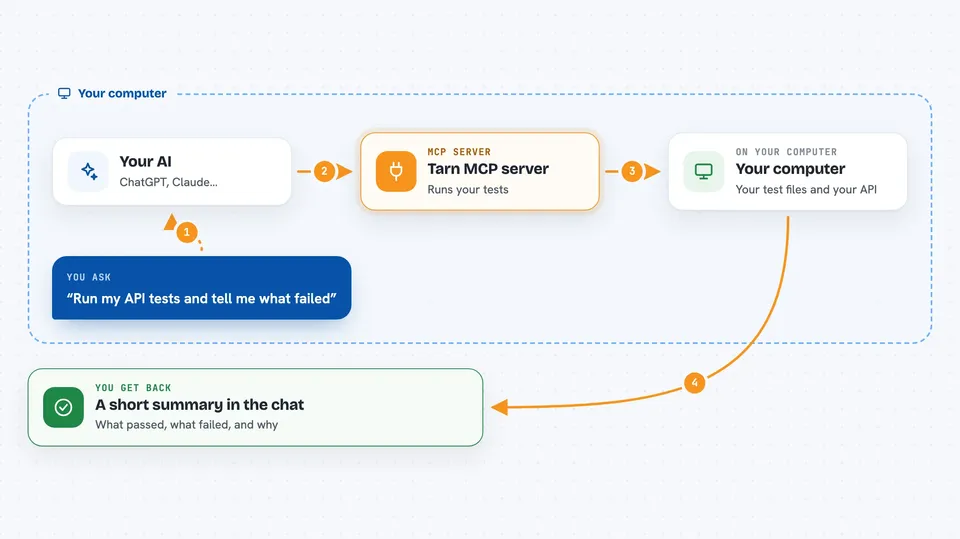
You ask your AI to check your API tests. The AI uses this helper to look at your test files, run them, and read the results. The helper talks to Tarn, which sends requests to your API and compares the answers to what you expected. When something fails, Tarn groups the failures and gives hints about the cause. Your AI reads that and tells you what went wrong and what to change.
 Click to zoom
What you can do with it
- List the API tests you have without running them
- Check that your test files are written correctly before running them
- Run your API tests and see which passed and which failed
- Get a plain explanation of why a test failed and what to try next
- Rerun only the tests that failed after you make a change
- Compare two runs to confirm a fix worked and nothing new broke
Try asking your AI
- “Run my API tests and tell me what failed”
- “Check my test files for mistakes before I run them”
- “Why did the health check test fail?”
- “Rerun just the failing tests and tell me if they pass now”
What it gives back to you
You get back a short summary in the chat: how many tests passed, how many failed, and which ones. For each failure, you get the test name, the step that broke, and a hint about the likely cause. If you ask for a fix plan, the AI gives you suggestions you can apply to your test files or your code.
Before you start
What you need
- The Tarn tool installed on your computer (the installer is one line in a terminal)
- Your API test files, which end in .tarn.yaml
- An AI app that supports MCP, like Claude Code, Cursor, or Windsurf
Good to know
Running tests sends real requests to your API, so if a test creates, changes, or deletes data, those changes really happen.
Install it with your AI
Add Tarn MCP server to your AI, no technical skills needed
You don't install anything by hand. You copy one prompt, paste it into an AI that can work on your computer, and it checks, installs and connects the server for you, asking you when it needs something.
Sign in to get the install prompt
Members get a ready-made prompt that lets the Claude desktop app check Tarn MCP server, install it and connect it for them, step by step. You don't need any technical skills: you copy, paste and answer a few questions. Your connected AI can also find and install any of the 4,361 MCP servers here for you.
Who it's for
Developers and testers who check that web services keep working, and anyone who wants their AI to help write and debug API tests.