MCP server · Developer tools
CervellaSwarm MCP server
by rafapra3008
Lets your AI hand tasks to a team of 17 specialist helpers, with three of them checking the work.
CervellaSwarm is a helper for Claude Code that gives your AI a small team of specialists to pass work to. There is one planner, three checkers, and twelve workers for things like backend code, frontend, testing, docs, and security. It is handy if you want a second pair of eyes on the code your AI writes, without setting up anything complicated.
What is an MCP server? The 30-second version
On its own, your AI can only chat with you. An MCP server is a small helper program that gives your AI a new skill or a connection to another service. This one connects your AI to the CervellaSwarm team of agents, so it can hand a task to a specialist worker and bring the result back to you. You stay in the same chat; the helper does the running around.
What this MCP server does
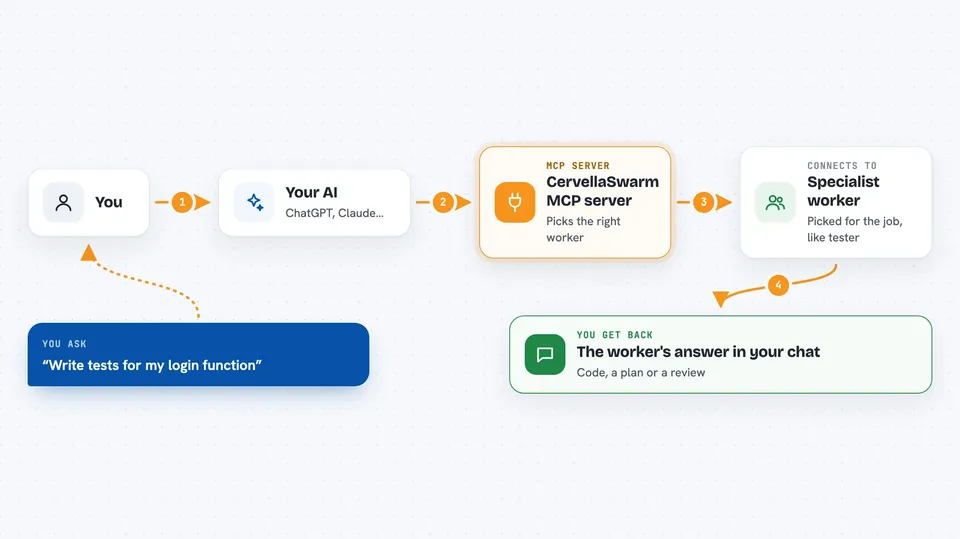
You ask your AI for something, like writing a login endpoint or reviewing a file. Your AI uses this helper to pick the right worker for the job, for example the backend worker for code or the tester for checks. The helper sends the task to that worker using your own Anthropic API key, and the worker does the work. You get the result back in the chat, and for some tasks a quality guardian reviews it before you see it. You can also ask which workers exist, check that your setup is correct, and see how much of your quota you have used.
 Click to zoom
What you can do with it
- Hand a coding task to a specialist worker like backend, frontend, or tester
- Ask a guardian to review code quality, research accuracy, or deploy safety
- Ask the architect to plan a complex task before any code is written
- List all 17 workers and what each one is good at
- Check that your API key and configuration are set up correctly
- Check how much of your usage quota is left
Try asking your AI
- “Use spawn_worker to create a REST API endpoint for user authentication”
- “Ask the tester worker to write tests for my login function”
- “Have the security worker review this file for vulnerabilities”
- “Show me the list of available workers and their specialties”
What it gives back to you
You get the worker's answer back in your chat, usually as text: code, a plan, a review, or a short report. The list_workers tool returns a simple list of names and specialties. check_status and check_usage return short answers about your setup and quota. Nothing is written to your files unless you ask your AI to do that afterwards.
Before you start
What you need
- Node.js installed on your computer
- The Claude Code app
- An Anthropic API key (a kind of password for the Anthropic service; you get one from your Anthropic account)
- The cervellaswarm CLI installed and set up with cervellaswarm init
Good to know
The workers use your own Anthropic API key, so every task you send spends some of your quota and may cost you money.
Install it with your AI
Add CervellaSwarm MCP server to your AI, no technical skills needed
You don't install anything by hand. You copy one prompt, paste it into an AI that can work on your computer, and it checks, installs and connects the server for you, asking you when it needs something.
Sign in to get the install prompt
Members get a ready-made prompt that lets the Claude desktop app check CervellaSwarm MCP server, install it and connect it for them, step by step. You don't need any technical skills: you copy, paste and answer a few questions. Your connected AI can also find and install any of the 4,609 MCP servers here for you.
Who it's for
Developers and technical teams who use Claude Code and want a structured way to split work between specialists and have it checked.